Image Moments#
Goal#
In this tutorial you will learn how to:
Use the OpenCV function cv::moments
Use the OpenCV function cv::contourArea
Use the OpenCV function cv::arcLength
Theory#
Code#
This tutorial code’s is shown lines below. You can also download it from here
#include "opencv2/imgcodecs.hpp"
#include "opencv2/highgui.hpp"
#include "opencv2/imgproc.hpp"
#include "opencv2/geometry.hpp"
#include <iostream>
#include <iomanip>

using namespace cv;
using namespace std;

Mat src_gray;
int thresh = 100;
RNG rng(12345);

/// Function header
void thresh_callback(int, void* );

int main( int argc, char** argv )
{
    /// Load source image
    CommandLineParser parser( argc, argv, "{@input | stuff.jpg | input image}" );
    Mat src = imread( samples::findFile( parser.get<String>( "@input" ) ) );

    if( src.empty() )
    {
        cout << "Could not open or find the image!\n" << endl;
        cout << "usage: " << argv[0] << " <Input image>" << endl;
        return -1;
    }

    /// Convert image to gray and blur it
    cvtColor( src, src_gray, COLOR_BGR2GRAY );
    blur( src_gray, src_gray, Size(3,3) );

    /// Create Window
    const char* source_window = "Source";
    namedWindow( source_window );
    imshow( source_window, src );

    const int max_thresh = 255;
    createTrackbar( "Canny thresh:", source_window, &thresh, max_thresh, thresh_callback );
    thresh_callback( 0, 0 );

    waitKey();
    return 0;
}

void thresh_callback(int, void* )
{
    /// Detect edges using canny
    Mat canny_output;
    Canny( src_gray, canny_output, thresh, thresh*2, 3 );
    /// Find contours
    vector<vector<Point> > contours;
    findContours( canny_output, contours, RETR_TREE, CHAIN_APPROX_SIMPLE );

    /// Get the moments
    vector<Moments> mu(contours.size() );
    for( size_t i = 0; i < contours.size(); i++ )
    {
        mu[i] = moments( contours[i] );
    }

    ///  Get the mass centers
    vector<Point2f> mc( contours.size() );
    for( size_t i = 0; i < contours.size(); i++ )
    {
        //add 1e-5 to avoid division by zero
        mc[i] = Point2f( static_cast<float>(mu[i].m10 / (mu[i].m00 + 1e-5)),
                         static_cast<float>(mu[i].m01 / (mu[i].m00 + 1e-5)) );
        cout << "mc[" << i << "]=" << mc[i] << endl;
    }

    /// Draw contours
    Mat drawing = Mat::zeros( canny_output.size(), CV_8UC3 );
    for( size_t i = 0; i< contours.size(); i++ )
    {
        Scalar color = Scalar( rng.uniform(0, 256), rng.uniform(0,256), rng.uniform(0,256) );
        drawContours( drawing, contours, (int)i, color, 2 );
        circle( drawing, mc[i], 4, color, -1 );
    }

    /// Show in a window
    imshow( "Contours", drawing );

    /// Calculate the area with the moments 00 and compare with the result of the OpenCV function
    cout << "\t Info: Area and Contour Length \n";
    for( size_t i = 0; i < contours.size(); i++ )
    {
        cout << " * Contour[" << i << "] - Area (M_00) = " << std::fixed << std::setprecision(2) << mu[i].m00
             << " - Area OpenCV: " << contourArea(contours[i]) << " - Length: " << arcLength( contours[i], true ) << endl;
    }
}
This tutorial code’s is shown lines below. You can also download it from here
import java.awt.BorderLayout;
import java.awt.Container;
import java.awt.Image;
import java.util.ArrayList;
import java.util.List;
import java.util.Random;

import javax.swing.BoxLayout;
import javax.swing.ImageIcon;
import javax.swing.JFrame;
import javax.swing.JLabel;
import javax.swing.JPanel;
import javax.swing.JSlider;
import javax.swing.event.ChangeEvent;
import javax.swing.event.ChangeListener;

import org.opencv.core.Core;
import org.opencv.core.CvType;
import org.opencv.core.Mat;
import org.opencv.core.MatOfPoint;
import org.opencv.core.MatOfPoint2f;
import org.opencv.core.Point;
import org.opencv.core.Scalar;
import org.opencv.core.Size;
import org.opencv.highgui.HighGui;
import org.opencv.imgcodecs.Imgcodecs;
import org.opencv.imgproc.Imgproc;
import org.opencv.imgproc.Moments;

class MomentsClass {
    private Mat srcGray = new Mat();
    private JFrame frame;
    private JLabel imgSrcLabel;
    private JLabel imgContoursLabel;
    private static final int MAX_THRESHOLD = 255;
    private int threshold = 100;
    private Random rng = new Random(12345);

    public MomentsClass(String[] args) {
        /// Load source image
        String filename = args.length > 0 ? args[0] : "../data/stuff.jpg";
        Mat src = Imgcodecs.imread(filename);
        if (src.empty()) {
            System.err.println("Cannot read image: " + filename);
            System.exit(0);
        }

        /// Convert image to gray and blur it
        Imgproc.cvtColor(src, srcGray, Imgproc.COLOR_BGR2GRAY);
        Imgproc.blur(srcGray, srcGray, new Size(3, 3));

        // Create and set up the window.
        frame = new JFrame("Image Moments demo");
        frame.setDefaultCloseOperation(JFrame.EXIT_ON_CLOSE);
        // Set up the content pane.
        Image img = HighGui.toBufferedImage(src);
        addComponentsToPane(frame.getContentPane(), img);
        // Use the content pane's default BorderLayout. No need for
        // setLayout(new BorderLayout());
        // Display the window.
        frame.pack();
        frame.setVisible(true);
        update();
    }

    private void addComponentsToPane(Container pane, Image img) {
        if (!(pane.getLayout() instanceof BorderLayout)) {
            pane.add(new JLabel("Container doesn't use BorderLayout!"));
            return;
        }

        JPanel sliderPanel = new JPanel();
        sliderPanel.setLayout(new BoxLayout(sliderPanel, BoxLayout.PAGE_AXIS));

        sliderPanel.add(new JLabel("Canny threshold: "));
        JSlider slider = new JSlider(0, MAX_THRESHOLD, threshold);
        slider.setMajorTickSpacing(20);
        slider.setMinorTickSpacing(10);
        slider.setPaintTicks(true);
        slider.setPaintLabels(true);
        slider.addChangeListener(new ChangeListener() {
            @Override
            public void stateChanged(ChangeEvent e) {
                JSlider source = (JSlider) e.getSource();
                threshold = source.getValue();
                update();
            }
        });
        sliderPanel.add(slider);
        pane.add(sliderPanel, BorderLayout.PAGE_START);

        JPanel imgPanel = new JPanel();
        imgSrcLabel = new JLabel(new ImageIcon(img));
        imgPanel.add(imgSrcLabel);

        Mat blackImg = Mat.zeros(srcGray.size(), CvType.CV_8U);
        imgContoursLabel = new JLabel(new ImageIcon(HighGui.toBufferedImage(blackImg)));
        imgPanel.add(imgContoursLabel);

        pane.add(imgPanel, BorderLayout.CENTER);
    }

    private void update() {
        /// Detect edges using Canny
        Mat cannyOutput = new Mat();
        Imgproc.Canny(srcGray, cannyOutput, threshold, threshold * 2);

        /// Find contours
        List<MatOfPoint> contours = new ArrayList<>();
        Mat hierarchy = new Mat();
        Imgproc.findContours(cannyOutput, contours, hierarchy, Imgproc.RETR_TREE, Imgproc.CHAIN_APPROX_SIMPLE);

        /// Get the moments
        List<Moments> mu = new ArrayList<>(contours.size());
        for (int i = 0; i < contours.size(); i++) {
            mu.add(Imgproc.moments(contours.get(i)));
        }

        /// Get the mass centers
        List<Point> mc = new ArrayList<>(contours.size());
        for (int i = 0; i < contours.size(); i++) {
            //add 1e-5 to avoid division by zero
            mc.add(new Point(mu.get(i).m10 / (mu.get(i).m00 + 1e-5), mu.get(i).m01 / (mu.get(i).m00 + 1e-5)));
        }

        /// Draw contours
        Mat drawing = Mat.zeros(cannyOutput.size(), CvType.CV_8UC3);
        for (int i = 0; i < contours.size(); i++) {
            Scalar color = new Scalar(rng.nextInt(256), rng.nextInt(256), rng.nextInt(256));
            Imgproc.drawContours(drawing, contours, i, color, 2);
            Imgproc.circle(drawing, mc.get(i), 4, color, -1);
        }

        /// Show in a window
        imgContoursLabel.setIcon(new ImageIcon(HighGui.toBufferedImage(drawing)));
        frame.repaint();

        /// Calculate the area with the moments 00 and compare with the result of the OpenCV function
        System.out.println("\t Info: Area and Contour Length \n");
        for (int i = 0; i < contours.size(); i++) {
            System.out.format(" * Contour[%d] - Area (M_00) = %.2f - Area OpenCV: %.2f - Length: %.2f\n", i,
                    mu.get(i).m00, Imgproc.contourArea(contours.get(i)),
                    Imgproc.arcLength(new MatOfPoint2f(contours.get(i).toArray()), true));
        }
    }
}

public class MomentsDemo {
    public static void main(String[] args) {
        // Load the native OpenCV library
        System.loadLibrary(Core.NATIVE_LIBRARY_NAME);

        // Schedule a job for the event dispatch thread:
        // creating and showing this application's GUI.
        javax.swing.SwingUtilities.invokeLater(new Runnable() {
            @Override
            public void run() {
                new MomentsClass(args);
            }
        });
    }
}
This tutorial code’s is shown lines below. You can also download it from here
from __future__ import print_function
from __future__ import division
import cv2 as cv
import numpy as np
import argparse
import random as rng

rng.seed(12345)

def thresh_callback(val):
    threshold = val

    # Detect edges using Canny
    canny_output = cv.Canny(src_gray, threshold, threshold * 2)

    # Find contours
    contours, _ = cv.findContours(canny_output, cv.RETR_TREE, cv.CHAIN_APPROX_SIMPLE)

    # Get the moments
    mu = [None]*len(contours)
    for i in range(len(contours)):
        mu[i] = cv.moments(contours[i])

    # Get the mass centers
    mc = [None]*len(contours)
    for i in range(len(contours)):
        # add 1e-5 to avoid division by zero
        mc[i] = (mu[i]['m10'] / (mu[i]['m00'] + 1e-5), mu[i]['m01'] / (mu[i]['m00'] + 1e-5))

    # Draw contours
    drawing = np.zeros((canny_output.shape[0], canny_output.shape[1], 3), dtype=np.uint8)
    for i in range(len(contours)):
        color = (rng.randint(0,256), rng.randint(0,256), rng.randint(0,256))
        cv.drawContours(drawing, contours, i, color, 2)
        cv.circle(drawing, (int(mc[i][0]), int(mc[i][1])), 4, color, -1)

    # Show in a window
    cv.imshow('Contours', drawing)

    # Calculate the area with the moments 00 and compare with the result of the OpenCV function
    for i in range(len(contours)):
        print(' * Contour[%d] - Area (M_00) = %.2f - Area OpenCV: %.2f - Length: %.2f' % (i, mu[i]['m00'], cv.contourArea(contours[i]), cv.arcLength(contours[i], True)))

# Load source image
parser = argparse.ArgumentParser(description='Code for Image Moments tutorial.')
parser.add_argument('--input', help='Path to input image.', default='stuff.jpg')
args = parser.parse_args()

src = cv.imread(cv.samples.findFile(args.input))
if src is None:
    print('Could not open or find the image:', args.input)
    exit(0)

# Convert image to gray and blur it
src_gray = cv.cvtColor(src, cv.COLOR_BGR2GRAY)
src_gray = cv.blur(src_gray, (3,3))

# Create Window
source_window = 'Source'
cv.namedWindow(source_window)
cv.imshow(source_window, src)
max_thresh = 255
thresh = 100 # initial threshold
cv.createTrackbar('Canny Thresh:', source_window, thresh, max_thresh, thresh_callback)
thresh_callback(thresh)

cv.waitKey()
Explanation#
Result#
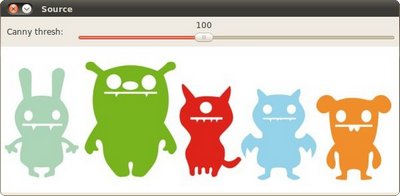
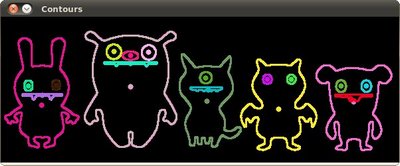
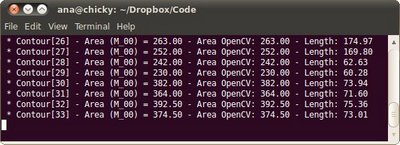
Here it is: