Image Pyramids#
Goal#
In this tutorial you will learn how to:
Use the OpenCV functions pyrUp() and pyrDown() to downsample or upsample a given image.
Theory#
Note
The explanation below belongs to the book Learning OpenCV by Bradski and Kaehler.
Usually we need to convert an image to a size different than its original. For this, there are two possible options:
Upsize the image (zoom in) or
Downsize it (zoom out).
Although there is a geometric transformation function in OpenCV that -literally- resize an image (resize , which we will show in a future tutorial), in this section we analyze first the use of Image Pyramids, which are widely applied in a huge range of vision applications.
Image Pyramid#
An image pyramid is a collection of images - all arising from a single original image - that are successively downsampled until some desired stopping point is reached.
There are two common kinds of image pyramids:
Gaussian pyramid: Used to downsample images
Laplacian pyramid: Used to reconstruct an upsampled image from an image lower in the pyramid (with less resolution)
In this tutorial we’ll use the Gaussian pyramid.
Gaussian Pyramid#
Imagine the pyramid as a set of layers in which the higher the layer, the smaller the size.
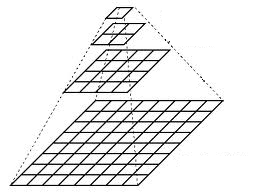
Every layer is numbered from bottom to top, so layer \((i+1)\) (denoted as \(G_{i+1}\) is smaller than layer \(i\) (\(G_{i}\)).
To produce layer \((i+1)\) in the Gaussian pyramid, we do the following:
Convolve \(G_{i}\) with a Gaussian kernel:
\[\begin{split}\frac{1}{256} \begin{bmatrix} 1 & 4 & 6 & 4 & 1 \\ 4 & 16 & 24 & 16 & 4 \\ 6 & 24 & 36 & 24 & 6 \\ 4 & 16 & 24 & 16 & 4 \\ 1 & 4 & 6 & 4 & 1 \end{bmatrix}\end{split}\]Remove every even-numbered row and column.
You can easily notice that the resulting image will be exactly one-quarter the area of its predecessor. Iterating this process on the input image \(G_{0}\) (original image) produces the entire pyramid.
The procedure above was useful to downsample an image. What if we want to make it bigger?: columns filled with zeros (\(0 \))
First, upsize the image to twice the original in each dimension, with the new even rows and
Perform a convolution with the same kernel shown above (multiplied by 4) to approximate the values of the “missing pixels”
These two procedures (downsampling and upsampling as explained above) are implemented by the OpenCV functions pyrUp() and pyrDown() , as we will see in an example with the code below:
Note
When we reduce the size of an image, we are actually losing information of the image.
Code#
This tutorial code’s is shown lines below.
You can also download it from here
#include "iostream"
#include "opencv2/imgproc.hpp"
#include "opencv2/imgcodecs.hpp"
#include "opencv2/highgui.hpp"

using namespace std;
using namespace cv;

const char* window_name = "Pyramids Demo";

int main( int argc, char** argv )
{
    /// General instructions
    cout << "\n Zoom In-Out demo \n "
            "------------------  \n"
            " * [i] -> Zoom in   \n"
            " * [o] -> Zoom out  \n"
            " * [ESC] -> Close program \n" << endl;

    const char* filename = argc >=2 ? argv[1] : "chicky_512.png";

    // Loads an image
    Mat src = imread( samples::findFile( filename ) );

    // Check if image is loaded fine
    if(src.empty()){
        printf(" Error opening image\n");
        printf(" Program Arguments: [image_name -- default chicky_512.png] \n");
        return EXIT_FAILURE;
    }

    for(;;)
    {
        imshow( window_name, src );
        char c = (char)waitKey(0);

        if( c == 27 )
        { break; }
        else if( c == 'i' )
        { pyrUp( src, src, Size( src.cols*2, src.rows*2 ) );
            printf( "** Zoom In: Image x 2 \n" );
        }
        else if( c == 'o' )
        { pyrDown( src, src, Size( src.cols/2, src.rows/2 ) );
            printf( "** Zoom Out: Image / 2 \n" );
        }
    }

    return EXIT_SUCCESS;
}
You can also download it from here
import org.opencv.core.*;
import org.opencv.highgui.HighGui;
import org.opencv.imgcodecs.Imgcodecs;
import org.opencv.imgproc.Imgproc;

class PyramidsRun {

    String window_name = "Pyramids Demo";

    public void run(String[] args) {
        /// General instructions
        System.out.println("\n" +
                " Zoom In-Out demo    \n" +
                "------------------   \n" +
                " * [i] -> Zoom [i]n  \n" +
                " * [o] -> Zoom [o]ut \n" +
                " * [ESC] -> Close program \n");

        String filename = ((args.length > 0) ? args[0] : "../data/chicky_512.png");

        // Load the image
        Mat src = Imgcodecs.imread(filename);

        // Check if image is loaded fine
        if( src.empty() ) {
            System.out.println("Error opening image!");
            System.out.println("Program Arguments: [image_name -- default ../data/chicky_512.png] \n");
            System.exit(-1);
        }

        while (true){
            HighGui.imshow( window_name, src );
            char c = (char) HighGui.waitKey(0);
            c = Character.toLowerCase(c);

            if( c == 27 ){
                break;
            }else if( c == 'i'){
                Imgproc.pyrUp( src, src, new Size( src.cols()*2, src.rows()*2 ) );
                System.out.println( "** Zoom In: Image x 2" );
            }else if( c == 'o'){
                Imgproc.pyrDown( src, src, new Size( src.cols()/2, src.rows()/2 ) );
                System.out.println( "** Zoom Out: Image / 2" );
            }
        }

        System.exit(0);
    }
}

public class Pyramids {
    public static void main(String[] args) {
        // Load the native library.
        System.loadLibrary(Core.NATIVE_LIBRARY_NAME);
        new PyramidsRun().run(args);
    }
}
You can also download it from here
import sys
import cv2 as cv

def main(argv):
    print("""
    Zoom In-Out demo
    ------------------
    * [i] -> Zoom [i]n
    * [o] -> Zoom [o]ut
    * [ESC] -> Close program
    """)
    filename = argv[0] if len(argv) > 0 else 'chicky_512.png'

    # Load the image
    src = cv.imread(cv.samples.findFile(filename))

    # Check if image is loaded fine
    if src is None:
        print ('Error opening image!')
        print ('Usage: pyramids.py [image_name -- default ../data/chicky_512.png] \n')
        return -1
    while 1:
        rows, cols, _channels = map(int, src.shape)
        cv.imshow('Pyramids Demo', src)
        k = cv.waitKey(0)

        if k == 27:
            break
        elif chr(k) == 'i':
            src = cv.pyrUp(src, dstsize=(2 * cols, 2 * rows))
            print ('** Zoom In: Image x 2')
        elif chr(k) == 'o':
            src = cv.pyrDown(src, dstsize=(cols // 2, rows // 2))
            print ('** Zoom Out: Image / 2')

    cv.destroyAllWindows()
    return 0

if __name__ == "__main__":
    main(sys.argv[1:])
Explanation#
Let’s check the general structure of the program:
Load an image#
const char* filename = argc >=2 ? argv[1] : "chicky_512.png";

// Loads an image
Mat src = imread( samples::findFile( filename ) );

// Check if image is loaded fine
if(src.empty()){
    printf(" Error opening image\n");
    printf(" Program Arguments: [image_name -- default chicky_512.png] \n");
    return EXIT_FAILURE;
}
String filename = ((args.length > 0) ? args[0] : "../data/chicky_512.png");

// Load the image
Mat src = Imgcodecs.imread(filename);

// Check if image is loaded fine
if( src.empty() ) {
    System.out.println("Error opening image!");
    System.out.println("Program Arguments: [image_name -- default ../data/chicky_512.png] \n");
    System.exit(-1);
}
filename = argv[0] if len(argv) > 0 else 'chicky_512.png'

# Load the image
src = cv.imread(cv.samples.findFile(filename))

# Check if image is loaded fine
if src is None:
    print ('Error opening image!')
    print ('Usage: pyramids.py [image_name -- default ../data/chicky_512.png] \n')
    return -1
Create window#
Loop#
for(;;)
{
    imshow( window_name, src );
    char c = (char)waitKey(0);

    if( c == 27 )
    { break; }
    else if( c == 'i' )
    { pyrUp( src, src, Size( src.cols*2, src.rows*2 ) );
        printf( "** Zoom In: Image x 2 \n" );
    }
    else if( c == 'o' )
    { pyrDown( src, src, Size( src.cols/2, src.rows/2 ) );
        printf( "** Zoom Out: Image / 2 \n" );
    }
}
while (true){
    HighGui.imshow( window_name, src );
    char c = (char) HighGui.waitKey(0);
    c = Character.toLowerCase(c);

    if( c == 27 ){
        break;
    }else if( c == 'i'){
        Imgproc.pyrUp( src, src, new Size( src.cols()*2, src.rows()*2 ) );
        System.out.println( "** Zoom In: Image x 2" );
    }else if( c == 'o'){
        Imgproc.pyrDown( src, src, new Size( src.cols()/2, src.rows()/2 ) );
        System.out.println( "** Zoom Out: Image / 2" );
    }
}
while 1:
    rows, cols, _channels = map(int, src.shape)
    cv.imshow('Pyramids Demo', src)
    k = cv.waitKey(0)

    if k == 27:
        break
    elif chr(k) == 'i':
        src = cv.pyrUp(src, dstsize=(2 * cols, 2 * rows))
        print ('** Zoom In: Image x 2')
    elif chr(k) == 'o':
        src = cv.pyrDown(src, dstsize=(cols // 2, rows // 2))
        print ('** Zoom Out: Image / 2')
Perform an infinite loop waiting for user input. Our program exits if the user presses ESC. Besides, it has two options:
Perform upsampling - Zoom ‘i’n (after pressing ‘i’)
We use the function pyrUp() with three arguments:
src: The current and destination image (to be shown on screen, supposedly the double of the input image)
Size( tmp.cols2, tmp.rows*2 )* : The destination size. Since we are upsampling, pyrUp() expects a size double than the input image (in this case src).
}else if( c == 'i'){
    Imgproc.pyrUp( src, src, new Size( src.cols()*2, src.rows()*2 ) );
    System.out.println( "** Zoom In: Image x 2" );
elif chr(k) == 'i':
    src = cv.pyrUp(src, dstsize=(2 * cols, 2 * rows))
    print ('** Zoom In: Image x 2')
Perform downsampling - Zoom ‘o’ut (after pressing ‘o’)
We use the function pyrDown() with three arguments (similarly to pyrUp()):
src: The current and destination image (to be shown on screen, supposedly half the input image)
Size( tmp.cols/2, tmp.rows/2 ) : The destination size. Since we are downsampling, pyrDown() expects half the size the input image (in this case src).
}else if( c == 'o'){
    Imgproc.pyrDown( src, src, new Size( src.cols()/2, src.rows()/2 ) );
    System.out.println( "** Zoom Out: Image / 2" );
elif chr(k) == 'o':
    src = cv.pyrDown(src, dstsize=(cols // 2, rows // 2))
    print ('** Zoom Out: Image / 2')
Notice that it is important that the input image can be divided by a factor of two (in both dimensions). Otherwise, an error will be shown.
Results#
The program calls by default an image chicky_512.png that comes in the
samples/datafolder. Notice that this image is \(512 \times 512\), hence a downsample won’t generate any error (\(512 = 2^{9}\)). The original image is shown below: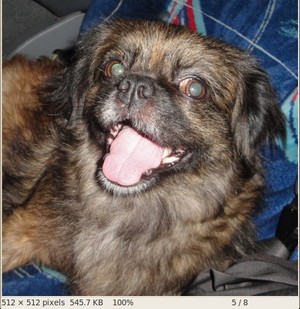
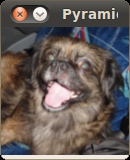
First we apply two successive pyrDown() operations by pressing ‘d’. Our output is:
Note that we should have lost some resolution due to the fact that we are diminishing the size of the image. This is evident after we apply pyrUp() twice (by pressing ‘u’). Our output is now: