Object detection with Generalized Ballard and Guil Hough Transform#
Goal#
In this tutorial you will learn how to:
Use [cv::GeneralizedHoughBallard](#cv::GeneralizedHoughBallard) and [cv::GeneralizedHoughGuil](#cv::GeneralizedHoughGuil) to detect an object
Example#
What does this program do?#
Load the image and template
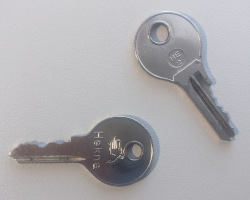
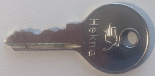
Instantiate [cv::GeneralizedHoughBallard](#cv::GeneralizedHoughBallard) with the help of
createGeneralizedHoughBallard()Instantiate [cv::GeneralizedHoughGuil](#cv::GeneralizedHoughGuil) with the help of
createGeneralizedHoughGuil()Set the required parameters for both GeneralizedHough variants
Detect and show found results
Note
Both variants can’t be instantiated directly. Using the create methods is required.
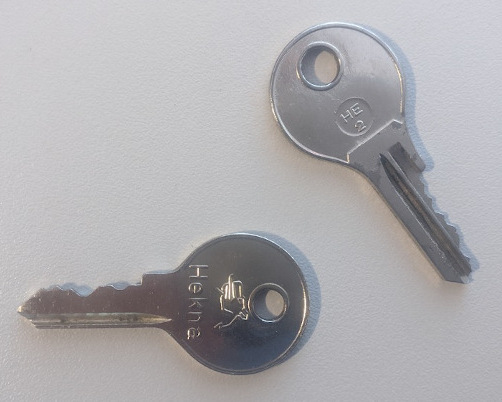
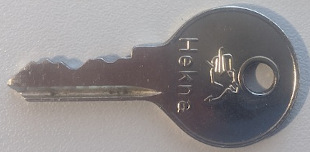
Guil Hough is very slow. Calculating the results for the “mini” files used in this tutorial takes only a few seconds. With image and template in a higher resolution, as shown below, my notebook requires about 5 minutes to calculate a result.
Code#
The complete code for this tutorial is shown below.
#include "opencv2/highgui.hpp"
#include "opencv2/imgproc.hpp"

using namespace cv;
using namespace std;

int main() {
//  load source image and grayscale template
    samples::addSamplesDataSearchSubDirectory("doc/tutorials/imgproc/generalized_hough_ballard_guil");
    Mat image = imread(samples::findFile("images/generalized_hough_mini_image.jpg"));
    Mat templ = imread(samples::findFile("images/generalized_hough_mini_template.jpg"), IMREAD_GRAYSCALE);

//  create grayscale image
    Mat grayImage;
    cvtColor(image, grayImage, COLOR_RGB2GRAY);

//  create variable for location, scale and rotation of detected templates
    vector<Vec4f> positionBallard, positionGuil;

//  template width and height
    int w = templ.cols;
    int h = templ.rows;

//  create ballard and set options
    Ptr<GeneralizedHoughBallard> ballard = createGeneralizedHoughBallard();
    ballard->setMinDist(10);
    ballard->setLevels(360);
    ballard->setDp(2);
    ballard->setMaxBufferSize(1000);
    ballard->setVotesThreshold(40);

    ballard->setCannyLowThresh(30);
    ballard->setCannyHighThresh(110);
    ballard->setTemplate(templ);

//  create guil and set options
    Ptr<GeneralizedHoughGuil> guil = createGeneralizedHoughGuil();
    guil->setMinDist(10);
    guil->setLevels(360);
    guil->setDp(3);
    guil->setMaxBufferSize(1000);

    guil->setMinAngle(0);
    guil->setMaxAngle(360);
    guil->setAngleStep(1);
    guil->setAngleThresh(1500);

    guil->setMinScale(0.5);
    guil->setMaxScale(2.0);
    guil->setScaleStep(0.05);
    guil->setScaleThresh(50);

    guil->setPosThresh(10);

    guil->setCannyLowThresh(30);
    guil->setCannyHighThresh(110);

    guil->setTemplate(templ);

//  execute ballard detection
    ballard->detect(grayImage, positionBallard);
//  execute guil detection
    guil->detect(grayImage, positionGuil);

//  draw ballard
    for (vector<Vec4f>::iterator iter = positionBallard.begin(); iter != positionBallard.end(); ++iter) {
        RotatedRect rRect = RotatedRect(Point2f((*iter)[0], (*iter)[1]),
                                        Size2f(w * (*iter)[2], h * (*iter)[2]),
                                        (*iter)[3]);
        Point2f vertices[4];
        rRect.points(vertices);
        for (int i = 0; i < 4; i++)
            line(image, vertices[i], vertices[(i + 1) % 4], Scalar(255, 0, 0), 6);
    }

//  draw guil
    for (vector<Vec4f>::iterator iter = positionGuil.begin(); iter != positionGuil.end(); ++iter) {
        RotatedRect rRect = RotatedRect(Point2f((*iter)[0], (*iter)[1]),
                                        Size2f(w * (*iter)[2], h * (*iter)[2]),
                                        (*iter)[3]);
        Point2f vertices[4];
        rRect.points(vertices);
        for (int i = 0; i < 4; i++)
            line(image, vertices[i], vertices[(i + 1) % 4], Scalar(0, 255, 0), 2);
    }

    imshow("result_img", image);
    waitKey();

    return EXIT_SUCCESS;
}
Explanation#
Load image, template and setup variables#
//  load source image and grayscale template
    samples::addSamplesDataSearchSubDirectory("doc/tutorials/imgproc/generalized_hough_ballard_guil");
    Mat image = imread(samples::findFile("images/generalized_hough_mini_image.jpg"));
    Mat templ = imread(samples::findFile("images/generalized_hough_mini_template.jpg"), IMREAD_GRAYSCALE);

//  create grayscale image
    Mat grayImage;
    cvtColor(image, grayImage, COLOR_RGB2GRAY);

//  create variable for location, scale and rotation of detected templates
    vector<Vec4f> positionBallard, positionGuil;

//  template width and height
    int w = templ.cols;
    int h = templ.rows;
The position vectors will contain the matches the detectors will find. Every entry contains four floating point values: position vector
[0]: x coordinate of center point
[1]: y coordinate of center point
[2]: scale of detected object compared to template
[3]: rotation of detected object in degree in relation to template
An example could look as follows: [200, 100, 0.9, 120]
Setup parameters#
//  create ballard and set options
    Ptr<GeneralizedHoughBallard> ballard = createGeneralizedHoughBallard();
    ballard->setMinDist(10);
    ballard->setLevels(360);
    ballard->setDp(2);
    ballard->setMaxBufferSize(1000);
    ballard->setVotesThreshold(40);

    ballard->setCannyLowThresh(30);
    ballard->setCannyHighThresh(110);
    ballard->setTemplate(templ);

//  create guil and set options
    Ptr<GeneralizedHoughGuil> guil = createGeneralizedHoughGuil();
    guil->setMinDist(10);
    guil->setLevels(360);
    guil->setDp(3);
    guil->setMaxBufferSize(1000);

    guil->setMinAngle(0);
    guil->setMaxAngle(360);
    guil->setAngleStep(1);
    guil->setAngleThresh(1500);

    guil->setMinScale(0.5);
    guil->setMaxScale(2.0);
    guil->setScaleStep(0.05);
    guil->setScaleThresh(50);

    guil->setPosThresh(10);

    guil->setCannyLowThresh(30);
    guil->setCannyHighThresh(110);

    guil->setTemplate(templ);
Finding the optimal values can end up in trial and error and depends on many factors, such as the image resolution.
Run detection#
//  execute ballard detection
    ballard->detect(grayImage, positionBallard);
//  execute guil detection
    guil->detect(grayImage, positionGuil);
As mentioned above, this step will take some time, especially with larger images and when using Guil.
Draw results and show image#
//  draw ballard
    for (vector<Vec4f>::iterator iter = positionBallard.begin(); iter != positionBallard.end(); ++iter) {
        RotatedRect rRect = RotatedRect(Point2f((*iter)[0], (*iter)[1]),
                                        Size2f(w * (*iter)[2], h * (*iter)[2]),
                                        (*iter)[3]);
        Point2f vertices[4];
        rRect.points(vertices);
        for (int i = 0; i < 4; i++)
            line(image, vertices[i], vertices[(i + 1) % 4], Scalar(255, 0, 0), 6);
    }

//  draw guil
    for (vector<Vec4f>::iterator iter = positionGuil.begin(); iter != positionGuil.end(); ++iter) {
        RotatedRect rRect = RotatedRect(Point2f((*iter)[0], (*iter)[1]),
                                        Size2f(w * (*iter)[2], h * (*iter)[2]),
                                        (*iter)[3]);
        Point2f vertices[4];
        rRect.points(vertices);
        for (int i = 0; i < 4; i++)
            line(image, vertices[i], vertices[(i + 1) % 4], Scalar(0, 255, 0), 2);
    }

    imshow("result_img", image);
    waitKey();
Result#
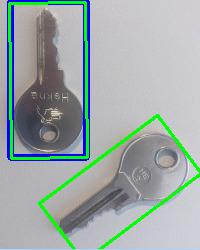
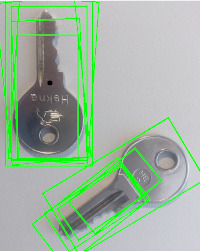
The blue rectangle shows the result of [cv::GeneralizedHoughBallard](#cv::GeneralizedHoughBallard) and the green rectangles the results of [cv::GeneralizedHoughGuil](#cv::GeneralizedHoughGuil).
Getting perfect results like in this example is unlikely if the parameters are not perfectly adapted to the sample. An example with less perfect parameters is shown below. For the Ballard variant, only the center of the result is marked as a black dot on this image. The rectangle would be the same as on the previous image.