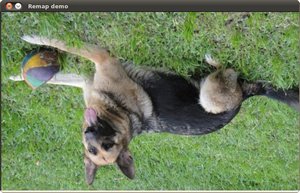
Remapping#
Goal#
In this tutorial you will learn how to:
a. Use the OpenCV function cv::remap to implement simple remapping routines.
Theory#
What is remapping?#
It is the process of taking pixels from one place in the image and locating them in another position in a new image.
To accomplish the mapping process, it might be necessary to do some interpolation for non-integer pixel locations, since there will not always be a one-to-one-pixel correspondence between source and destination images.
We can express the remap for every pixel location \((x,y)\) as:
\[ g(x,y) = f ( h(x,y) ) \]where \(g()\) is the remapped image, \(f()\) the source image and \(h(x,y)\) is the mapping function that operates on \((x,y)\).
Let’s think in a quick example. Imagine that we have an image \(I\) and, say, we want to do a remap such that:
\[ h(x,y) = (I.cols - x, y ) \]What would happen? It is easily seen that the image would flip in the \(x\) direction. For instance, consider the input image:
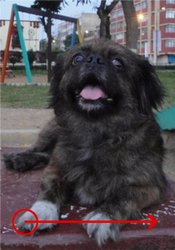
observe how the red circle changes positions with respect to \(x\) (considering \(x\) the horizontal direction):
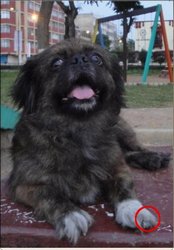
In OpenCV, the function cv::remap offers a simple remapping implementation.
Code#
What does this program do?
Loads an image
Each second, apply 1 of 4 different remapping processes to the image and display them indefinitely in a window.
Wait for the user to exit the program
The tutorial code is shown lines below. You can also download it from here
#include "opencv2/imgcodecs.hpp"
#include "opencv2/highgui.hpp"
#include "opencv2/imgproc.hpp"
#include <iostream>

using namespace cv;

/// Function Headers
void update_map( int &ind, Mat &map_x, Mat &map_y );

int main(int argc, const char** argv)
{
    CommandLineParser parser(argc, argv, "{@image |chicky_512.png|input image name}");
    std::string filename = parser.get<std::string>(0);
    /// Load the image
    Mat src = imread( samples::findFile( filename ), IMREAD_COLOR );
    if (src.empty())
    {
        std::cout << "Cannot read image: " << filename << std::endl;
        return -1;
    }

    /// Create dst, map_x and map_y with the same size as src:
    Mat dst(src.size(), src.type());
    Mat map_x(src.size(), CV_32FC1);
    Mat map_y(src.size(), CV_32FC1);

    /// Create window
    const char* remap_window = "Remap demo";
    namedWindow( remap_window, WINDOW_AUTOSIZE );

    /// Index to switch between the remap modes
    int ind = 0;
    for(;;)
    {
        /// Update map_x & map_y. Then apply remap
        update_map(ind, map_x, map_y);
        remap( src, dst, map_x, map_y, INTER_LINEAR, BORDER_CONSTANT, Scalar(0, 0, 0) );

        /// Display results
        imshow( remap_window, dst );

        /// Each 1 sec. Press ESC to exit the program
        char c = (char)waitKey( 1000 );
        if( c == 27 )
        {
            break;
        }
    }
    return 0;
}

void update_map( int &ind, Mat &map_x, Mat &map_y )
{
    for( int i = 0; i < map_x.rows; i++ )
    {
        for( int j = 0; j < map_x.cols; j++ )
        {
            switch( ind )
            {
            case 0:
                if( j > map_x.cols*0.25 && j < map_x.cols*0.75 && i > map_x.rows*0.25 && i < map_x.rows*0.75 )
                {
                    map_x.at<float>(i, j) = 2*( j - map_x.cols*0.25f ) + 0.5f;
                    map_y.at<float>(i, j) = 2*( i - map_x.rows*0.25f ) + 0.5f;
                }
                else
                {
                    map_x.at<float>(i, j) = 0;
                    map_y.at<float>(i, j) = 0;
                }
                break;
            case 1:
                map_x.at<float>(i, j) = (float)j;
                map_y.at<float>(i, j) = (float)(map_x.rows - i);
                break;
            case 2:
                map_x.at<float>(i, j) = (float)(map_x.cols - j);
                map_y.at<float>(i, j) = (float)i;
                break;
            case 3:
                map_x.at<float>(i, j) = (float)(map_x.cols - j);
                map_y.at<float>(i, j) = (float)(map_x.rows - i);
                break;
            default:
                break;
            } // end of switch
        }
    }
    ind = (ind+1) % 4;
}
The tutorial code is shown lines below. You can also download it from here
import org.opencv.core.Core;
import org.opencv.core.CvType;
import org.opencv.core.Mat;
import org.opencv.highgui.HighGui;
import org.opencv.imgcodecs.Imgcodecs;
import org.opencv.imgproc.Imgproc;

class Remap {
    private Mat mapX = new Mat();
    private Mat mapY = new Mat();
    private Mat dst = new Mat();
    private int ind = 0;

    private void updateMap() {
        float buffX[] = new float[(int) (mapX.total() * mapX.channels())];
        mapX.get(0, 0, buffX);

        float buffY[] = new float[(int) (mapY.total() * mapY.channels())];
        mapY.get(0, 0, buffY);

        for (int i = 0; i < mapX.rows(); i++) {
            for (int j = 0; j < mapX.cols(); j++) {
                switch (ind) {
                case 0:
                    if( j > mapX.cols()*0.25 && j < mapX.cols()*0.75 && i > mapX.rows()*0.25 && i < mapX.rows()*0.75 ) {
                        buffX[i*mapX.cols() + j] = 2*( j - mapX.cols()*0.25f ) + 0.5f;
                        buffY[i*mapY.cols() + j] = 2*( i - mapX.rows()*0.25f ) + 0.5f;
                    } else {
                        buffX[i*mapX.cols() + j] = 0;
                        buffY[i*mapY.cols() + j] = 0;
                    }
                    break;
                case 1:
                    buffX[i*mapX.cols() + j] = j;
                    buffY[i*mapY.cols() + j] = mapY.rows() - i;
                    break;
                case 2:
                    buffX[i*mapX.cols() + j] = mapY.cols() - j;
                    buffY[i*mapY.cols() + j] = i;
                    break;
                case 3:
                    buffX[i*mapX.cols() + j] = mapY.cols() - j;
                    buffY[i*mapY.cols() + j] = mapY.rows() - i;
                    break;
                default:
                    break;
                }
            }
        }
        mapX.put(0, 0, buffX);
        mapY.put(0, 0, buffY);
        ind = (ind+1) % 4;
    }

    public void run(String[] args) {
        String filename = args.length > 0 ? args[0] : "../data/chicky_512.png";
        Mat src = Imgcodecs.imread(filename, Imgcodecs.IMREAD_COLOR);
        if (src.empty()) {
            System.err.println("Cannot read image: " + filename);
            System.exit(0);
        }

        mapX = new Mat(src.size(), CvType.CV_32F);
        mapY = new Mat(src.size(), CvType.CV_32F);

        final String winname = "Remap demo";
        HighGui.namedWindow(winname, HighGui.WINDOW_AUTOSIZE);

        for (;;) {
            updateMap();
            Imgproc.remap(src, dst, mapX, mapY, Imgproc.INTER_LINEAR);
            HighGui.imshow(winname, dst);
            if (HighGui.waitKey(1000) == 27) {
                break;
            }
        }
        System.exit(0);
    }
}

public class RemapDemo {
    public static void main(String[] args) {
        // Load the native OpenCV library
        System.loadLibrary(Core.NATIVE_LIBRARY_NAME);

        new Remap().run(args);
    }
}
The tutorial code is shown lines below. You can also download it from here
from __future__ import print_function
import cv2 as cv
import numpy as np
import argparse

def update_map(ind, map_x, map_y):
    if ind == 0:
        for i in range(map_x.shape[0]):
            for j in range(map_x.shape[1]):
                if j > map_x.shape[1]*0.25 and j < map_x.shape[1]*0.75 and i > map_x.shape[0]*0.25 and i < map_x.shape[0]*0.75:
                    map_x[i,j] = 2 * (j-map_x.shape[1]*0.25) + 0.5
                    map_y[i,j] = 2 * (i-map_y.shape[0]*0.25) + 0.5
                else:
                    map_x[i,j] = 0
                    map_y[i,j] = 0
    elif ind == 1:
        for i in range(map_x.shape[0]):
            map_x[i,:] = [x for x in range(map_x.shape[1])]
        for j in range(map_y.shape[1]):
            map_y[:,j] = [map_y.shape[0]-y for y in range(map_y.shape[0])]
    elif ind == 2:
        for i in range(map_x.shape[0]):
            map_x[i,:] = [map_x.shape[1]-x for x in range(map_x.shape[1])]
        for j in range(map_y.shape[1]):
            map_y[:,j] = [y for y in range(map_y.shape[0])]
    elif ind == 3:
        for i in range(map_x.shape[0]):
            map_x[i,:] = [map_x.shape[1]-x for x in range(map_x.shape[1])]
        for j in range(map_y.shape[1]):
            map_y[:,j] = [map_y.shape[0]-y for y in range(map_y.shape[0])]

parser = argparse.ArgumentParser(description='Code for Remapping tutorial.')
parser.add_argument('--input', help='Path to input image.', default='chicky_512.png')
args = parser.parse_args()

src = cv.imread(cv.samples.findFile(args.input), cv.IMREAD_COLOR)
if src is None:
    print('Could not open or find the image: ', args.input)
    exit(0)

map_x = np.zeros((src.shape[0], src.shape[1]), dtype=np.float32)
map_y = np.zeros((src.shape[0], src.shape[1]), dtype=np.float32)

window_name = 'Remap demo'
cv.namedWindow(window_name)

ind = 0
while True:
    update_map(ind, map_x, map_y)
    ind = (ind + 1) % 4
    dst = cv.remap(src, map_x, map_y, cv.INTER_LINEAR)
    cv.imshow(window_name, dst)
    c = cv.waitKey(1000)
    if c == 27:
        break
Explanation#
Load an image:
Mat src = Imgcodecs.imread(filename, Imgcodecs.IMREAD_COLOR);
if (src.empty()) {
    System.err.println("Cannot read image: " + filename);
    System.exit(0);
}
src = cv.imread(cv.samples.findFile(args.input), cv.IMREAD_COLOR)
if src is None:
    print('Could not open or find the image: ', args.input)
    exit(0)
Create the destination image and the two mapping matrices (for x and y )
map_x = np.zeros((src.shape[0], src.shape[1]), dtype=np.float32)
map_y = np.zeros((src.shape[0], src.shape[1]), dtype=np.float32)
Create a window to display results
/// Create window
const char* remap_window = "Remap demo";
namedWindow( remap_window, WINDOW_AUTOSIZE );
final String winname = "Remap demo";
HighGui.namedWindow(winname, HighGui.WINDOW_AUTOSIZE);
window_name = 'Remap demo'
cv.namedWindow(window_name)
Establish a loop. Each 1000 ms we update our mapping matrices (mat_x and mat_y) and apply them to our source image:
/// Index to switch between the remap modes
int ind = 0;
for(;;)
{
    /// Update map_x & map_y. Then apply remap
    update_map(ind, map_x, map_y);
    remap( src, dst, map_x, map_y, INTER_LINEAR, BORDER_CONSTANT, Scalar(0, 0, 0) );

    /// Display results
    imshow( remap_window, dst );

    /// Each 1 sec. Press ESC to exit the program
    char c = (char)waitKey( 1000 );
    if( c == 27 )
    {
        break;
    }
}
for (;;) {
    updateMap();
    Imgproc.remap(src, dst, mapX, mapY, Imgproc.INTER_LINEAR);
    HighGui.imshow(winname, dst);
    if (HighGui.waitKey(1000) == 27) {
        break;
    }
}
The function that applies the remapping is cv::remap . We give the following arguments:
src: Source image
dst: Destination image of same size as src
map_x: The mapping function in the x direction. It is equivalent to the first component of \(h(i,j)\)
map_y: Same as above, but in y direction. Note that map_y and map_x are both of the same size as src
INTER_LINEAR: The type of interpolation to use for non-integer pixels. This is by default.
BORDER_CONSTANT: Default
How do we update our mapping matrices mat_x and mat_y? Go on reading:
Updating the mapping matrices: We are going to perform 4 different mappings:
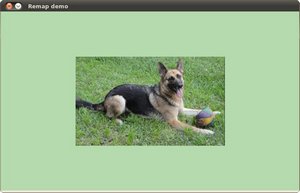
Reduce the picture to half its size and will display it in the middle:
\[ h(i,j) = ( 2 \times i - src.cols/2 + 0.5, 2 \times j - src.rows/2 + 0.5) \]for all pairs \((i,j)\) such that: \(\dfrac{src.cols}{4}<i<\dfrac{3 \cdot src.cols}{4}\) and \(\dfrac{src.rows}{4}<j<\dfrac{3 \cdot src.rows}{4}\)
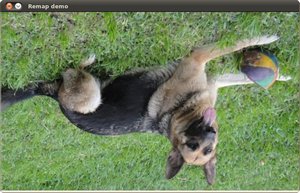
Turn the image upside down: \(h( i, j ) = (i, src.rows - j)\)
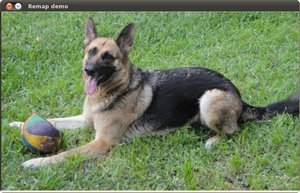
Reflect the image from left to right: \(h(i,j) = ( src.cols - i, j )\)
Combination of b and c: \(h(i,j) = ( src.cols - i, src.rows - j )\)
This is expressed in the following snippet. Here, map_x represents the first coordinate of h(i,j) and map_y the second coordinate.
void update_map( int &ind, Mat &map_x, Mat &map_y )
{
    for( int i = 0; i < map_x.rows; i++ )
    {
        for( int j = 0; j < map_x.cols; j++ )
        {
            switch( ind )
            {
            case 0:
                if( j > map_x.cols*0.25 && j < map_x.cols*0.75 && i > map_x.rows*0.25 && i < map_x.rows*0.75 )
                {
                    map_x.at<float>(i, j) = 2*( j - map_x.cols*0.25f ) + 0.5f;
                    map_y.at<float>(i, j) = 2*( i - map_x.rows*0.25f ) + 0.5f;
                }
                else
                {
                    map_x.at<float>(i, j) = 0;
                    map_y.at<float>(i, j) = 0;
                }
                break;
            case 1:
                map_x.at<float>(i, j) = (float)j;
                map_y.at<float>(i, j) = (float)(map_x.rows - i);
                break;
            case 2:
                map_x.at<float>(i, j) = (float)(map_x.cols - j);
                map_y.at<float>(i, j) = (float)i;
                break;
            case 3:
                map_x.at<float>(i, j) = (float)(map_x.cols - j);
                map_y.at<float>(i, j) = (float)(map_x.rows - i);
                break;
            default:
                break;
            } // end of switch
        }
    }
    ind = (ind+1) % 4;
}
private void updateMap() {
    float buffX[] = new float[(int) (mapX.total() * mapX.channels())];
    mapX.get(0, 0, buffX);

    float buffY[] = new float[(int) (mapY.total() * mapY.channels())];
    mapY.get(0, 0, buffY);

    for (int i = 0; i < mapX.rows(); i++) {
        for (int j = 0; j < mapX.cols(); j++) {
            switch (ind) {
            case 0:
                if( j > mapX.cols()*0.25 && j < mapX.cols()*0.75 && i > mapX.rows()*0.25 && i < mapX.rows()*0.75 ) {
                    buffX[i*mapX.cols() + j] = 2*( j - mapX.cols()*0.25f ) + 0.5f;
                    buffY[i*mapY.cols() + j] = 2*( i - mapX.rows()*0.25f ) + 0.5f;
                } else {
                    buffX[i*mapX.cols() + j] = 0;
                    buffY[i*mapY.cols() + j] = 0;
                }
                break;
            case 1:
                buffX[i*mapX.cols() + j] = j;
                buffY[i*mapY.cols() + j] = mapY.rows() - i;
                break;
            case 2:
                buffX[i*mapX.cols() + j] = mapY.cols() - j;
                buffY[i*mapY.cols() + j] = i;
                break;
            case 3:
                buffX[i*mapX.cols() + j] = mapY.cols() - j;
                buffY[i*mapY.cols() + j] = mapY.rows() - i;
                break;
            default:
                break;
            }
        }
    }
    mapX.put(0, 0, buffX);
    mapY.put(0, 0, buffY);
    ind = (ind+1) % 4;
}
def update_map(ind, map_x, map_y):
    if ind == 0:
        for i in range(map_x.shape[0]):
            for j in range(map_x.shape[1]):
                if j > map_x.shape[1]*0.25 and j < map_x.shape[1]*0.75 and i > map_x.shape[0]*0.25 and i < map_x.shape[0]*0.75:
                    map_x[i,j] = 2 * (j-map_x.shape[1]*0.25) + 0.5
                    map_y[i,j] = 2 * (i-map_y.shape[0]*0.25) + 0.5
                else:
                    map_x[i,j] = 0
                    map_y[i,j] = 0
    elif ind == 1:
        for i in range(map_x.shape[0]):
            map_x[i,:] = [x for x in range(map_x.shape[1])]
        for j in range(map_y.shape[1]):
            map_y[:,j] = [map_y.shape[0]-y for y in range(map_y.shape[0])]
    elif ind == 2:
        for i in range(map_x.shape[0]):
            map_x[i,:] = [map_x.shape[1]-x for x in range(map_x.shape[1])]
        for j in range(map_y.shape[1]):
            map_y[:,j] = [y for y in range(map_y.shape[0])]
    elif ind == 3:
        for i in range(map_x.shape[0]):
            map_x[i,:] = [map_x.shape[1]-x for x in range(map_x.shape[1])]
        for j in range(map_y.shape[1]):
            map_y[:,j] = [map_y.shape[0]-y for y in range(map_y.shape[0])]
Result#
After compiling the code above, you can execute it giving as argument an image path. For instance, by using the following image:
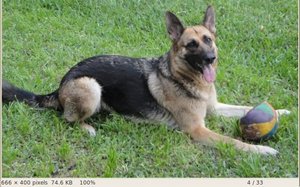
This is the result of reducing it to half the size and centering it:
Turning it upside down:
Reflecting it in the x direction:
Reflecting it in both directions: