

Histogram Comparison#
Goal#
In this tutorial you will learn how to:
Use the function cv::compareHist to get a numerical parameter that express how well two histograms match with each other.
Use different metrics to compare histograms
Theory#
To compare two histograms ( \(H_{1}\) and \(H_{2}\) ), first we have to choose a metric (\(d(H_{1}, H_{2})\)) to express how well both histograms match.
OpenCV implements the function cv::compareHist to perform a comparison. It also offers 6 different metrics to compute the matching:
Correlation ( cv::HISTCMP_CORREL )
\[ d(H_1,H_2) = \frac{\sum_I (H_1(I) - \bar{H_1}) (H_2(I) - \bar{H_2})}{\sqrt{\sum_I(H_1(I) - \bar{H_1})^2 \sum_I(H_2(I) - \bar{H_2})^2}} \]where
\[ \bar{H_k} = \frac{1}{N} \sum _J H_k(J) \]and \(N\) is the total number of histogram bins.
Chi-Square ( cv::HISTCMP_CHISQR )
\[ d(H_1,H_2) = \sum _I \frac{\left(H_1(I)-H_2(I)\right)^2}{H_1(I)} \]Intersection ( cv::HISTCMP_INTERSECT )
\[ d(H_1,H_2) = \sum _I \min (H_1(I), H_2(I)) \]Bhattacharyya distance ( cv::HISTCMP_BHATTACHARYYA )
\[ d(H_1,H_2) = \sqrt{1 - \frac{1}{\sqrt{\bar{H_1} \bar{H_2} N^2}} \sum_I \sqrt{H_1(I) \cdot H_2(I)}} \]Alternative Chi-Square ( cv::HISTCMP_CHISQR_ALT )
\[ d(H_1,H_2) = 2 * \sum _I \frac{\left(H_1(I)-H_2(I)\right)^2}{H_1(I)+H_2(I)} \]Kullback-Leibler divergence ( cv::HISTCMP_KL_DIV )
\[ d(H_1,H_2) = \sum _I H_1(I) \log \left(\frac{H_1(I)}{H_2(I)}\right) \]
Code#
What does this program do?
Loads a base image and 2 test images to be compared with it.
Generate 1 image that is the lower half of the base image
Convert the images to HSV format
Calculate the H-S histogram for all the images and normalize them in order to compare them.
Compare the histogram of the base image with respect to the 2 test histograms, the histogram of the lower half base image and with the same base image histogram.
Display the numerical matching parameters obtained.
Downloadable code: Click here
Code at glance:
#include "opencv2/imgcodecs.hpp"
#include "opencv2/highgui.hpp"
#include "opencv2/imgproc.hpp"
#include <iostream>

using namespace std;
using namespace cv;

const char* keys =
    "{ help  h| | Print help message. }"
    "{ @input1 |Histogram_Comparison_Source_0.jpg | Path to input image 1. }"
    "{ @input2 |Histogram_Comparison_Source_1.jpg | Path to input image 2. }"
    "{ @input3 |Histogram_Comparison_Source_2.jpg | Path to input image 3. }";

int main( int argc, char** argv )
{
    CommandLineParser parser( argc, argv, keys );
    samples::addSamplesDataSearchSubDirectory( "doc/tutorials/imgproc/histograms/histogram_comparison/images" );
    Mat src_base = imread(samples::findFile( parser.get<String>( "@input1" ) ) );
    Mat src_test1 = imread(samples::findFile( parser.get<String>( "@input2" ) ) );
    Mat src_test2 = imread(samples::findFile( parser.get<String>( "@input3" ) ) );
    if( src_base.empty() || src_test1.empty() || src_test2.empty() )
    {
        cout << "Could not open or find the images!\n" << endl;
        parser.printMessage();
        return -1;
    }

    Mat hsv_base, hsv_test1, hsv_test2;
    cvtColor( src_base, hsv_base, COLOR_BGR2HSV );
    cvtColor( src_test1, hsv_test1, COLOR_BGR2HSV );
    cvtColor( src_test2, hsv_test2, COLOR_BGR2HSV );

    Mat hsv_half_down = hsv_base( Range( hsv_base.rows/2, hsv_base.rows ), Range( 0, hsv_base.cols ) );

    int h_bins = 50, s_bins = 60;
    int histSize[] = { h_bins, s_bins };

    // hue varies from 0 to 179, saturation from 0 to 255
    float h_ranges[] = { 0, 180 };
    float s_ranges[] = { 0, 256 };

    const float* ranges[] = { h_ranges, s_ranges };

    // Use the 0-th and 1-st channels
    int channels[] = { 0, 1 };

    Mat hist_base, hist_half_down, hist_test1, hist_test2;

    calcHist( &hsv_base, 1, channels, Mat(), hist_base, 2, histSize, ranges, true, false );
    normalize( hist_base, hist_base, 1, 0, NORM_L1, -1, Mat() );

    calcHist( &hsv_half_down, 1, channels, Mat(), hist_half_down, 2, histSize, ranges, true, false );
    normalize( hist_half_down, hist_half_down, 1, 0, NORM_L1, -1, Mat() );

    calcHist( &hsv_test1, 1, channels, Mat(), hist_test1, 2, histSize, ranges, true, false );
    normalize( hist_test1, hist_test1, 1, 0, NORM_L1, -1, Mat() );

    calcHist( &hsv_test2, 1, channels, Mat(), hist_test2, 2, histSize, ranges, true, false );
    normalize( hist_test2, hist_test2, 1, 0, NORM_L1, -1, Mat() );

    for( int compare_method = 0; compare_method < 6; compare_method++ )
    {
        double base_base = compareHist( hist_base, hist_base, compare_method );
        double base_half = compareHist( hist_base, hist_half_down, compare_method );
        double base_test1 = compareHist( hist_base, hist_test1, compare_method );
        double base_test2 = compareHist( hist_base, hist_test2, compare_method );

        cout << "Method " << compare_method << " Perfect, Base-Half, Base-Test(1), Base-Test(2) : "
             <<  base_base << " / " << base_half << " / " << base_test1 << " / " << base_test2 << endl;
    }

    cout << "Done \n";
    return 0;
}
Downloadable code: Click here
Code at glance:
import java.util.Arrays;
import java.util.List;

import org.opencv.core.Core;
import org.opencv.core.Mat;
import org.opencv.core.MatOfFloat;
import org.opencv.core.MatOfInt;
import org.opencv.core.Range;
import org.opencv.imgcodecs.Imgcodecs;
import org.opencv.imgproc.Imgproc;

class CompareHist {
    public void run(String[] args) {
        if (args.length != 3) {
            System.err.println("You must supply 3 arguments that correspond to the paths to 3 images.");
            System.exit(0);
        }
        Mat srcBase = Imgcodecs.imread(args[0]);
        Mat srcTest1 = Imgcodecs.imread(args[1]);
        Mat srcTest2 = Imgcodecs.imread(args[2]);
        if (srcBase.empty() || srcTest1.empty() || srcTest2.empty()) {
            System.err.println("Cannot read the images");
            System.exit(0);
        }

        Mat hsvBase = new Mat(), hsvTest1 = new Mat(), hsvTest2 = new Mat();
        Imgproc.cvtColor( srcBase, hsvBase, Imgproc.COLOR_BGR2HSV );
        Imgproc.cvtColor( srcTest1, hsvTest1, Imgproc.COLOR_BGR2HSV );
        Imgproc.cvtColor( srcTest2, hsvTest2, Imgproc.COLOR_BGR2HSV );

        Mat hsvHalfDown = hsvBase.submat( new Range( hsvBase.rows()/2, hsvBase.rows() - 1 ), new Range( 0, hsvBase.cols() - 1 ) );

        int hBins = 50, sBins = 60;
        int[] histSize = { hBins, sBins };

        // hue varies from 0 to 179, saturation from 0 to 255
        float[] ranges = { 0, 180, 0, 256 };

        // Use the 0-th and 1-st channels
        int[] channels = { 0, 1 };

        Mat histBase = new Mat(), histHalfDown = new Mat(), histTest1 = new Mat(), histTest2 = new Mat();

        List<Mat> hsvBaseList = Arrays.asList(hsvBase);
        Imgproc.calcHist(hsvBaseList, new MatOfInt(channels), new Mat(), histBase, new MatOfInt(histSize), new MatOfFloat(ranges), false);
        Core.normalize(histBase, histBase, 1, 0, Core.NORM_L1);

        List<Mat> hsvHalfDownList = Arrays.asList(hsvHalfDown);
        Imgproc.calcHist(hsvHalfDownList, new MatOfInt(channels), new Mat(), histHalfDown, new MatOfInt(histSize), new MatOfFloat(ranges), false);
        Core.normalize(histHalfDown, histHalfDown, 1, 0, Core.NORM_L1);

        List<Mat> hsvTest1List = Arrays.asList(hsvTest1);
        Imgproc.calcHist(hsvTest1List, new MatOfInt(channels), new Mat(), histTest1, new MatOfInt(histSize), new MatOfFloat(ranges), false);
        Core.normalize(histTest1, histTest1, 1, 0, Core.NORM_L1);

        List<Mat> hsvTest2List = Arrays.asList(hsvTest2);
        Imgproc.calcHist(hsvTest2List, new MatOfInt(channels), new Mat(), histTest2, new MatOfInt(histSize), new MatOfFloat(ranges), false);
        Core.normalize(histTest2, histTest2, 1, 0, Core.NORM_L1);

        for( int compareMethod = 0; compareMethod < 6; compareMethod++ ) {
            double baseBase = Imgproc.compareHist( histBase, histBase, compareMethod );
            double baseHalf = Imgproc.compareHist( histBase, histHalfDown, compareMethod );
            double baseTest1 = Imgproc.compareHist( histBase, histTest1, compareMethod );
            double baseTest2 = Imgproc.compareHist( histBase, histTest2, compareMethod );

            System.out.println("Method " + compareMethod + " Perfect, Base-Half, Base-Test(1), Base-Test(2) : " + baseBase + " / " + baseHalf
                    + " / " + baseTest1 + " / " + baseTest2);
        }
    }
}

public class CompareHistDemo {
    public static void main(String[] args) {
        // Load the native OpenCV library
        System.loadLibrary(Core.NATIVE_LIBRARY_NAME);

        new CompareHist().run(args);
    }
}
Downloadable code: Click here
Code at glance:
from __future__ import print_function
from __future__ import division
import cv2 as cv
import numpy as np
import argparse

parser = argparse.ArgumentParser(description='Code for Histogram Comparison tutorial.')
parser.add_argument('--input1', help='Path to input image 1.')
parser.add_argument('--input2', help='Path to input image 2.')
parser.add_argument('--input3', help='Path to input image 3.')
args = parser.parse_args()

src_base = cv.imread(args.input1)
src_test1 = cv.imread(args.input2)
src_test2 = cv.imread(args.input3)
if src_base is None or src_test1 is None or src_test2 is None:
    print('Could not open or find the images!')
    exit(0)

hsv_base = cv.cvtColor(src_base, cv.COLOR_BGR2HSV)
hsv_test1 = cv.cvtColor(src_test1, cv.COLOR_BGR2HSV)
hsv_test2 = cv.cvtColor(src_test2, cv.COLOR_BGR2HSV)

hsv_half_down = hsv_base[hsv_base.shape[0]//2:,:]

h_bins = 50
s_bins = 60
histSize = [h_bins, s_bins]

# hue varies from 0 to 179, saturation from 0 to 255
h_ranges = [0, 180]
s_ranges = [0, 256]
ranges = h_ranges + s_ranges # concat lists

# Use the 0-th and 1-st channels
channels = [0, 1]

hist_base = cv.calcHist([hsv_base], channels, None, histSize, ranges, accumulate=False)
cv.normalize(hist_base, hist_base, alpha=1, beta=0, norm_type=cv.NORM_L1)

hist_half_down = cv.calcHist([hsv_half_down], channels, None, histSize, ranges, accumulate=False)
cv.normalize(hist_half_down, hist_half_down, alpha=1, beta=0, norm_type=cv.NORM_L1)

hist_test1 = cv.calcHist([hsv_test1], channels, None, histSize, ranges, accumulate=False)
cv.normalize(hist_test1, hist_test1, alpha=1, beta=0, norm_type=cv.NORM_L1)

hist_test2 = cv.calcHist([hsv_test2], channels, None, histSize, ranges, accumulate=False)
cv.normalize(hist_test2, hist_test2, alpha=1, beta=0, norm_type=cv.NORM_L1)

for compare_method in range(6):
    base_base = cv.compareHist(hist_base, hist_base, compare_method)
    base_half = cv.compareHist(hist_base, hist_half_down, compare_method)
    base_test1 = cv.compareHist(hist_base, hist_test1, compare_method)
    base_test2 = cv.compareHist(hist_base, hist_test2, compare_method)

    print('Method:', compare_method, 'Perfect, Base-Half, Base-Test(1), Base-Test(2) :',\
          base_base, '/', base_half, '/', base_test1, '/', base_test2)
Explanation#
Load the base image (src_base) and the other two test images:
CommandLineParser parser( argc, argv, keys );
samples::addSamplesDataSearchSubDirectory( "doc/tutorials/imgproc/histograms/histogram_comparison/images" );
Mat src_base = imread(samples::findFile( parser.get<String>( "@input1" ) ) );
Mat src_test1 = imread(samples::findFile( parser.get<String>( "@input2" ) ) );
Mat src_test2 = imread(samples::findFile( parser.get<String>( "@input3" ) ) );
if( src_base.empty() || src_test1.empty() || src_test2.empty() )
{
    cout << "Could not open or find the images!\n" << endl;
    parser.printMessage();
    return -1;
}
if (args.length != 3) {
    System.err.println("You must supply 3 arguments that correspond to the paths to 3 images.");
    System.exit(0);
}
Mat srcBase = Imgcodecs.imread(args[0]);
Mat srcTest1 = Imgcodecs.imread(args[1]);
Mat srcTest2 = Imgcodecs.imread(args[2]);
if (srcBase.empty() || srcTest1.empty() || srcTest2.empty()) {
    System.err.println("Cannot read the images");
    System.exit(0);
}
parser = argparse.ArgumentParser(description='Code for Histogram Comparison tutorial.')
parser.add_argument('--input1', help='Path to input image 1.')
parser.add_argument('--input2', help='Path to input image 2.')
parser.add_argument('--input3', help='Path to input image 3.')
args = parser.parse_args()

src_base = cv.imread(args.input1)
src_test1 = cv.imread(args.input2)
src_test2 = cv.imread(args.input3)
if src_base is None or src_test1 is None or src_test2 is None:
    print('Could not open or find the images!')
    exit(0)
Convert them to HSV format:
Also, create an image of half the base image (in HSV format):
hsv_half_down = hsv_base[hsv_base.shape[0]//2:,:]
Initialize the arguments to calculate the histograms (bins, ranges and channels H and S).
int h_bins = 50, s_bins = 60;
int histSize[] = { h_bins, s_bins };

// hue varies from 0 to 179, saturation from 0 to 255
float h_ranges[] = { 0, 180 };
float s_ranges[] = { 0, 256 };

const float* ranges[] = { h_ranges, s_ranges };

// Use the 0-th and 1-st channels
int channels[] = { 0, 1 };
int hBins = 50, sBins = 60;
int[] histSize = { hBins, sBins };

// hue varies from 0 to 179, saturation from 0 to 255
float[] ranges = { 0, 180, 0, 256 };

// Use the 0-th and 1-st channels
int[] channels = { 0, 1 };
h_bins = 50
s_bins = 60
histSize = [h_bins, s_bins]

# hue varies from 0 to 179, saturation from 0 to 255
h_ranges = [0, 180]
s_ranges = [0, 256]
ranges = h_ranges + s_ranges # concat lists

# Use the 0-th and 1-st channels
channels = [0, 1]
Calculate the Histograms for the base image, the 2 test images and the half-down base image:
Mat hist_base, hist_half_down, hist_test1, hist_test2;

calcHist( &hsv_base, 1, channels, Mat(), hist_base, 2, histSize, ranges, true, false );
normalize( hist_base, hist_base, 1, 0, NORM_L1, -1, Mat() );

calcHist( &hsv_half_down, 1, channels, Mat(), hist_half_down, 2, histSize, ranges, true, false );
normalize( hist_half_down, hist_half_down, 1, 0, NORM_L1, -1, Mat() );

calcHist( &hsv_test1, 1, channels, Mat(), hist_test1, 2, histSize, ranges, true, false );
normalize( hist_test1, hist_test1, 1, 0, NORM_L1, -1, Mat() );

calcHist( &hsv_test2, 1, channels, Mat(), hist_test2, 2, histSize, ranges, true, false );
normalize( hist_test2, hist_test2, 1, 0, NORM_L1, -1, Mat() );
Mat histBase = new Mat(), histHalfDown = new Mat(), histTest1 = new Mat(), histTest2 = new Mat();

List<Mat> hsvBaseList = Arrays.asList(hsvBase);
Imgproc.calcHist(hsvBaseList, new MatOfInt(channels), new Mat(), histBase, new MatOfInt(histSize), new MatOfFloat(ranges), false);
Core.normalize(histBase, histBase, 1, 0, Core.NORM_L1);

List<Mat> hsvHalfDownList = Arrays.asList(hsvHalfDown);
Imgproc.calcHist(hsvHalfDownList, new MatOfInt(channels), new Mat(), histHalfDown, new MatOfInt(histSize), new MatOfFloat(ranges), false);
Core.normalize(histHalfDown, histHalfDown, 1, 0, Core.NORM_L1);

List<Mat> hsvTest1List = Arrays.asList(hsvTest1);
Imgproc.calcHist(hsvTest1List, new MatOfInt(channels), new Mat(), histTest1, new MatOfInt(histSize), new MatOfFloat(ranges), false);
Core.normalize(histTest1, histTest1, 1, 0, Core.NORM_L1);

List<Mat> hsvTest2List = Arrays.asList(hsvTest2);
Imgproc.calcHist(hsvTest2List, new MatOfInt(channels), new Mat(), histTest2, new MatOfInt(histSize), new MatOfFloat(ranges), false);
Core.normalize(histTest2, histTest2, 1, 0, Core.NORM_L1);
hist_base = cv.calcHist([hsv_base], channels, None, histSize, ranges, accumulate=False)
cv.normalize(hist_base, hist_base, alpha=1, beta=0, norm_type=cv.NORM_L1)

hist_half_down = cv.calcHist([hsv_half_down], channels, None, histSize, ranges, accumulate=False)
cv.normalize(hist_half_down, hist_half_down, alpha=1, beta=0, norm_type=cv.NORM_L1)

hist_test1 = cv.calcHist([hsv_test1], channels, None, histSize, ranges, accumulate=False)
cv.normalize(hist_test1, hist_test1, alpha=1, beta=0, norm_type=cv.NORM_L1)

hist_test2 = cv.calcHist([hsv_test2], channels, None, histSize, ranges, accumulate=False)
cv.normalize(hist_test2, hist_test2, alpha=1, beta=0, norm_type=cv.NORM_L1)
Apply sequentially the 6 comparison methods between the histogram of the base image (hist_base) and the other histograms:
for( int compare_method = 0; compare_method < 6; compare_method++ )
{
    double base_base = compareHist( hist_base, hist_base, compare_method );
    double base_half = compareHist( hist_base, hist_half_down, compare_method );
    double base_test1 = compareHist( hist_base, hist_test1, compare_method );
    double base_test2 = compareHist( hist_base, hist_test2, compare_method );

    cout << "Method " << compare_method << " Perfect, Base-Half, Base-Test(1), Base-Test(2) : "
         <<  base_base << " / " << base_half << " / " << base_test1 << " / " << base_test2 << endl;
}
for( int compareMethod = 0; compareMethod < 6; compareMethod++ ) {
    double baseBase = Imgproc.compareHist( histBase, histBase, compareMethod );
    double baseHalf = Imgproc.compareHist( histBase, histHalfDown, compareMethod );
    double baseTest1 = Imgproc.compareHist( histBase, histTest1, compareMethod );
    double baseTest2 = Imgproc.compareHist( histBase, histTest2, compareMethod );

    System.out.println("Method " + compareMethod + " Perfect, Base-Half, Base-Test(1), Base-Test(2) : " + baseBase + " / " + baseHalf
            + " / " + baseTest1 + " / " + baseTest2);
}
for compare_method in range(6):
    base_base = cv.compareHist(hist_base, hist_base, compare_method)
    base_half = cv.compareHist(hist_base, hist_half_down, compare_method)
    base_test1 = cv.compareHist(hist_base, hist_test1, compare_method)
    base_test2 = cv.compareHist(hist_base, hist_test2, compare_method)

    print('Method:', compare_method, 'Perfect, Base-Half, Base-Test(1), Base-Test(2) :',\
          base_base, '/', base_half, '/', base_test1, '/', base_test2)
Results#
We use as input the following images:
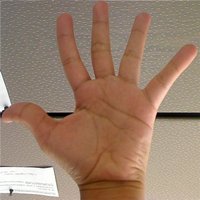
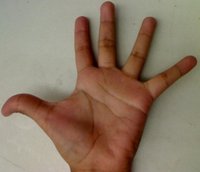
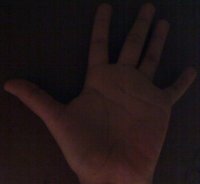 where the first one is the base (to be compared to the others), the other 2 are the test images.
We will also compare the first image with respect to itself and with respect of half the base
image.
where the first one is the base (to be compared to the others), the other 2 are the test images.
We will also compare the first image with respect to itself and with respect of half the base
image.We should expect a perfect match when we compare the base image histogram with itself. Also, compared with the histogram of half the base image, it should present a high match since both are from the same source. For the other two test images, we can observe that they have very different lighting conditions, so the matching should not be very good:
Here the numeric results we got with OpenCV 4.12.0:
Method
Base - Base
Base - Half
Base - Test 1
Base - Test 2
Correlation
1.000000
0.880438
0.20457
0.065752
Chi-square
0.000000
0.328307
181.674
80.1494
Intersection
1.000000
0.75005
0.315061
0.0908022
Bhattacharyya
0.000000
0.237866
0.679825
0.873709
Chi-Square alt.
0.000000
0.395046
2.31572
3.41024
KL divergence
0.000000
0.321064
2.6616
9.55412
For the Correlation and Intersection methods, the higher the metric, the more accurate the match. As we can see, the match base-base is the highest of all as expected. Also we can observe that the match base-half is the second best match (as we predicted). For the other four metrics, the less the result, the better the match.