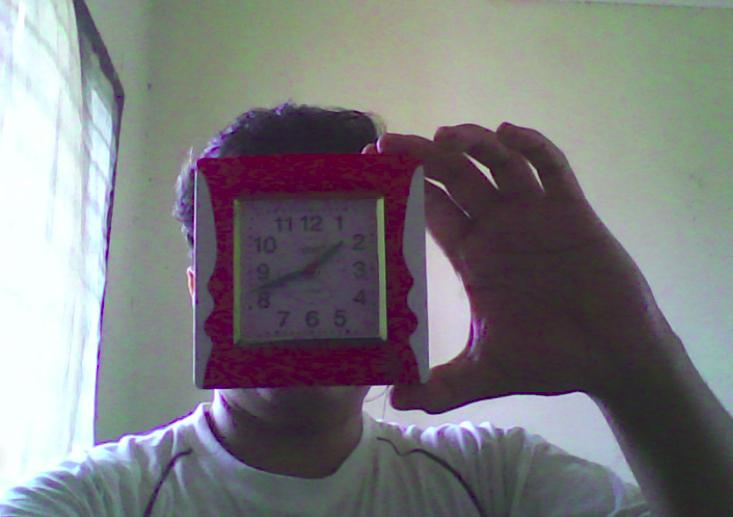
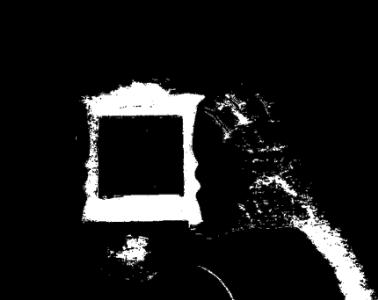
Thresholding Operations using inRange#
Goal#
In this tutorial you will learn how to:
Perform basic thresholding operations using OpenCV cv::inRange function.
Detect an object based on the range of pixel values in the HSV colorspace.
Theory#
In the previous tutorial, we learnt how to perform thresholding using cv::threshold function.
In this tutorial, we will learn how to do it using cv::inRange function.
The concept remains the same, but now we add a range of pixel values we need.
HSV colorspace#
HSV (hue, saturation, value) colorspace is a model to represent the colorspace similar to the RGB color model. Since the hue channel models the color type, it is very useful in image processing tasks that need to segment objects based on its color. Variation of the saturation goes from unsaturated to represent shades of gray and fully saturated (no white component). Value channel describes the brightness or the intensity of the color. Next image shows the HSV cylinder.
![By SharkDderivative work: SharkD [CC BY-SA 3.0 or GFDL], via Wikimedia Commons](../../../_images/Threshold_inRange_HSV_colorspace.jpg)
Since colors in the RGB colorspace are coded using the three channels, it is more difficult to segment an object in the image based on its color.
![By SharkD [GFDL or CC BY-SA 4.0], from Wikimedia Commons](../../../_images/Threshold_inRange_RGB_colorspace.jpg)
Formulas used to convert from one colorspace to another colorspace using cv::cvtColor function are described in Color conversions
Code#
The tutorial code’s is shown lines below. You can also download it from here
#include "opencv2/imgproc.hpp"
#include "opencv2/highgui.hpp"
#include "opencv2/videoio.hpp"
#include <iostream>

using namespace cv;

const int max_value_H = 360/2;
const int max_value = 255;
const String window_capture_name = "Video Capture";
const String window_detection_name = "Object Detection";
int low_H = 0, low_S = 0, low_V = 0;
int high_H = max_value_H, high_S = max_value, high_V = max_value;

static void on_low_H_thresh_trackbar(int, void *)
{
    low_H = min(high_H-1, low_H);
    setTrackbarPos("Low H", window_detection_name, low_H);
}

static void on_high_H_thresh_trackbar(int, void *)
{
    high_H = max(high_H, low_H+1);
    setTrackbarPos("High H", window_detection_name, high_H);
}

static void on_low_S_thresh_trackbar(int, void *)
{
    low_S = min(high_S-1, low_S);
    setTrackbarPos("Low S", window_detection_name, low_S);
}

static void on_high_S_thresh_trackbar(int, void *)
{
    high_S = max(high_S, low_S+1);
    setTrackbarPos("High S", window_detection_name, high_S);
}

static void on_low_V_thresh_trackbar(int, void *)
{
    low_V = min(high_V-1, low_V);
    setTrackbarPos("Low V", window_detection_name, low_V);
}

static void on_high_V_thresh_trackbar(int, void *)
{
    high_V = max(high_V, low_V+1);
    setTrackbarPos("High V", window_detection_name, high_V);
}

int main(int argc, char* argv[])
{
    VideoCapture cap(argc > 1 ? atoi(argv[1]) : 0);

    namedWindow(window_capture_name);
    namedWindow(window_detection_name);

    // Trackbars to set thresholds for HSV values
    createTrackbar("Low H", window_detection_name, &low_H, max_value_H, on_low_H_thresh_trackbar);
    createTrackbar("High H", window_detection_name, &high_H, max_value_H, on_high_H_thresh_trackbar);
    createTrackbar("Low S", window_detection_name, &low_S, max_value, on_low_S_thresh_trackbar);
    createTrackbar("High S", window_detection_name, &high_S, max_value, on_high_S_thresh_trackbar);
    createTrackbar("Low V", window_detection_name, &low_V, max_value, on_low_V_thresh_trackbar);
    createTrackbar("High V", window_detection_name, &high_V, max_value, on_high_V_thresh_trackbar);

    Mat frame, frame_HSV, frame_threshold;
    while (true) {
        cap >> frame;
        if(frame.empty())
        {
            break;
        }

        // Convert from BGR to HSV colorspace
        cvtColor(frame, frame_HSV, COLOR_BGR2HSV);
        // Detect the object based on HSV Range Values
        inRange(frame_HSV, Scalar(low_H, low_S, low_V), Scalar(high_H, high_S, high_V), frame_threshold);

        // Show the frames
        imshow(window_capture_name, frame);
        imshow(window_detection_name, frame_threshold);

        char key = (char) waitKey(30);
        if (key == 'q' || key == 27)
        {
            break;
        }
    }
    return 0;
}
The tutorial code’s is shown lines below. You can also download it from here
import java.awt.BorderLayout;
import java.awt.Container;
import java.awt.Image;
import java.awt.event.WindowAdapter;
import java.awt.event.WindowEvent;
import java.util.List;

import javax.swing.BoxLayout;
import javax.swing.ImageIcon;
import javax.swing.JFrame;
import javax.swing.JLabel;
import javax.swing.JPanel;
import javax.swing.JSlider;
import javax.swing.SwingWorker;
import javax.swing.event.ChangeEvent;
import javax.swing.event.ChangeListener;

import org.opencv.core.Core;
import org.opencv.core.Mat;
import org.opencv.core.Scalar;
import org.opencv.highgui.HighGui;
import org.opencv.imgproc.Imgproc;
import org.opencv.videoio.VideoCapture;

public class ThresholdInRange {
    private static int MAX_VALUE = 255;
    private static int MAX_VALUE_H = 360/2;
    private static final String WINDOW_NAME = "Thresholding Operations using inRange demo";
    private static final String LOW_H_NAME = "Low H";
    private static final String LOW_S_NAME = "Low S";
    private static final String LOW_V_NAME = "Low V";
    private static final String HIGH_H_NAME = "High H";
    private static final String HIGH_S_NAME = "High S";
    private static final String HIGH_V_NAME = "High V";
    private JSlider sliderLowH;
    private JSlider sliderHighH;
    private JSlider sliderLowS;
    private JSlider sliderHighS;
    private JSlider sliderLowV;
    private JSlider sliderHighV;
    private VideoCapture cap;
    private Mat matFrame = new Mat();
    private JFrame frame;
    private JLabel imgCaptureLabel;
    private JLabel imgDetectionLabel;
    private CaptureTask captureTask;

    public ThresholdInRange(String[] args) {
        int cameraDevice = 0;
        if (args.length > 0) {
            cameraDevice = Integer.parseInt(args[0]);
        }
        cap = new VideoCapture(cameraDevice);
        if (!cap.isOpened()) {
            System.err.println("Cannot open camera: " + cameraDevice);
            System.exit(0);
        }
        if (!cap.read(matFrame)) {
            System.err.println("Cannot read camera stream.");
            System.exit(0);
        }

        // Create and set up the window.
        frame = new JFrame(WINDOW_NAME);
        frame.setDefaultCloseOperation(JFrame.EXIT_ON_CLOSE);
        frame.addWindowListener(new WindowAdapter() {
            @Override
            public void windowClosing(WindowEvent windowEvent) {
                captureTask.cancel(true);
            }
        });
        // Set up the content pane.
        Image img = HighGui.toBufferedImage(matFrame);
        addComponentsToPane(frame.getContentPane(), img);
        // Use the content pane's default BorderLayout. No need for
        // setLayout(new BorderLayout());
        // Display the window.
        frame.pack();
        frame.setVisible(true);

        captureTask = new CaptureTask();
        captureTask.execute();
    }

    private class CaptureTask extends SwingWorker<Void, Mat> {
        @Override
        protected Void doInBackground() {
            Mat matFrame = new Mat();

            while (!isCancelled()) {
                if (!cap.read(matFrame)) {
                    break;
                }
                publish(matFrame.clone());
            }
            return null;
        }

        @Override
        protected void process(List<Mat> frames) {
            Mat frame = frames.get(frames.size() - 1);
            Mat frameHSV = new Mat();
            Imgproc.cvtColor(frame, frameHSV, Imgproc.COLOR_BGR2HSV);
            Mat thresh = new Mat();
            Core.inRange(frameHSV, new Scalar(sliderLowH.getValue(), sliderLowS.getValue(), sliderLowV.getValue()),
                    new Scalar(sliderHighH.getValue(), sliderHighS.getValue(), sliderHighV.getValue()), thresh);
            update(frame, thresh);
        }
    }

    private void addComponentsToPane(Container pane, Image img) {
        if (!(pane.getLayout() instanceof BorderLayout)) {
            pane.add(new JLabel("Container doesn't use BorderLayout!"));
            return;
        }

        JPanel sliderPanel = new JPanel();
        sliderPanel.setLayout(new BoxLayout(sliderPanel, BoxLayout.PAGE_AXIS));

        sliderPanel.add(new JLabel(LOW_H_NAME));
        sliderLowH = new JSlider(0, MAX_VALUE_H, 0);
        sliderLowH.setMajorTickSpacing(50);
        sliderLowH.setMinorTickSpacing(10);
        sliderLowH.setPaintTicks(true);
        sliderLowH.setPaintLabels(true);
        sliderPanel.add(sliderLowH);

        sliderPanel.add(new JLabel(HIGH_H_NAME));
        sliderHighH = new JSlider(0, MAX_VALUE_H, MAX_VALUE_H);
        sliderHighH.setMajorTickSpacing(50);
        sliderHighH.setMinorTickSpacing(10);
        sliderHighH.setPaintTicks(true);
        sliderHighH.setPaintLabels(true);
        sliderPanel.add(sliderHighH);

        sliderPanel.add(new JLabel(LOW_S_NAME));
        sliderLowS = new JSlider(0, MAX_VALUE, 0);
        sliderLowS.setMajorTickSpacing(50);
        sliderLowS.setMinorTickSpacing(10);
        sliderLowS.setPaintTicks(true);
        sliderLowS.setPaintLabels(true);
        sliderPanel.add(sliderLowS);

        sliderPanel.add(new JLabel(HIGH_S_NAME));
        sliderHighS = new JSlider(0, MAX_VALUE, MAX_VALUE);
        sliderHighS.setMajorTickSpacing(50);
        sliderHighS.setMinorTickSpacing(10);
        sliderHighS.setPaintTicks(true);
        sliderHighS.setPaintLabels(true);
        sliderPanel.add(sliderHighS);

        sliderPanel.add(new JLabel(LOW_V_NAME));
        sliderLowV = new JSlider(0, MAX_VALUE, 0);
        sliderLowV.setMajorTickSpacing(50);
        sliderLowV.setMinorTickSpacing(10);
        sliderLowV.setPaintTicks(true);
        sliderLowV.setPaintLabels(true);
        sliderPanel.add(sliderLowV);

        sliderPanel.add(new JLabel(HIGH_V_NAME));
        sliderHighV = new JSlider(0, MAX_VALUE, MAX_VALUE);
        sliderHighV.setMajorTickSpacing(50);
        sliderHighV.setMinorTickSpacing(10);
        sliderHighV.setPaintTicks(true);
        sliderHighV.setPaintLabels(true);
        sliderPanel.add(sliderHighV);

        sliderLowH.addChangeListener(new ChangeListener() {
            @Override
            public void stateChanged(ChangeEvent e) {
                JSlider source = (JSlider) e.getSource();
                int valH = Math.min(sliderHighH.getValue()-1, source.getValue());
                sliderLowH.setValue(valH);
            }
        });
        sliderHighH.addChangeListener(new ChangeListener() {
            @Override
            public void stateChanged(ChangeEvent e) {
                JSlider source = (JSlider) e.getSource();
                int valH = Math.max(source.getValue(), sliderLowH.getValue()+1);
                sliderHighH.setValue(valH);
            }
        });
        sliderLowS.addChangeListener(new ChangeListener() {
            @Override
            public void stateChanged(ChangeEvent e) {
                JSlider source = (JSlider) e.getSource();
                int valS = Math.min(sliderHighS.getValue()-1, source.getValue());
                sliderLowS.setValue(valS);
            }
        });
        sliderHighS.addChangeListener(new ChangeListener() {
            @Override
            public void stateChanged(ChangeEvent e) {
                JSlider source = (JSlider) e.getSource();
                int valS = Math.max(source.getValue(), sliderLowS.getValue()+1);
                sliderHighS.setValue(valS);
            }
        });
        sliderLowV.addChangeListener(new ChangeListener() {
            @Override
            public void stateChanged(ChangeEvent e) {
                JSlider source = (JSlider) e.getSource();
                int valV = Math.min(sliderHighV.getValue()-1, source.getValue());
                sliderLowV.setValue(valV);
            }
        });
        sliderHighV.addChangeListener(new ChangeListener() {
            @Override
            public void stateChanged(ChangeEvent e) {
                JSlider source = (JSlider) e.getSource();
                int valV = Math.max(source.getValue(), sliderLowV.getValue()+1);
                sliderHighV.setValue(valV);
            }
        });

        pane.add(sliderPanel, BorderLayout.PAGE_START);
        JPanel framePanel = new JPanel();
        imgCaptureLabel = new JLabel(new ImageIcon(img));
        framePanel.add(imgCaptureLabel);
        imgDetectionLabel = new JLabel(new ImageIcon(img));
        framePanel.add(imgDetectionLabel);
        pane.add(framePanel, BorderLayout.CENTER);
    }

    private void update(Mat imgCapture, Mat imgThresh) {
        imgCaptureLabel.setIcon(new ImageIcon(HighGui.toBufferedImage(imgCapture)));
        imgDetectionLabel.setIcon(new ImageIcon(HighGui.toBufferedImage(imgThresh)));
        frame.repaint();
    }

    public static void main(String[] args) {
        // Load the native OpenCV library
        System.loadLibrary(Core.NATIVE_LIBRARY_NAME);

        // Schedule a job for the event dispatch thread:
        // creating and showing this application's GUI.
        javax.swing.SwingUtilities.invokeLater(new Runnable() {
            @Override
            public void run() {
                new ThresholdInRange(args);
            }
        });
    }
}
The tutorial code’s is shown lines below. You can also download it from here
from __future__ import print_function
import cv2 as cv
import argparse

max_value = 255
max_value_H = 360//2
low_H = 0
low_S = 0
low_V = 0
high_H = max_value_H
high_S = max_value
high_V = max_value
window_capture_name = 'Video Capture'
window_detection_name = 'Object Detection'
low_H_name = 'Low H'
low_S_name = 'Low S'
low_V_name = 'Low V'
high_H_name = 'High H'
high_S_name = 'High S'
high_V_name = 'High V'

def on_low_H_thresh_trackbar(val):
    global low_H
    global high_H
    low_H = val
    low_H = min(high_H-1, low_H)
    cv.setTrackbarPos(low_H_name, window_detection_name, low_H)

def on_high_H_thresh_trackbar(val):
    global low_H
    global high_H
    high_H = val
    high_H = max(high_H, low_H+1)
    cv.setTrackbarPos(high_H_name, window_detection_name, high_H)

def on_low_S_thresh_trackbar(val):
    global low_S
    global high_S
    low_S = val
    low_S = min(high_S-1, low_S)
    cv.setTrackbarPos(low_S_name, window_detection_name, low_S)

def on_high_S_thresh_trackbar(val):
    global low_S
    global high_S
    high_S = val
    high_S = max(high_S, low_S+1)
    cv.setTrackbarPos(high_S_name, window_detection_name, high_S)

def on_low_V_thresh_trackbar(val):
    global low_V
    global high_V
    low_V = val
    low_V = min(high_V-1, low_V)
    cv.setTrackbarPos(low_V_name, window_detection_name, low_V)

def on_high_V_thresh_trackbar(val):
    global low_V
    global high_V
    high_V = val
    high_V = max(high_V, low_V+1)
    cv.setTrackbarPos(high_V_name, window_detection_name, high_V)

parser = argparse.ArgumentParser(description='Code for Thresholding Operations using inRange tutorial.')
parser.add_argument('--camera', help='Camera divide number.', default=0, type=int)
args = parser.parse_args()

cap = cv.VideoCapture(args.camera)

cv.namedWindow(window_capture_name)
cv.namedWindow(window_detection_name)

cv.createTrackbar(low_H_name, window_detection_name , low_H, max_value_H, on_low_H_thresh_trackbar)
cv.createTrackbar(high_H_name, window_detection_name , high_H, max_value_H, on_high_H_thresh_trackbar)
cv.createTrackbar(low_S_name, window_detection_name , low_S, max_value, on_low_S_thresh_trackbar)
cv.createTrackbar(high_S_name, window_detection_name , high_S, max_value, on_high_S_thresh_trackbar)
cv.createTrackbar(low_V_name, window_detection_name , low_V, max_value, on_low_V_thresh_trackbar)
cv.createTrackbar(high_V_name, window_detection_name , high_V, max_value, on_high_V_thresh_trackbar)

while True:
    ret, frame = cap.read()
    if frame is None:
        break

    frame_HSV = cv.cvtColor(frame, cv.COLOR_BGR2HSV)
    frame_threshold = cv.inRange(frame_HSV, (low_H, low_S, low_V), (high_H, high_S, high_V))

    cv.imshow(window_capture_name, frame)
    cv.imshow(window_detection_name, frame_threshold)

    key = cv.waitKey(30)
    if key == ord('q') or key == 27:
        break
Explanation#
Let’s check the general structure of the program:
Capture the video stream from default or supplied capturing device.
VideoCapture cap(argc > 1 ? atoi(argv[1]) : 0);
cap = new VideoCapture(cameraDevice);
cap = cv.VideoCapture(args.camera)
Create a window to display the default frame and the threshold frame.
namedWindow(window_capture_name);
namedWindow(window_detection_name);
// Create and set up the window.
frame = new JFrame(WINDOW_NAME);
frame.setDefaultCloseOperation(JFrame.EXIT_ON_CLOSE);
frame.addWindowListener(new WindowAdapter() {
    @Override
    public void windowClosing(WindowEvent windowEvent) {
        captureTask.cancel(true);
    }
});
// Set up the content pane.
Image img = HighGui.toBufferedImage(matFrame);
addComponentsToPane(frame.getContentPane(), img);
// Use the content pane's default BorderLayout. No need for
// setLayout(new BorderLayout());
// Display the window.
frame.pack();
frame.setVisible(true);
cv.namedWindow(window_capture_name)
cv.namedWindow(window_detection_name)
Create the trackbars to set the range of HSV values
// Trackbars to set thresholds for HSV values
createTrackbar("Low H", window_detection_name, &low_H, max_value_H, on_low_H_thresh_trackbar);
createTrackbar("High H", window_detection_name, &high_H, max_value_H, on_high_H_thresh_trackbar);
createTrackbar("Low S", window_detection_name, &low_S, max_value, on_low_S_thresh_trackbar);
createTrackbar("High S", window_detection_name, &high_S, max_value, on_high_S_thresh_trackbar);
createTrackbar("Low V", window_detection_name, &low_V, max_value, on_low_V_thresh_trackbar);
createTrackbar("High V", window_detection_name, &high_V, max_value, on_high_V_thresh_trackbar);
sliderPanel.add(new JLabel(LOW_H_NAME));
sliderLowH = new JSlider(0, MAX_VALUE_H, 0);
sliderLowH.setMajorTickSpacing(50);
sliderLowH.setMinorTickSpacing(10);
sliderLowH.setPaintTicks(true);
sliderLowH.setPaintLabels(true);
sliderPanel.add(sliderLowH);

sliderPanel.add(new JLabel(HIGH_H_NAME));
sliderHighH = new JSlider(0, MAX_VALUE_H, MAX_VALUE_H);
sliderHighH.setMajorTickSpacing(50);
sliderHighH.setMinorTickSpacing(10);
sliderHighH.setPaintTicks(true);
sliderHighH.setPaintLabels(true);
sliderPanel.add(sliderHighH);

sliderPanel.add(new JLabel(LOW_S_NAME));
sliderLowS = new JSlider(0, MAX_VALUE, 0);
sliderLowS.setMajorTickSpacing(50);
sliderLowS.setMinorTickSpacing(10);
sliderLowS.setPaintTicks(true);
sliderLowS.setPaintLabels(true);
sliderPanel.add(sliderLowS);

sliderPanel.add(new JLabel(HIGH_S_NAME));
sliderHighS = new JSlider(0, MAX_VALUE, MAX_VALUE);
sliderHighS.setMajorTickSpacing(50);
sliderHighS.setMinorTickSpacing(10);
sliderHighS.setPaintTicks(true);
sliderHighS.setPaintLabels(true);
sliderPanel.add(sliderHighS);

sliderPanel.add(new JLabel(LOW_V_NAME));
sliderLowV = new JSlider(0, MAX_VALUE, 0);
sliderLowV.setMajorTickSpacing(50);
sliderLowV.setMinorTickSpacing(10);
sliderLowV.setPaintTicks(true);
sliderLowV.setPaintLabels(true);
sliderPanel.add(sliderLowV);

sliderPanel.add(new JLabel(HIGH_V_NAME));
sliderHighV = new JSlider(0, MAX_VALUE, MAX_VALUE);
sliderHighV.setMajorTickSpacing(50);
sliderHighV.setMinorTickSpacing(10);
sliderHighV.setPaintTicks(true);
sliderHighV.setPaintLabels(true);
sliderPanel.add(sliderHighV);
cv.createTrackbar(low_H_name, window_detection_name , low_H, max_value_H, on_low_H_thresh_trackbar)
cv.createTrackbar(high_H_name, window_detection_name , high_H, max_value_H, on_high_H_thresh_trackbar)
cv.createTrackbar(low_S_name, window_detection_name , low_S, max_value, on_low_S_thresh_trackbar)
cv.createTrackbar(high_S_name, window_detection_name , high_S, max_value, on_high_S_thresh_trackbar)
cv.createTrackbar(low_V_name, window_detection_name , low_V, max_value, on_low_V_thresh_trackbar)
cv.createTrackbar(high_V_name, window_detection_name , high_V, max_value, on_high_V_thresh_trackbar)
Until the user want the program to exit do the following
private class CaptureTask extends SwingWorker<Void, Mat> {
    @Override
    protected Void doInBackground() {
        Mat matFrame = new Mat();

        while (!isCancelled()) {
            if (!cap.read(matFrame)) {
                break;
            }
            publish(matFrame.clone());
        }
        return null;
    }

    @Override
    protected void process(List<Mat> frames) {
        Mat frame = frames.get(frames.size() - 1);
        Mat frameHSV = new Mat();
        Imgproc.cvtColor(frame, frameHSV, Imgproc.COLOR_BGR2HSV);
        Mat thresh = new Mat();
        Core.inRange(frameHSV, new Scalar(sliderLowH.getValue(), sliderLowS.getValue(), sliderLowV.getValue()),
                new Scalar(sliderHighH.getValue(), sliderHighS.getValue(), sliderHighV.getValue()), thresh);
        update(frame, thresh);
    }
}
Show the images
imgCaptureLabel.setIcon(new ImageIcon(HighGui.toBufferedImage(imgCapture)));
imgDetectionLabel.setIcon(new ImageIcon(HighGui.toBufferedImage(imgThresh)));
frame.repaint();
For a trackbar which controls the lower range, say for example hue value:
static void on_low_H_thresh_trackbar(int, void *)
{
    low_H = min(high_H-1, low_H);
    setTrackbarPos("Low H", window_detection_name, low_H);
}
sliderLowH.addChangeListener(new ChangeListener() {
    @Override
    public void stateChanged(ChangeEvent e) {
        JSlider source = (JSlider) e.getSource();
        int valH = Math.min(sliderHighH.getValue()-1, source.getValue());
        sliderLowH.setValue(valH);
    }
});
def on_low_H_thresh_trackbar(val):
    global low_H
    global high_H
    low_H = val
    low_H = min(high_H-1, low_H)
    cv.setTrackbarPos(low_H_name, window_detection_name, low_H)
For a trackbar which controls the upper range, say for example hue value:
static void on_high_H_thresh_trackbar(int, void *)
{
    high_H = max(high_H, low_H+1);
    setTrackbarPos("High H", window_detection_name, high_H);
}
sliderHighH.addChangeListener(new ChangeListener() {
    @Override
    public void stateChanged(ChangeEvent e) {
        JSlider source = (JSlider) e.getSource();
        int valH = Math.max(source.getValue(), sliderLowH.getValue()+1);
        sliderHighH.setValue(valH);
    }
});
def on_high_H_thresh_trackbar(val):
    global low_H
    global high_H
    high_H = val
    high_H = max(high_H, low_H+1)
    cv.setTrackbarPos(high_H_name, window_detection_name, high_H)
It is necessary to find the maximum and minimum value to avoid discrepancies such as the high value of threshold becoming less than the low value.
Results#
After compiling this program, run it. The program will open two windows
As you set the range values from the trackbar, the resulting frame will be visible in the other window.