

Class cv::RotatedRect#
The class represents rotated (i.e. not up-right) rectangles on a plane. View details
#include <opencv2/core/types.hpp>Collaboration diagram for cv::RotatedRect:
Detailed Description#
The class represents rotated (i.e. not up-right) rectangles on a plane.
Each rectangle is specified by the center point (mass center), length of each side (represented by Size2f structure) and the rotation angle in degrees.
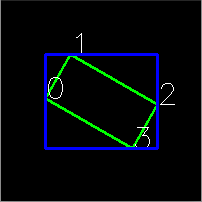
The sample below demonstrates how to use RotatedRect:
    Mat test_image(200, 200, CV_8UC3, Scalar(0));
    RotatedRect rRect = RotatedRect(Point2f(100,100), Size2f(100,50), 30);

    Point2f vertices[4];
    rRect.points(vertices);
    for (int i = 0; i < 4; i++)
    {
        line(test_image, vertices[i], vertices[(i+1)%4], Scalar(0,255,0), 2);
        putText(test_image, vertex_names[i], vertices[i], FONT_HERSHEY_SIMPLEX, 1, Scalar(255,255,255));
    }

    Rect brect = rRect.boundingRect();
    rectangle(test_image, brect, Scalar(255,0,0), 2);

    imshow("rectangles", test_image);
    waitKey(0);
See also
CamShift, fitEllipse, minAreaRect, CvBox2D
- Examples
- samples/cpp/geometry.cpp.
Constructor & Destructor Documentation#
RotatedRect()#
cv::RotatedRect::RotatedRect()
Python:
cv.RotatedRect() -> <RotatedRect object>
cv.RotatedRect(center, size, angle) -> <RotatedRect object>
cv.RotatedRect(point1, point2, point3) -> <RotatedRect object>
default constructor
RotatedRect()#
cv::RotatedRect::RotatedRect(
const Point2f & center,
const Size2f & size,
float angle )
Python:
cv.RotatedRect() -> <RotatedRect object>
cv.RotatedRect(center, size, angle) -> <RotatedRect object>
cv.RotatedRect(point1, point2, point3) -> <RotatedRect object>
full constructor
Parameters
center— The rectangle mass center.size— Width and height of the rectangle.angle— The rotation angle in a clockwise direction. When the angle is 0, 90, 180, 270 etc., the rectangle becomes an up-right rectangle.
RotatedRect()#
cv::RotatedRect::RotatedRect(
const Point2f & point1,
const Point2f & point2,
const Point2f & point3 )
Python:
cv.RotatedRect() -> <RotatedRect object>
cv.RotatedRect(center, size, angle) -> <RotatedRect object>
cv.RotatedRect(point1, point2, point3) -> <RotatedRect object>
Any 3 end points of the RotatedRect. They must be given in order (either clockwise or anticlockwise).
Member Function Documentation#
boundingRect()#
Rect cv::RotatedRect::boundingRect()
Python:
cv.RotatedRect.boundingRect() -> retval
returns the minimal up-right integer rectangle containing the rotated rectangle
boundingRect2f()#
Rect2f cv::RotatedRect::boundingRect2f()
Python:
cv.RotatedRect.boundingRect2f() -> retval
returns the minimal (exact) floating point rectangle containing the rotated rectangle, not intended for use with images
points()#
void cv::RotatedRect::points(Point2f[] pts)
Python:
cv.RotatedRect.points() -> pts
returns 4 vertices of the rotated rectangle
Note
Bottom, Top, Left and Right sides refer to the original rectangle (angle is 0), so after 180 degree rotation bottomLeft point will be located at the top right corner of the rectangle.
Parameters
pts— The points array for storing rectangle vertices. The order is bottomLeft, topLeft, topRight, bottomRight.
points()#
void cv::RotatedRect::points(std::vector< Point2f > & pts)
Python:
cv.RotatedRect.points() -> pts
Member Data Documentation#
angle#
float cv::RotatedRect::angle
returns the rotation angle. When the angle is 0, 90, 180, 270 etc., the rectangle becomes an up-right rectangle.
center#
Point2f cv::RotatedRect::center
returns the rectangle mass center
size#
Size2f cv::RotatedRect::size
returns width and height of the rectangle
Source file#
The documentation for this class was generated from the following file:
opencv2/core/types.hpp