

Shape analysis and fitting#
Topics#
Detailed Description#
Classes#
Name |
Description |
|---|---|
|
Represents an edge in a graph for Minimum Spanning Tree (MST) computation. View details |
Enumerations#
enum cv::Subdiv2D {
    cv::PTLOC_ERROR = -2,
    cv::PTLOC_OUTSIDE_RECT = -1,
    cv::PTLOC_INSIDE = 0,
    cv::PTLOC_VERTEX = 1,
    cv::PTLOC_ON_EDGE = 2
}
enum cv::Subdiv2D {
    cv::NEXT_AROUND_ORG = 0x00,
    cv::NEXT_AROUND_DST = 0x22,
    cv::PREV_AROUND_ORG = 0x11,
    cv::PREV_AROUND_DST = 0x33,
    cv::NEXT_AROUND_LEFT = 0x13,
    cv::NEXT_AROUND_RIGHT = 0x31,
    cv::PREV_AROUND_LEFT = 0x20,
    cv::PREV_AROUND_RIGHT = 0x02
}
enum cv::DistanceTypes {
    cv::DIST_USER = -1,
    cv::DIST_L1 = 1,
    cv::DIST_L2 = 2,
    cv::DIST_C = 3,
    cv::DIST_L12 = 4,
    cv::DIST_FAIR = 5,
    cv::DIST_WELSCH = 6,
    cv::DIST_HUBER = 7
}
enum cv::MSTAlgorithm {
    cv::MST_PRIM = 0,
    cv::MST_KRUSKAL = 1
}
Represents the algorithms available for building a Minimum Spanning Tree (MST). View details
enum cv::RectanglesIntersectTypes {
    cv::INTERSECT_NONE = 0,
    cv::INTERSECT_PARTIAL = 1,
    cv::INTERSECT_FULL = 2
}
types of intersection between rectangles View details
Functions#
Return |
Name |
Description |
|---|---|---|
|
||
|
||
|
||
|
||
|
|
Approximates a polygonal curve(s) with the specified precision. |
|
|
Approximates a polygon with a convex hull with a specified accuracy and number of sides. |
|
|
Calculates a contour perimeter or a curve length. |
|
Calculates the up-right bounding rectangle of a point set or non-zero pixels of gray-scale image. |
|
|
|
Finds the four vertices of a rotated rect. Useful to draw the rotated rectangle. |
|
|
Builds a Minimum Spanning Tree (MST) using the specified algorithm (see MSTAlgorithm). |
|
||
|
||
|
||
|
|
|
|
|
Calculates a contour area. |
|
|
Finds the convex hull of a point set. |
|
|
Finds the convexity defects of a contour. |
|
|
|
|
|
|
|
|
Returns the edge destination. |
|
|
Returns the edge origin. |
|
|
Finds the subdivision vertex closest to the given point. |
|
Fits an ellipse around a set of 2D points. |
|
|
Fits an ellipse around a set of 2D points. |
|
|
Fits an ellipse around a set of 2D points. |
|
|
|
Fits a line to a 2D or 3D point set. |
|
Calculates an affine transform from three pairs of the corresponding points. |
|
|
||
|
|
Compute for each 2d point the nearest 2d point located on a given ellipse. |
|
|
Returns one of the edges related to the given edge. |
|
|
Returns a list of all edges. |
|
|
Returns a list of the leading edge ID connected to each triangle. |
|
||
|
Calculates a perspective transform from four pairs of the corresponding points. |
|
|
Calculates an affine matrix of 2D rotation. |
|
|
||
|
|
Returns a list of all triangles. |
|
Returns vertex location from vertex ID. |
|
|
|
Returns a list of all Voronoi facets. |
|
|
|
|
|
Calculates seven Hu invariants. |
|
|
Creates a new empty Delaunay subdivision. |
|
|
Creates a new empty Delaunay subdivision. |
|
|
Insert multiple points into a Delaunay triangulation. |
|
|
Insert a single point into a Delaunay triangulation. |
|
|
Finds intersection of two convex polygons. |
|
Inverts an affine transformation. |
|
|
|
Tests a contour convexity. |
|
||
|
||
|
|
|
|
||
|
|
Returns the location of a point within a Delaunay triangulation. |
|
|
Compares two shapes. |
|
Finds a rotated rectangle of the minimum area enclosing the input 2D point set. |
|
|
|
Finds a circle of the minimum area enclosing a 2D point set. |
|
|
Finds a convex polygon of minimum area enclosing a 2D point set and returns its area. |
|
|
Finds a triangle of minimum area enclosing a 2D point set and returns its area. |
|
Calculates all of the moments up to the third order of a polygon or rasterized shape. |
|
|
||
|
|
|
|
|
Returns next edge around the edge origin. |
|
|
Performs a point-in-contour test. |
|
|
Finds out if there is any intersection between two rotated rectangles. |
|
|
Returns another edge of the same quad-edge. |
|
|
|
|
|
|
|
|
|
|
|
Variables#
Enumeration Type Documentation#
enum#
#include <opencv2/geometry/2d.hpp>
Subdiv2D point location cases
Enumerator:
|
Point location error. |
|
Point outside the subdivision bounding rect. |
|
Point inside some facet. |
|
Point coincides with one of the subdivision vertices. |
|
Point on some edge. |
enum#
#include <opencv2/geometry/2d.hpp>
Subdiv2D edge type navigation (see: getEdge())
Enumerator:
|
|
|
|
|
|
|
|
DistanceTypes#
enum cv::DistanceTypes
#include <opencv2/geometry/2d.hpp>
Distance types for Distance Transform and M-estimators
See also
Enumerator:
|
User defined distance. |
|
distance = |x1-x2| + |y1-y2| |
|
the simple euclidean distance |
|
distance = max(|x1-x2|,|y1-y2|) |
|
L1-L2 metric: distance = 2(sqrt(1+x*x/2) - 1)) |
|
distance = c^2(|x|/c-log(1+|x|/c)), c = 1.3998 |
|
distance = c^2/2(1-exp(-(x/c)^2)), c = 2.9846 |
|
distance = |x|<c ? x^2/2 : c(|x|-c/2), c=1.345 |
MSTAlgorithm#
enum cv::MSTAlgorithm
#include <opencv2/geometry/mst.hpp>
Represents the algorithms available for building a Minimum Spanning Tree (MST).
More algorithms may be added in the future.
Enumerator:
|
|
RectanglesIntersectTypes#
enum cv::RectanglesIntersectTypes
#include <opencv2/geometry/2d.hpp>
types of intersection between rectangles
Enumerator:
|
No intersection. |
|
There is a partial intersection. |
|
One of the rectangle is fully enclosed in the other. |
Function Documentation#
QuadEdge()#
cv::Subdiv2D::QuadEdge::QuadEdge()
#include <opencv2/geometry/2d.hpp>
QuadEdge()#
cv::Subdiv2D::QuadEdge::QuadEdge(int edgeidx)
#include <opencv2/geometry/2d.hpp>
Vertex()#
cv::Subdiv2D::Vertex::Vertex()
#include <opencv2/geometry/2d.hpp>
Vertex()#
cv::Subdiv2D::Vertex::Vertex(
Point2f pt,
bool isvirtual,
int firstEdge = 0 )
#include <opencv2/geometry/2d.hpp>
approxPolyDP()#
void cv::approxPolyDP(
InputArray curve,
OutputArray approxCurve,
double epsilon,
bool closed )
#include <opencv2/geometry/2d.hpp>
Python:
cv.approxPolyDP(curve, epsilon, closed[, approxCurve]) -> approxCurve
Approximates a polygonal curve(s) with the specified precision.
T he function cv::approxPolyDP approximates a curve or a p*olygon with another curve/polygon with less vertices so that the distance between them is less or equal to the specified precision. It uses the Douglas-Peucker algorithm https://en.wikipedia.org/wiki/Ramer-Douglas-Peucker_algorithm
Parameters
curve— Input vector of a 2D point stored in std::vector or MatapproxCurve— Result of the approximation. The type should match the type of the input curve.epsilon— Parameter specifying the approximation accuracy. This is the maximum distance between the original curve and its approximation.closed— If true, the approximated curve is closed (its first and last vertices are connected). Otherwise, it is not closed.
approxPolyN()#
void cv::approxPolyN(
InputArray curve,
OutputArray approxCurve,
int nsides,
float epsilon_percentage = -1.0,
bool ensure_convex = true )
#include <opencv2/geometry/2d.hpp>
Python:
cv.approxPolyN(curve, nsides[, approxCurve[, epsilon_percentage[, ensure_convex]]]) -> approxCurve
Approximates a polygon with a convex hull with a specified accuracy and number of sides.
T he cv::approxPolyN function approximates a polygon with *a convex hull so that the difference between the contour area of the original contour and the new polygon is minimal. It uses a greedy algorithm for contracting two vertices into one in such a way that the additional area is minimal. Straight lines formed by each edge of the convex contour are drawn and the areas of the resulting triangles are considered. Each vertex will lie either on the original contour or outside it.
The algorithm based on the paper [168] .
Parameters
curve— Input vector of a 2D points stored in std::vector or Mat, points must be float or integer.approxCurve— Result of the approximation. The type is vector of a 2D point (Point2f or Point) in std::vector or Mat.nsides— The parameter defines the number of sides of the result polygon.epsilon_percentage— defines the percentage of the maximum of additional area. If it equals -1, it is not used. Otherwise algorithm stops if additional area is greater than contourArea(_curve) * percentage. If additional area exceeds the limit, algorithm returns as many vertices as there were at the moment the limit was exceeded.ensure_convex— If it is true, algorithm creates a convex hull of input contour. Otherwise input vector should be convex.
arcLength()#
double cv::arcLength(
InputArray curve,
bool closed )
#include <opencv2/geometry/2d.hpp>
Python:
cv.arcLength(curve, closed) -> retval
Calculates a contour perimeter or a curve length.
The function computes a curve length or a closed contour perimeter.
Parameters
curve— Input vector of 2D points, stored in std::vector or Mat.closed— Flag indicating whether the curve is closed or not.
boundingRect()#
Rect cv::boundingRect(InputArray array)
#include <opencv2/geometry/2d.hpp>
Python:
cv.boundingRect(array) -> retval
Calculates the up-right bounding rectangle of a point set or non-zero pixels of gray-scale image.
The function calculates and returns the minimal up-right bounding rectangle for the specified point set or non-zero pixels of gray-scale image.
Parameters
array— Input gray-scale image or 2D point set, stored in std::vector or Mat.
boxPoints()#
void cv::boxPoints(
RotatedRect box,
OutputArray points )
#include <opencv2/geometry/2d.hpp>
Python:
cv.boxPoints(box[, points]) -> points
Finds the four vertices of a rotated rect. Useful to draw the rotated rectangle.
The function finds the four vertices of a rotated rectangle. The four vertices are returned in clockwise order starting from the point with greatest \(y\). If two points have the same \(y\) coordinate the rightmost is the starting point. This function is useful to draw the rectangle. In C++, instead of using this function, you can directly use RotatedRect::points method. Please visit the tutorial on Creating Bounding rotated boxes and ellipsesfor contours” for more information.
Parameters
box— The input rotated rectangle. It may be the output of minAreaRect.points— The output array of four vertices of rectangles.
buildMST()#
bool cv::buildMST(
int numNodes,
const std::vector< MSTEdge > & inputEdges,
std::vector< MSTEdge > & resultingEdges,
MSTAlgorithm algorithm,
int root = 0 )
#include <opencv2/geometry/mst.hpp>
Python:
cv.buildMST(numNodes, inputEdges, algorithm[, root]) -> retval, resultingEdges
Builds a Minimum Spanning Tree (MST) using the specified algorithm (see MSTAlgorithm).
Supports graphs with negative edge weights. Self-loop edges (edges where source and target are the same) are ignored. If multiple edges exist between the same pair of nodes, only the one with the lowest weight is considered. If the graph is disconnected or input is invalid, the function returns false.
Note
The root parameter is ignored for algorithms that do not require a starting node.
Additional MST algorithms may be supported in the future via the algorithm parameter (see MSTAlgorithm).
Parameters
numNodes— Number of nodes in the graph (must be greater than 0).inputEdges— Input vector of edges representing the graph.resultingEdges— Output vector to store the edges of the resulting MST.algorithm— Specifies which algorithm to use to compute the MST (see MSTAlgorithm).root— Starting node for the MST algorithm (only used for certain algorithms).
Returns
true if a valid MST was successfully built; false otherwise.
contourArea()#
double cv::contourArea(
InputArray contour,
bool oriented = false )
#include <opencv2/geometry/2d.hpp>
Python:
cv.contourArea(contour[, oriented]) -> retval
Calculates a contour area.
The function computes a contour area. Similarly to moments , the area is computed using the Green formula. Thus, the returned area and the number of non-zero pixels, if you draw the contour using drawContours or fillPoly , can be different. Also, the function will most certainly give a wrong results for contours with self-intersections.
Example:
vector<Point> contour;
contour.push_back(Point2f(0, 0));
contour.push_back(Point2f(10, 0));
contour.push_back(Point2f(10, 10));
contour.push_back(Point2f(5, 4));

double area0 = contourArea(contour);
vector<Point> approx;
approxPolyDP(contour, approx, 5, true);
double area1 = contourArea(approx);

cout << "area0 =" << area0 << endl <<
        "area1 =" << area1 << endl <<
        "approx poly vertices" << approx.size() << endl;
Parameters
contour— Input vector of 2D points (contour vertices), stored in std::vector or Mat.oriented— Oriented area flag. If it is true, the function returns a signed area value, depending on the contour orientation (clockwise or counter-clockwise). Using this feature you can determine orientation of a contour by taking the sign of an area. By default, the parameter is false, which means that the absolute value is returned.
convexHull()#
void cv::convexHull(
InputArray points,
OutputArray hull,
bool clockwise = false,
bool returnPoints = true )
#include <opencv2/geometry/2d.hpp>
Python:
cv.convexHull(points[, hull[, clockwise[, returnPoints]]]) -> hull
Finds the convex hull of a point set.
The function cv::convexHull finds the convex hull of a 2D point set using the Sklansky’s algorithm [276] that has O(N logN) complexity in the current implementation.
Note
points and hull should be different arrays, inplace processing isn’t supported.
Check the corresponding tutorial for more details.
useful links:
https://www.learnopencv.com/convex-hull-using-opencv-in-python-and-c/
Parameters
points— Input 2D point set, stored in std::vector or Mat.hull— Output convex hull. It is either an integer vector of indices or vector of points. In the first case, the hull elements are 0-based indices of the convex hull points in the original array (since the set of convex hull points is a subset of the original point set). In the second case, hull elements are the convex hull points themselves.clockwise— Orientation flag. If it is true, the output convex hull is oriented clockwise. Otherwise, it is oriented counter-clockwise. The assumed coordinate system has its X axis pointing to the right, and its Y axis pointing upwards.returnPoints— Operation flag. In case of a matrix, when the flag is true, the function returns convex hull points. Otherwise, it returns indices of the convex hull points. When the output array is std::vector, the flag is ignored, and the output depends on the type of the vector: std::vectorimplies returnPoints=false, std::vector implies returnPoints=true.
convexityDefects()#
void cv::convexityDefects(
InputArray contour,
InputArray convexhull,
OutputArray convexityDefects )
#include <opencv2/geometry/2d.hpp>
Python:
cv.convexityDefects(contour, convexhull[, convexityDefects]) -> convexityDefects
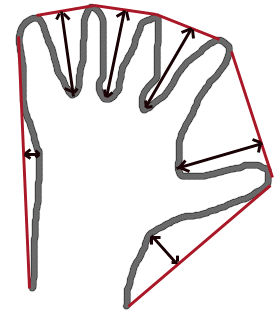
Finds the convexity defects of a contour.
The figure below displays convexity defects of a hand contour:
Parameters
contour— Input contour.convexhull— Convex hull obtained using convexHull that should contain indices of the contour points that make the hull.convexityDefects— The output vector of convexity defects. In C++ and the new Python/Java interface each convexity defect is represented as 4-element integer vector (a.k.a. Vec4i): (start_index, end_index, farthest_pt_index, fixpt_depth), where indices are 0-based indices in the original contour of the convexity defect beginning, end and the farthest point, and fixpt_depth is fixed-point approximation (with 8 fractional bits) of the distance between the farthest contour point and the hull. That is, to get the floating-point value of the depth will be fixpt_depth/256.0.
fitEllipse()#
RotatedRect cv::fitEllipse(InputArray points)
#include <opencv2/geometry/2d.hpp>
Python:
cv.fitEllipse(points) -> retval
Fits an ellipse around a set of 2D points.
The function calculates the ellipse that fits (in a least-squares sense) a set of 2D points best of all. It returns the rotated rectangle in which the ellipse is inscribed. The first algorithm described by [106] is used. Developer should keep in mind that it is possible that the returned ellipse/rotatedRect data contains negative indices, due to the data points being close to the border of the containing Mat element.
Note
Input point types are Point2i or Point2f and at least 5 points are required.
getClosestEllipsePoints function can be used to compute the ellipse fitting error.
Parameters
points— Input 2D point set, stored in std::vector<> or Mat
fitEllipseAMS()#
RotatedRect cv::fitEllipseAMS(InputArray points)
#include <opencv2/geometry/2d.hpp>
Python:
cv.fitEllipseAMS(points) -> retval
Fits an ellipse around a set of 2D points.
The function calculates the ellipse that fits a set of 2D points. It returns the rotated rectangle in which the ellipse is inscribed. The Approximate Mean Square (AMS) proposed by Taubin1991 is used.
For an ellipse, this basis set is \( \chi= \left(x^2, x y, y^2, x, y, 1\right) \), which is a set of six free coefficients \( A^T=\left\{A_{\text{xx}},A_{\text{xy}},A_{\text{yy}},A_x,A_y,A_0\right\} \). However, to specify an ellipse, all that is needed is five numbers; the major and minor axes lengths \( (a,b) \), the position \( (x_0,y_0) \), and the orientation \( \theta \). This is because the basis set includes lines, quadratics, parabolic and hyperbolic functions as well as elliptical functions as possible fits. If the fit is found to be a parabolic or hyperbolic function then the standard fitEllipse method is used. The AMS method restricts the fit to parabolic, hyperbolic and elliptical curves by imposing the condition that \( A^T ( D_x^T D_x + D_y^T D_y) A = 1 \) where the matrices \( Dx \) and \( Dy \) are the partial derivatives of the design matrix \( D \) with respect to x and y. The matrices are formed row by row applying the following to each of the points in the set: \begin{align*} D(i,:)&=\left{x_i^2, x_i y_i, y_i^2, x_i, y_i, 1\right} & D_x(i,:)&=\left{2 x_i,y_i,0,1,0,0\right} & D_y(i,:)&=\left{0,x_i,2 y_i,0,1,0\right} \end{align*} The AMS method minimizes the cost function \begin{equation*} \epsilon ^2=\frac{ A^T D^T D A }{ A^T (D_x^T D_x + D_y^T D_y) A^T } \end{equation*}
The minimum cost is found by solving the generalized eigenvalue problem.
Note
Input point types are Point2i or Point2f and at least 5 points are required.
getClosestEllipsePoints function can be used to compute the ellipse fitting error.
Parameters
points— Input 2D point set, stored in std::vector<> or Mat
fitEllipseDirect()#
RotatedRect cv::fitEllipseDirect(InputArray points)
#include <opencv2/geometry/2d.hpp>
Python:
cv.fitEllipseDirect(points) -> retval
Fits an ellipse around a set of 2D points.
The function calculates the ellipse that fits a set of 2D points. It returns the rotated rectangle in which the ellipse is inscribed. The Direct least square (Direct) method by [235] is used.
For an ellipse, this basis set is \( \chi= \left(x^2, x y, y^2, x, y, 1\right) \), which is a set of six free coefficients \( A^T=\left\{A_{\text{xx}},A_{\text{xy}},A_{\text{yy}},A_x,A_y,A_0\right\} \). However, to specify an ellipse, all that is needed is five numbers; the major and minor axes lengths \( (a,b) \), the position \( (x_0,y_0) \), and the orientation \( \theta \). This is because the basis set includes lines, quadratics, parabolic and hyperbolic functions as well as elliptical functions as possible fits. The Direct method confines the fit to ellipses by ensuring that \( 4 A_{xx} A_{yy}- A_{xy}^2 > 0 \). The condition imposed is that \( 4 A_{xx} A_{yy}- A_{xy}^2=1 \) which satisfies the inequality and as the coefficients can be arbitrarily scaled is not overly restrictive.
The minimum cost is found by solving the generalized eigenvalue problem.
The system produces only one positive eigenvalue \( \lambda\) which is chosen as the solution with its eigenvector \(\mathbf{u}\). These are used to find the coefficients
\begin{equation*} A = \sqrt{\frac{1}{\mathbf{u}^T C \mathbf{u}}} \mathbf{u} \end{equation*} The scaling factor guarantees that \(A^T C A =1\).
Note
Input point types are Point2i or Point2f and at least 5 points are required.
getClosestEllipsePoints function can be used to compute the ellipse fitting error.
Parameters
points— Input 2D point set, stored in std::vector<> or Mat
fitLine()#
void cv::fitLine(
InputArray points,
OutputArray line,
int distType,
double param,
double reps,
double aeps )
#include <opencv2/geometry/2d.hpp>
Python:
cv.fitLine(points, distType, param, reps, aeps[, line]) -> line
Fits a line to a 2D or 3D point set.
The function fitLine fits a line to a 2D or 3D point set by minimizing \(\sum_i \rho(r_i)\) where \(r_i\) is a distance between the \(i^{th}\) point, the line and \(\rho(r)\) is a distance function, one of the following:
DIST_L2
DIST_L1
DIST_L12
DIST_FAIR
DIST_WELSCH
DIST_HUBER
The algorithm is based on the M-estimator ( https://en.wikipedia.org/wiki/M-estimator ) technique that iteratively fits the line using the weighted least-squares algorithm. After each iteration the weights \(w_i\) are adjusted to be inversely proportional to \(\rho(r_i)\) .
Parameters
points— Input vector of 2D or 3D points, stored in std::vector<> or Mat.line— Output line parameters. In case of 2D fitting, it should be a vector of 4 elements (like Vec4f) - (vx, vy, x0, y0), where (vx, vy) is a normalized vector collinear to the line and (x0, y0) is a point on the line. In case of 3D fitting, it should be a vector of 6 elements (like Vec6f) - (vx, vy, vz, x0, y0, z0), where (vx, vy, vz) is a normalized vector collinear to the line and (x0, y0, z0) is a point on the line.distType— Distance used by the M-estimator, see DistanceTypesparam— Numerical parameter ( C ) for some types of distances. If it is 0, an optimal value is chosen.reps— Sufficient accuracy for the radius (distance between the coordinate origin and the line).aeps— Sufficient accuracy for the angle. 0.01 would be a good default value for reps and aeps.
getAffineTransform()#
Mat cv::getAffineTransform(
const Point2f[] src,
const Point2f[] dst )
#include <opencv2/geometry/2d.hpp>
Python:
cv.getAffineTransform(src, dst) -> retval
Calculates an affine transform from three pairs of the corresponding points.
The function calculates the \(2 \times 3\) matrix of an affine transform so that:
where
See also
Parameters
src— Coordinates of triangle vertices in the source image.dst— Coordinates of the corresponding triangle vertices in the destination image.
getAffineTransform()#
Mat cv::getAffineTransform(
InputArray src,
InputArray dst )
#include <opencv2/geometry/2d.hpp>
Python:
cv.getAffineTransform(src, dst) -> retval
getClosestEllipsePoints()#
void cv::getClosestEllipsePoints(
const RotatedRect & ellipse_params,
InputArray points,
OutputArray closest_pts )
#include <opencv2/geometry/2d.hpp>
Python:
cv.getClosestEllipsePoints(ellipse_params, points[, closest_pts]) -> closest_pts
Compute for each 2d point the nearest 2d point located on a given ellipse.
The function computes the nearest 2d location on a given ellipse for a vector of 2d points and is based on [57] code. This function can be used to compute for instance the ellipse fitting error.
See also
Parameters
ellipse_params— Ellipse parameterspoints— Input 2d pointsclosest_pts— For each 2d point, their corresponding closest 2d point located on a given ellipse
getPerspectiveTransform()#
Mat cv::getPerspectiveTransform(
const Point2f[] src,
const Point2f[] dst,
int solveMethod = DECOMP_LU )
#include <opencv2/geometry/2d.hpp>
Python:
cv.getPerspectiveTransform(src, dst[, solveMethod]) -> retval
This is an overloaded member function, provided for convenience. It differs from the above function only in what argument(s) it accepts.
getPerspectiveTransform()#
Mat cv::getPerspectiveTransform(
InputArray src,
InputArray dst,
int solveMethod = DECOMP_LU )
#include <opencv2/geometry/2d.hpp>
Python:
cv.getPerspectiveTransform(src, dst[, solveMethod]) -> retval
Calculates a perspective transform from four pairs of the corresponding points.
The function calculates the \(3 \times 3\) matrix of a perspective transform so that:
where
See also
Parameters
src— Coordinates of quadrangle vertices in the source image.dst— Coordinates of the corresponding quadrangle vertices in the destination image.solveMethod— method passed to cv::solve (DecompTypes)
getRotationMatrix2D()#
Mat cv::getRotationMatrix2D(
Point2f center,
double angle,
double scale )
#include <opencv2/geometry/2d.hpp>
Python:
cv.getRotationMatrix2D(center, angle, scale) -> retval
Calculates an affine matrix of 2D rotation.
The function calculates the following matrix:
where
The transformation maps the rotation center to itself. If this is not the target, adjust the shift.
See also
Parameters
center— Center of the rotation in the source image.angle— Rotation angle in degrees. Positive values mean counter-clockwise rotation (the coordinate origin is assumed to be the top-left corner).scale— Isotropic scale factor.
Here is the call graph for this function:
getRotationMatrix2D_()#
Matx23d cv::getRotationMatrix2D_(
Point2f center,
double angle,
double scale )
#include <opencv2/geometry/2d.hpp>
See also
HuMoments()#
void cv::HuMoments(
const Moments & m,
OutputArray hu )
#include <opencv2/geometry/2d.hpp>
Python:
cv.HuMoments(m[, hu]) -> hu
This is an overloaded member function, provided for convenience. It differs from the above function only in what argument(s) it accepts.
HuMoments()#
void cv::HuMoments(
const Moments & moments,
double[7] hu )
#include <opencv2/geometry/2d.hpp>
Python:
cv.HuMoments(m[, hu]) -> hu
Calculates seven Hu invariants.
The function calculates seven Hu invariants (introduced in [147]; see also https://en.wikipedia.org/wiki/Image_moment) defined as:
where \(\eta_{ji}\) stands for \(\texttt{Moments::nu}_{ji}\) .
These values are proved to be invariants to the image scale, rotation, and reflection except the seventh one, whose sign is changed by reflection. This invariance is proved with the assumption of infinite image resolution. In case of raster images, the computed Hu invariants for the original and transformed images are a bit different.
See also
Parameters
moments— Input moments computed with moments .hu— Output Hu invariants.
intersectConvexConvex()#
float cv::intersectConvexConvex(
InputArray p1,
InputArray p2,
OutputArray p12,
bool handleNested = true )
#include <opencv2/geometry/2d.hpp>
Python:
cv.intersectConvexConvex(p1, p2[, p12[, handleNested]]) -> retval, p12
Finds intersection of two convex polygons.
Note
intersectConvexConvex doesn’t confirm that both polygons are convex and will return invalid results if they aren’t.
Parameters
p1— First polygonp2— Second polygonp12— Output polygon describing the intersecting areahandleNested— When true, an intersection is found if one of the polygons is fully enclosed in the other. When false, no intersection is found. If the polygons share a side or the vertex of one polygon lies on an edge of the other, they are not considered nested and an intersection will be found regardless of the value of handleNested.
Returns
Area of intersecting polygon. May be negative, if algorithm has not converged, e.g. non-convex input.
invertAffineTransform()#
void cv::invertAffineTransform(
InputArray M,
OutputArray iM )
#include <opencv2/geometry/2d.hpp>
Python:
cv.invertAffineTransform(M[, iM]) -> iM
Inverts an affine transformation.
The function computes an inverse affine transformation represented by \(2 \times 3\) matrix M:
The result is also a \(2 \times 3\) matrix of the same type as M.
Parameters
M— Original affine transformation.iM— Output reverse affine transformation.
isContourConvex()#
bool cv::isContourConvex(InputArray contour)
#include <opencv2/geometry/2d.hpp>
Python:
cv.isContourConvex(contour) -> retval
Tests a contour convexity.
The function tests whether the input contour is convex or not. The contour must be simple, that is, without self-intersections. Otherwise, the function output is undefined.
Parameters
contour— Input vector of 2D points, stored in std::vector<> or Mat
isfree()#
bool cv::Subdiv2D::QuadEdge::isfree()
#include <opencv2/geometry/2d.hpp>
isfree()#
bool cv::Subdiv2D::Vertex::isfree()
#include <opencv2/geometry/2d.hpp>
isvirtual()#
bool cv::Subdiv2D::Vertex::isvirtual()
#include <opencv2/geometry/2d.hpp>
matchShapes()#
double cv::matchShapes(
InputArray contour1,
InputArray contour2,
int method,
double parameter )
#include <opencv2/geometry/2d.hpp>
Python:
cv.matchShapes(contour1, contour2, method, parameter) -> retval
Compares two shapes.
The function compares two shapes. All three implemented methods use the Hu invariants (see HuMoments)
Parameters
contour1— First contour or grayscale image.contour2— Second contour or grayscale image.method— Comparison method, see ShapeMatchModesparameter— Method-specific parameter (not supported now).
minAreaRect()#
RotatedRect cv::minAreaRect(InputArray points)
#include <opencv2/geometry/2d.hpp>
Python:
cv.minAreaRect(points) -> retval
Finds a rotated rectangle of the minimum area enclosing the input 2D point set.
The function calculates and returns the minimum-area bounding rectangle (possibly rotated) for a specified point set. The angle of rotation represents the angle between the line connecting the starting and ending points (based on the clockwise order with greatest index for the corner with greatest \(y\)) and the horizontal axis. This angle always falls between \([-90, 0)\) because, if the object rotates more than a rect angle, the next edge is used to measure the angle. The starting and ending points change as the object rotates.Developer should keep in mind that the returned RotatedRect can contain negative indices when data is close to the containing Mat element boundary.
Parameters
points— Input vector of 2D points, stored in std::vector<> or Mat
minEnclosingCircle()#
void cv::minEnclosingCircle(
InputArray points,
Point2f & center,
float & radius )
#include <opencv2/geometry/2d.hpp>
Python:
cv.minEnclosingCircle(points) -> center, radius
Finds a circle of the minimum area enclosing a 2D point set.
The function finds the minimal enclosing circle of a 2D point set using an iterative algorithm.
Parameters
points— Input vector of 2D points, stored in std::vector<> or Matcenter— Output center of the circle.radius— Output radius of the circle.
minEnclosingConvexPolygon()#
double cv::minEnclosingConvexPolygon(
InputArray points,
OutputArray polygon,
int k )
#include <opencv2/geometry/2d.hpp>
Python:
cv.minEnclosingConvexPolygon(points, k[, polygon]) -> retval, polygon
Finds a convex polygon of minimum area enclosing a 2D point set and returns its area.
This function takes a given set of 2D points and finds the enclosing polygon with k vertices and minimal area. It takes the set of points and the parameter k as input and returns the area of the minimal enclosing polygon.
The Implementation is based on a paper by Aggarwal, Chang and Yap [2]. They provide a \(\theta(n²log(n)log(k))\) algorithm for finding the minimal convex polygon with k vertices enclosing a 2D convex polygon with n vertices (k < n). Since the minEnclosingConvexPolygon function takes a 2D point set as input, an additional preprocessing step of computing the convex hull of the 2D point set is required. The complexity of the convexHull function is \(O(n log(n))\) which is lower than \(\theta(n²log(n)log(k))\). Thus the overall complexity of the function is \(O(n²log(n)log(k))\).
Parameters
points— Input vector of 2D points, stored in std::vector<> or Matpolygon— Output vector of 2D points defining the vertices of the enclosing polygonk— Number of vertices of the output polygon
minEnclosingTriangle()#
double cv::minEnclosingTriangle(
InputArray points,
OutputArray triangle )
#include <opencv2/geometry/2d.hpp>
Python:
cv.minEnclosingTriangle(points[, triangle]) -> retval, triangle
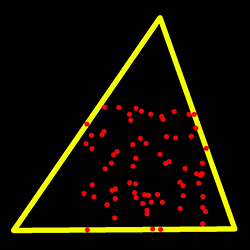
Finds a triangle of minimum area enclosing a 2D point set and returns its area.
The function finds a triangle of minimum area enclosing the given set of 2D points and returns its area. The output for a given 2D point set is shown in the image below. 2D points are depicted in red* and the enclosing triangle in yellow.
The implementation of the algorithm is based on O’Rourke’s [234] and Klee and Laskowski’s [167] papers. O’Rourke provides a \(\theta(n)\) algorithm for finding the minimal enclosing triangle of a 2D convex polygon with n vertices. Since the minEnclosingTriangle function takes a 2D point set as input an additional preprocessing step of computing the convex hull of the 2D point set is required. The complexity of the convexHull function is \(O(n log(n))\) which is higher than \(\theta(n)\). Thus the overall complexity of the function is \(O(n log(n))\).
Parameters
points— Input vector of 2D points with depth CV_32S or CV_32F, stored in std::vector<> or Mattriangle— Output vector of three 2D points defining the vertices of the triangle. The depth of the OutputArray must be CV_32F.
moments()#
Moments cv::moments(
InputArray array,
bool binaryImage = false )
#include <opencv2/geometry/2d.hpp>
Python:
cv.moments(array[, binaryImage]) -> retval
Calculates all of the moments up to the third order of a polygon or rasterized shape.
The function computes moments, up to the 3rd order, of a vector shape or a rasterized shape. The results are returned in the structure cv::Moments.
Note
Only applicable to contour moments calculations from Python bindings: Note that the numpy type for the input array should be either np.int32 or np.float32.
For contour-based moments, the zeroth-order moment m00 represents the contour area.
If the input contour is degenerate (for example, a single point or all points are collinear), the area is zero and therefore m00 == 0.
In this case, the centroid coordinates (m10/m00, m01/m00) are undefined and must be handled explicitly by the caller.
A common workaround is to compute the center using cv::boundingRect() or by averaging the input points.
See also
Parameters
array— Single channel raster image (CV_8U, CV_16U, CV_16S, CV_32F, CV_64F) or an array ( \(1 \times N\) or \(N \times 1\) ) of 2D points (Point or Point2f).binaryImage— If it is true, all non-zero image pixels are treated as 1’s. The parameter is used for images only.
Returns
moments.
pointPolygonTest()#
double cv::pointPolygonTest(
InputArray contour,
Point2f pt,
bool measureDist )
#include <opencv2/geometry/2d.hpp>
Python:
cv.pointPolygonTest(contour, pt, measureDist) -> retval
Performs a point-in-contour test.
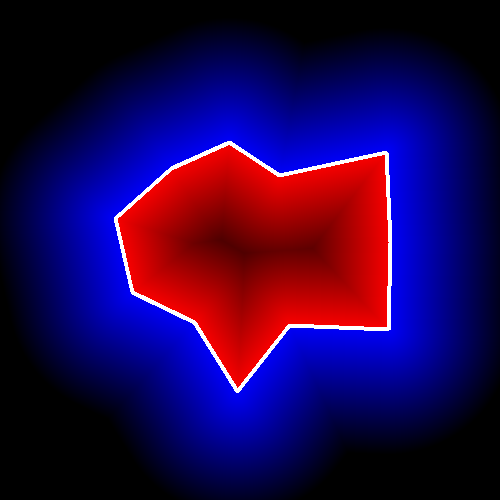
The function determines whether the point is inside a contour, outside, or lies on an edge (or coincides with a vertex). It returns positive (inside), negative (outside), or zero (on an edge) value, correspondingly. When measureDist=false , the return value is +1, -1, and 0, respectively. Otherwise, the return value is a signed distance between the point and the nearest contour edge.
See below a sample output of the function where each image pixel is tested against the contour:
Parameters
contour— Input contour.pt— Point tested against the contour.measureDist— If true, the function estimates the signed distance from the point to the nearest contour edge. Otherwise, the function only checks if the point is inside a contour or not.
rotatedRectangleIntersection()#
int cv::rotatedRectangleIntersection(
const RotatedRect & rect1,
const RotatedRect & rect2,
OutputArray intersectingRegion )
#include <opencv2/geometry/2d.hpp>
Python:
cv.rotatedRectangleIntersection(rect1, rect2[, intersectingRegion]) -> retval, intersectingRegion
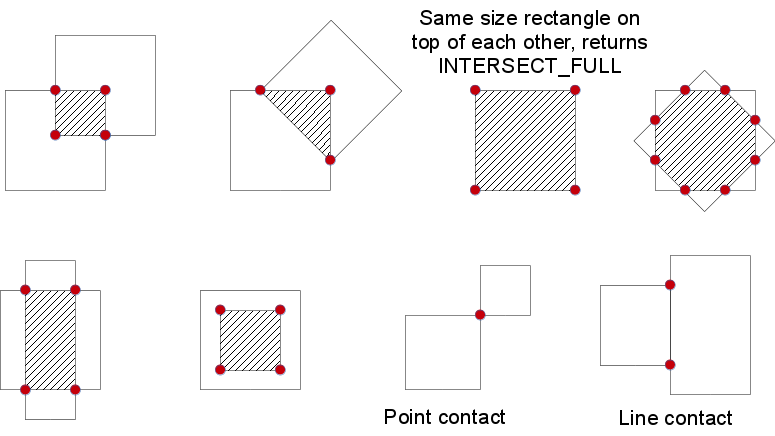
Finds out if there is any intersection between two rotated rectangles.
If there is then the vertices of the intersecting region are returned as well.
Below are some examples of intersection configurations. The hatched pattern indicates the intersecting region and the red vertices are returned by the function.
Parameters
rect1— First rectanglerect2— Second rectangleintersectingRegion— The output array of the vertices of the intersecting region. It returns at most 8 vertices. Stored as std::vector<cv::Point2f> or cv::Mat as Mx1 of type CV_32FC2.
Returns
One of RectanglesIntersectTypes
Variable Documentation#
firstEdge#
int cv::Subdiv2D::Vertex::firstEdge
#include <opencv2/geometry/2d.hpp>
next#
int cv::Subdiv2D::QuadEdge::next
#include <opencv2/geometry/2d.hpp>
pt#
int cv::Subdiv2D::QuadEdge::pt
#include <opencv2/geometry/2d.hpp>
pt#
Point2f cv::Subdiv2D::Vertex::pt
#include <opencv2/geometry/2d.hpp>
type#
int cv::Subdiv2D::Vertex::type
#include <opencv2/geometry/2d.hpp>