Feature Matching with FLANN#
Goal#
In this tutorial you will learn how to:
Use the [cv::FlannBasedMatcher](#cv::FlannBasedMatcher) interface in order to perform a quick and efficient matching by using the Clustering and Search in Multi-Dimensional Spaces module
\warning You need the OpenCV contrib modules to be able to use the SURF features (alternatives are ORB, KAZE, … features).
Theory#
Classical feature descriptors (SIFT, SURF, …) are usually compared and matched using the Euclidean distance (or L2-norm). Since SIFT and SURF descriptors represent the histogram of oriented gradient (of the Haar wavelet response for SURF) in a neighborhood, alternatives of the Euclidean distance are histogram-based metrics (\( \chi^{2} \), Earth Mover’s Distance (EMD), …).
Arandjelovic et al. proposed in [15] to extend to the RootSIFT descriptor:
a square root (Hellinger) kernel instead of the standard Euclidean distance to measure the similarity between SIFT descriptors leads to a dramatic performance boost in all stages of the pipeline.
Binary descriptors (ORB, BRISK, …) are matched using the Hamming distance. This distance is equivalent to count the number of different elements for binary strings (population count after applying a XOR operation):
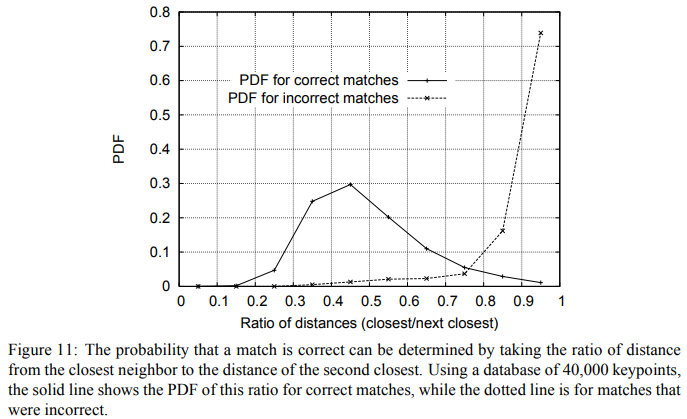
To filter the matches, Lowe proposed in [194] to use a distance ratio test to try to eliminate false matches. The distance ratio between the two nearest matches of a considered keypoint is computed and it is a good match when this value is below a threshold. Indeed, this ratio allows helping to discriminate between ambiguous matches (distance ratio between the two nearest neighbors is close to one) and well discriminated matches. The figure below from the SIFT paper illustrates the probability that a match is correct based on the nearest-neighbor distance ratio test.
Alternative or additional filterering tests are:
cross check test (good match \( \left( f_a, f_b \right) \) if feature \( f_b \) is the best match for \( f_a \) in \( I_b \) and feature \( f_a \) is the best match for \( f_b \) in \( I_a \))
geometric test (eliminate matches that do not fit to a geometric model, e.g. RANSAC or robust homography for planar objects)
Code#
This tutorial code’s is shown lines below. You can also download it from here
#include <iostream>
#include "opencv2/core.hpp"
#ifdef HAVE_OPENCV_XFEATURES2D
#include "opencv2/highgui.hpp"
#include "opencv2/features.hpp"
#include "opencv2/xfeatures2d.hpp"

using namespace cv;
using namespace cv::xfeatures2d;
using std::cout;
using std::endl;

const char* keys =
    "{ help h |                  | Print help message. }"
    "{ input1 | box.png          | Path to input image 1. }"
    "{ input2 | box_in_scene.png | Path to input image 2. }";

int main( int argc, char* argv[] )
{
    CommandLineParser parser( argc, argv, keys );
    Mat img1 = imread( samples::findFile( parser.get<String>("input1") ), IMREAD_GRAYSCALE );
    Mat img2 = imread( samples::findFile( parser.get<String>("input2") ), IMREAD_GRAYSCALE );
    if ( img1.empty() || img2.empty() )
    {
        cout << "Could not open or find the image!\n" << endl;
        parser.printMessage();
        return -1;
    }

    //-- Step 1: Detect the keypoints using SURF Detector, compute the descriptors
    int minHessian = 400;
    Ptr<SURF> detector = SURF::create( minHessian );
    std::vector<KeyPoint> keypoints1, keypoints2;
    Mat descriptors1, descriptors2;
    detector->detectAndCompute( img1, noArray(), keypoints1, descriptors1 );
    detector->detectAndCompute( img2, noArray(), keypoints2, descriptors2 );

    //-- Step 2: Matching descriptor vectors with a FLANN based matcher
    // Since SURF is a floating-point descriptor NORM_L2 is used
    Ptr<DescriptorMatcher> matcher = DescriptorMatcher::create(DescriptorMatcher::FLANNBASED);
    std::vector< std::vector<DMatch> > knn_matches;
    matcher->knnMatch( descriptors1, descriptors2, knn_matches, 2 );

    //-- Filter matches using the Lowe's ratio test
    const float ratio_thresh = 0.7f;
    std::vector<DMatch> good_matches;
    for (size_t i = 0; i < knn_matches.size(); i++)
    {
        if (knn_matches[i][0].distance < ratio_thresh * knn_matches[i][1].distance)
        {
            good_matches.push_back(knn_matches[i][0]);
        }
    }

    //-- Draw matches
    Mat img_matches;
    drawMatches( img1, keypoints1, img2, keypoints2, good_matches, img_matches, Scalar::all(-1),
                 Scalar::all(-1), std::vector<char>(), DrawMatchesFlags::NOT_DRAW_SINGLE_POINTS );

    //-- Show detected matches
    imshow("Good Matches", img_matches );

    waitKey();
    return 0;
}
#else
int main()
{
    std::cout << "This tutorial code needs the xfeatures2d contrib module to be run." << std::endl;
    return 0;
}
#endif
This tutorial code’s is shown lines below. You can also download it from here
import java.util.ArrayList;
import java.util.List;

import org.opencv.core.Core;
import org.opencv.core.DMatch;
import org.opencv.core.Mat;
import org.opencv.core.MatOfByte;
import org.opencv.core.MatOfDMatch;
import org.opencv.core.MatOfKeyPoint;
import org.opencv.core.Scalar;
import org.opencv.features.DescriptorMatcher;
import org.opencv.features.Features;
import org.opencv.highgui.HighGui;
import org.opencv.imgcodecs.Imgcodecs;
import org.opencv.xfeatures2d.SURF;

class SURFFLANNMatching {
    public void run(String[] args) {
        String filename1 = args.length > 1 ? args[0] : "../data/box.png";
        String filename2 = args.length > 1 ? args[1] : "../data/box_in_scene.png";
        Mat img1 = Imgcodecs.imread(filename1, Imgcodecs.IMREAD_GRAYSCALE);
        Mat img2 = Imgcodecs.imread(filename2, Imgcodecs.IMREAD_GRAYSCALE);
        if (img1.empty() || img2.empty()) {
            System.err.println("Cannot read images!");
            System.exit(0);
        }

        //-- Step 1: Detect the keypoints using SURF Detector, compute the descriptors
        double hessianThreshold = 400;
        int nOctaves = 4, nOctaveLayers = 3;
        boolean extended = false, upright = false;
        SURF detector = SURF.create(hessianThreshold, nOctaves, nOctaveLayers, extended, upright);
        MatOfKeyPoint keypoints1 = new MatOfKeyPoint(), keypoints2 = new MatOfKeyPoint();
        Mat descriptors1 = new Mat(), descriptors2 = new Mat();
        detector.detectAndCompute(img1, new Mat(), keypoints1, descriptors1);
        detector.detectAndCompute(img2, new Mat(), keypoints2, descriptors2);

        //-- Step 2: Matching descriptor vectors with a FLANN based matcher
        // Since SURF is a floating-point descriptor NORM_L2 is used
        DescriptorMatcher matcher = DescriptorMatcher.create(DescriptorMatcher.FLANNBASED);
        List<MatOfDMatch> knnMatches = new ArrayList<>();
        matcher.knnMatch(descriptors1, descriptors2, knnMatches, 2);

        //-- Filter matches using the Lowe's ratio test
        float ratioThresh = 0.7f;
        List<DMatch> listOfGoodMatches = new ArrayList<>();
        for (int i = 0; i < knnMatches.size(); i++) {
            if (knnMatches.get(i).rows() > 1) {
                DMatch[] matches = knnMatches.get(i).toArray();
                if (matches[0].distance < ratioThresh * matches[1].distance) {
                    listOfGoodMatches.add(matches[0]);
                }
            }
        }
        MatOfDMatch goodMatches = new MatOfDMatch();
        goodMatches.fromList(listOfGoodMatches);

        //-- Draw matches
        Mat imgMatches = new Mat();
        Features.drawMatches(img1, keypoints1, img2, keypoints2, goodMatches, imgMatches, Scalar.all(-1),
                Scalar.all(-1), new MatOfByte(), Features.DrawMatchesFlags_NOT_DRAW_SINGLE_POINTS);

        //-- Show detected matches
        HighGui.imshow("Good Matches", imgMatches);
        HighGui.waitKey(0);

        System.exit(0);
    }
}

public class SURFFLANNMatchingDemo {
    public static void main(String[] args) {
        // Load the native OpenCV library
        System.loadLibrary(Core.NATIVE_LIBRARY_NAME);

        new SURFFLANNMatching().run(args);
    }
}
This tutorial code’s is shown lines below. You can also download it from here
from __future__ import print_function
import cv2 as cv
import numpy as np
import argparse

parser = argparse.ArgumentParser(description='Code for Feature Matching with FLANN tutorial.')
parser.add_argument('--input1', help='Path to input image 1.', default='box.png')
parser.add_argument('--input2', help='Path to input image 2.', default='box_in_scene.png')
args = parser.parse_args()

img1 = cv.imread(cv.samples.findFile(args.input1), cv.IMREAD_GRAYSCALE)
img2 = cv.imread(cv.samples.findFile(args.input2), cv.IMREAD_GRAYSCALE)
if img1 is None or img2 is None:
    print('Could not open or find the images!')
    exit(0)

#-- Step 1: Detect the keypoints using SURF Detector, compute the descriptors
minHessian = 400
detector = cv.xfeatures2d_SURF.create(hessianThreshold=minHessian)
keypoints1, descriptors1 = detector.detectAndCompute(img1, None)
keypoints2, descriptors2 = detector.detectAndCompute(img2, None)

#-- Step 2: Matching descriptor vectors with a FLANN based matcher
# Since SURF is a floating-point descriptor NORM_L2 is used
matcher = cv.DescriptorMatcher_create(cv.DescriptorMatcher_FLANNBASED)
knn_matches = matcher.knnMatch(descriptors1, descriptors2, 2)

#-- Filter matches using the Lowe's ratio test
ratio_thresh = 0.7
good_matches = []
for m,n in knn_matches:
    if m.distance < ratio_thresh * n.distance:
        good_matches.append(m)

#-- Draw matches
img_matches = np.empty((max(img1.shape[0], img2.shape[0]), img1.shape[1]+img2.shape[1], 3), dtype=np.uint8)
cv.drawMatches(img1, keypoints1, img2, keypoints2, good_matches, img_matches, flags=cv.DrawMatchesFlags_NOT_DRAW_SINGLE_POINTS)

#-- Show detected matches
cv.imshow('Good Matches', img_matches)

cv.waitKey()
Explanation#
Result#
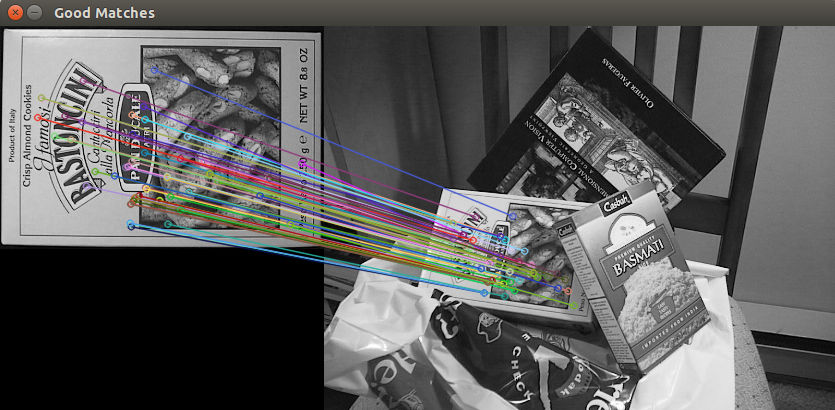
Here is the result of the SURF feature matching using the distance ratio test: