Feature Description#
Goal#
In this tutorial you will learn how to:
Use the [cv::DescriptorExtractor](#cv::DescriptorExtractor) interface in order to find the feature vector correspondent to the keypoints. Specifically:
Use cv::xfeatures2d::SURF and its function cv::xfeatures2d::SURF::compute to perform the required calculations.
Use a [cv::DescriptorMatcher](#cv::DescriptorMatcher) to match the features vector
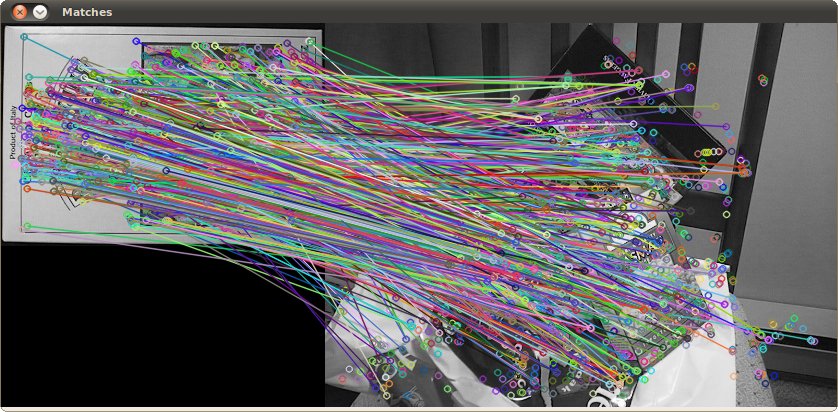
Use the function cv::drawMatches to draw the detected matches.
\warning You need the OpenCV contrib modules to be able to use the SURF features (alternatives are ORB, KAZE, … features).
Theory#
Code#
This tutorial code’s is shown lines below. You can also download it from here
#include <iostream>
#include "opencv2/core.hpp"
#ifdef HAVE_OPENCV_XFEATURES2D
#include "opencv2/highgui.hpp"
#include "opencv2/features.hpp"
#include "opencv2/xfeatures2d.hpp"

using namespace cv;
using namespace cv::xfeatures2d;
using std::cout;
using std::endl;

const char* keys =
    "{ help h |                  | Print help message. }"
    "{ input1 | box.png          | Path to input image 1. }"
    "{ input2 | box_in_scene.png | Path to input image 2. }";

int main( int argc, char* argv[] )
{
    CommandLineParser parser( argc, argv, keys );
    Mat img1 = imread( samples::findFile( parser.get<String>("input1") ), IMREAD_GRAYSCALE );
    Mat img2 = imread( samples::findFile( parser.get<String>("input2") ), IMREAD_GRAYSCALE );
    if ( img1.empty() || img2.empty() )
    {
        cout << "Could not open or find the image!\n" << endl;
        parser.printMessage();
        return -1;
    }

    //-- Step 1: Detect the keypoints using SURF Detector, compute the descriptors
    int minHessian = 400;
    Ptr<SURF> detector = SURF::create( minHessian );
    std::vector<KeyPoint> keypoints1, keypoints2;
    Mat descriptors1, descriptors2;
    detector->detectAndCompute( img1, noArray(), keypoints1, descriptors1 );
    detector->detectAndCompute( img2, noArray(), keypoints2, descriptors2 );

    //-- Step 2: Matching descriptor vectors with a brute force matcher
    // Since SURF is a floating-point descriptor NORM_L2 is used
    Ptr<DescriptorMatcher> matcher = DescriptorMatcher::create(DescriptorMatcher::BRUTEFORCE);
    std::vector< DMatch > matches;
    matcher->match( descriptors1, descriptors2, matches );

    //-- Draw matches
    Mat img_matches;
    drawMatches( img1, keypoints1, img2, keypoints2, matches, img_matches );

    //-- Show detected matches
    imshow("Matches", img_matches );

    waitKey();
    return 0;
}
#else
int main()
{
    std::cout << "This tutorial code needs the xfeatures2d contrib module to be run." << std::endl;
    return 0;
}
#endif
This tutorial code’s is shown lines below. You can also download it from here
import org.opencv.core.Core;
import org.opencv.core.Mat;
import org.opencv.core.MatOfDMatch;
import org.opencv.core.MatOfKeyPoint;
import org.opencv.features.DescriptorMatcher;
import org.opencv.features.Features;
import org.opencv.highgui.HighGui;
import org.opencv.imgcodecs.Imgcodecs;
import org.opencv.xfeatures2d.SURF;

class SURFMatching {
    public void run(String[] args) {
        String filename1 = args.length > 1 ? args[0] : "../data/box.png";
        String filename2 = args.length > 1 ? args[1] : "../data/box_in_scene.png";
        Mat img1 = Imgcodecs.imread(filename1, Imgcodecs.IMREAD_GRAYSCALE);
        Mat img2 = Imgcodecs.imread(filename2, Imgcodecs.IMREAD_GRAYSCALE);
        if (img1.empty() || img2.empty()) {
            System.err.println("Cannot read images!");
            System.exit(0);
        }

        //-- Step 1: Detect the keypoints using SURF Detector, compute the descriptors
        double hessianThreshold = 400;
        int nOctaves = 4, nOctaveLayers = 3;
        boolean extended = false, upright = false;
        SURF detector = SURF.create(hessianThreshold, nOctaves, nOctaveLayers, extended, upright);
        MatOfKeyPoint keypoints1 = new MatOfKeyPoint(), keypoints2 = new MatOfKeyPoint();
        Mat descriptors1 = new Mat(), descriptors2 = new Mat();
        detector.detectAndCompute(img1, new Mat(), keypoints1, descriptors1);
        detector.detectAndCompute(img2, new Mat(), keypoints2, descriptors2);

        //-- Step 2: Matching descriptor vectors with a brute force matcher
        // Since SURF is a floating-point descriptor NORM_L2 is used
        DescriptorMatcher matcher = DescriptorMatcher.create(DescriptorMatcher.BRUTEFORCE);
        MatOfDMatch matches = new MatOfDMatch();
        matcher.match(descriptors1, descriptors2, matches);

        //-- Draw matches
        Mat imgMatches = new Mat();
        Features.drawMatches(img1, keypoints1, img2, keypoints2, matches, imgMatches);

        HighGui.imshow("Matches", imgMatches);
        HighGui.waitKey(0);

        System.exit(0);
    }
}

public class SURFMatchingDemo {
    public static void main(String[] args) {
        // Load the native OpenCV library
        System.loadLibrary(Core.NATIVE_LIBRARY_NAME);

        new SURFMatching().run(args);
    }
}
This tutorial code’s is shown lines below. You can also download it from here
from __future__ import print_function
import cv2 as cv
import numpy as np
import argparse

parser = argparse.ArgumentParser(description='Code for Feature Detection tutorial.')
parser.add_argument('--input1', help='Path to input image 1.', default='box.png')
parser.add_argument('--input2', help='Path to input image 2.', default='box_in_scene.png')
args = parser.parse_args()

img1 = cv.imread(cv.samples.findFile(args.input1), cv.IMREAD_GRAYSCALE)
img2 = cv.imread(cv.samples.findFile(args.input2), cv.IMREAD_GRAYSCALE)
if img1 is None or img2 is None:
    print('Could not open or find the images!')
    exit(0)

#-- Step 1: Detect the keypoints using SURF Detector, compute the descriptors
minHessian = 400
detector = cv.xfeatures2d_SURF.create(hessianThreshold=minHessian)
keypoints1, descriptors1 = detector.detectAndCompute(img1, None)
keypoints2, descriptors2 = detector.detectAndCompute(img2, None)

#-- Step 2: Matching descriptor vectors with a brute force matcher
# Since SURF is a floating-point descriptor NORM_L2 is used
matcher = cv.DescriptorMatcher_create(cv.DescriptorMatcher_BRUTEFORCE)
matches = matcher.match(descriptors1, descriptors2)

#-- Draw matches
img_matches = np.empty((max(img1.shape[0], img2.shape[0]), img1.shape[1]+img2.shape[1], 3), dtype=np.uint8)
cv.drawMatches(img1, keypoints1, img2, keypoints2, matches, img_matches)

#-- Show detected matches
cv.imshow('Matches', img_matches)

cv.waitKey()
Explanation#
Result#
Here is the result after applying the BruteForce matcher between the two original images: