Reading and Writing Attributes#
Goal#
This tutorial shows you:
How to write attributes?
How to read attributes?
Note
Although attributes can be associated with groups and datasets, only attributes
with the root group are implemented in OpenCV. Supported attribute types are
int, double, cv::String and cv::InputArray (only for continuous arrays).
Source Code#
The following code demonstrates reading and writing attributes
inside the root group with data types cv::Mat, cv::String, int
and double.
You can download the code from here or find it in the file
modules/hdf/samples/read_write_attributes.cpp of the opencv_contrib source code library.
#include <iostream>

#include <opencv2/core.hpp>
#include <opencv2/hdf.hpp>

using namespace cv;

static void read_write_attributes()
{
    String filename = "attributes.h5";

    Ptr<hdf::HDF5> h5io = hdf::open(filename);

    String attr_mat_name = "array attribute";
    Mat attr_mat;
    attr_mat = (cv::Mat_<float>(2, 3) << 0, 1, 2, 3, 4, 5, 6);
    if (!h5io->atexists(attr_mat_name))
        h5io->atwrite(attr_mat, attr_mat_name);

    String attr_str_name = "string attribute";
    String attr_str = "Hello HDF5 from OpenCV!";
    if (!h5io->atexists(attr_str_name))
        h5io->atwrite(attr_str, attr_str_name);

    String attr_int_name = "int attribute";
    int attr_int = 123456;
    if (!h5io->atexists(attr_int_name))
        h5io->atwrite(attr_int, attr_int_name);

    String attr_double_name = "double attribute";
    double attr_double = 45678.123;
    if (!h5io->atexists(attr_double_name))
        h5io->atwrite(attr_double, attr_double_name);

    // read attributes
    Mat expected_attr_mat;
    int expected_attr_int;
    double expected_attr_double;

    String expected_attr_str;
    h5io->atread(&expected_attr_str, attr_str_name);

    h5io->atread(expected_attr_mat, attr_mat_name);
    h5io->atread(&expected_attr_int, attr_int_name);
    h5io->atread(&expected_attr_double, attr_double_name);

    // check results
    CV_Assert(norm(attr_mat - expected_attr_mat) < 1e-10);
    CV_Assert(attr_str.compare(expected_attr_str) == 0);
    CV_Assert(attr_int == expected_attr_int);
    CV_Assert(fabs(attr_double - expected_attr_double) < 1e-10);

    h5io->close();
}

int main()
{
    read_write_attributes();

    return 0;
}
Explanation#
The first step is to open the HDF5 file:
Ptr<hdf::HDF5> h5io = hdf::open(filename);
Then we use cv::hdf::HDF5::atwrite() to write attributes by specifying its value and name:
Warning
Before writing an attribute, we have to make sure that the attribute does not exist using cv::hdf::HDF5::atexists().
To read an attribute, we use cv::hdf::HDF5::atread() by specifying the attribute name
h5io->atread(expected_attr_mat, attr_mat_name);
In the end, we have to close the HDF file
h5io->close();
Results#
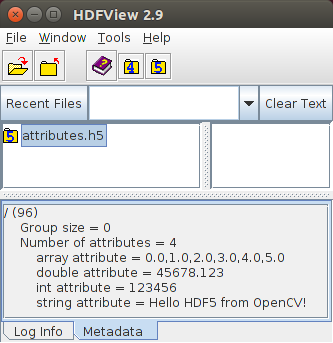
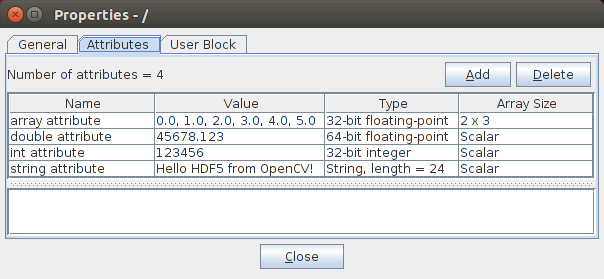
Figure 1 and Figure 2 give the results visualized using the tool HDFView.