Creating, Writing and Reading Datasets#
Goal#
This tutorial shows you:
How to create a dataset?
How to write a
cv::Matto a dataset?How to read a
cv::Matfrom a dataset?
Note
Currently, it supports only reading and writing cv::Mat and the matrix should be continuous in memory. Supports for other data types have not been implemented yet.
Source Code#
The following code demonstrates writing a single channel matrix and a two-channel matrix to datasets and then reading them back.
You can download the code from here or find it in the file
modules/hdf/samples/create_read_write_datasets.cpp of the opencv_contrib source code library.
#include <iostream>

#include <opencv2/core.hpp>
#include <opencv2/hdf.hpp>

using namespace cv;

static void write_root_group_single_channel()
{
    String filename = "root_group_single_channel.h5";
    String dataset_name = "/single"; // Note that it is a child of the root group /

    // prepare data
    Mat data;
    data = (cv::Mat_<float>(2, 3) << 0, 1, 2, 3, 4, 5, 6);

    Ptr<hdf::HDF5> h5io = hdf::open(filename);

    // write data to the given dataset
    // the dataset "/single" is created automatically, since it is a child of the root
    h5io->dswrite(data, dataset_name);

    Mat expected;
    h5io->dsread(expected, dataset_name);

    double diff = norm(data - expected);
    CV_Assert(abs(diff) < 1e-10);

    h5io->close();
}

static void write_single_channel()
{
    String filename = "single_channel.h5";
    String parent_name = "/data";
    String dataset_name = parent_name + "/single";

    // prepare data
    Mat data;
    data = (cv::Mat_<float>(2, 3) << 0, 1, 2, 3, 4, 5);

    Ptr<hdf::HDF5> h5io = hdf::open(filename);

    // first we need to create the parent group
    if (!h5io->hlexists(parent_name)) h5io->grcreate(parent_name);

    // create the dataset if it not exists
    if (!h5io->hlexists(dataset_name)) h5io->dscreate(data.rows, data.cols, data.type(), dataset_name);

    // the following is the same with the above function write_root_group_single_channel()

    h5io->dswrite(data, dataset_name);

    Mat expected;
    h5io->dsread(expected, dataset_name);

    double diff = norm(data - expected);
    CV_Assert(abs(diff) < 1e-10);

    h5io->close();
}

/*
 * creating, reading and writing multiple-channel matrices
 * are the same with single channel matrices
 */
static void write_multiple_channels()
{
    String filename = "two_channels.h5";
    String parent_name = "/data";
    String dataset_name = parent_name + "/two_channels";

    // prepare data
    Mat data(2, 3, CV_32SC2);
    for (size_t i = 0; i < data.total()*data.channels(); i++)
        ((int*) data.data)[i] = (int)i;

    Ptr<hdf::HDF5> h5io = hdf::open(filename);

    // first we need to create the parent group
    if (!h5io->hlexists(parent_name)) h5io->grcreate(parent_name);

    // create the dataset if it not exists
    if (!h5io->hlexists(dataset_name)) h5io->dscreate(data.rows, data.cols, data.type(), dataset_name);

    // the following is the same with the above function write_root_group_single_channel()

    h5io->dswrite(data, dataset_name);

    Mat expected;
    h5io->dsread(expected, dataset_name);

    double diff = norm(data - expected);
    CV_Assert(abs(diff) < 1e-10);

    h5io->close();
}

int main()
{
    write_root_group_single_channel();

    write_single_channel();

    write_multiple_channels();

    return 0;
}
Explanation#
The first step for creating a dataset is to open the file
Ptr<hdf::HDF5> h5io = hdf::open(filename);
For the function write_root_group_single_channel(), since
the dataset name is /single, which is inside the root group, we can use
// write data to the given dataset
// the dataset "/single" is created automatically, since it is a child of the root
h5io->dswrite(data, dataset_name);
to write the data directly to the dataset without the need of creating it beforehand. Because it is created inside cv::hdf::HDF5::dswrite() automatically.
Warning
This applies only to datasets that reside inside the root group.
Of course, we can create the dataset by ourselves:
// first we need to create the parent group
if (!h5io->hlexists(parent_name)) h5io->grcreate(parent_name);

// create the dataset if it not exists
if (!h5io->hlexists(dataset_name)) h5io->dscreate(data.rows, data.cols, data.type(), dataset_name);
To read data from a dataset, we use
Mat expected;
h5io->dsread(expected, dataset_name);
by specifying the name of the dataset.
We can check that the data read out is exactly the data written before by using
Results#
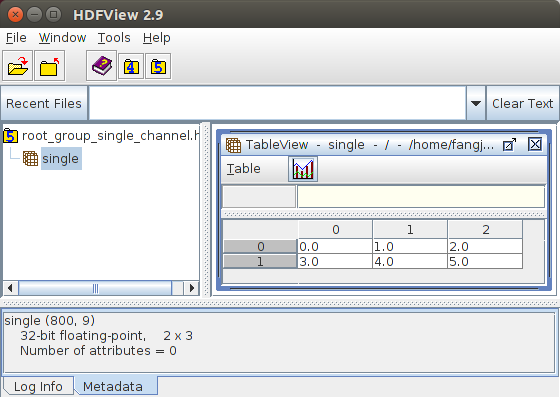
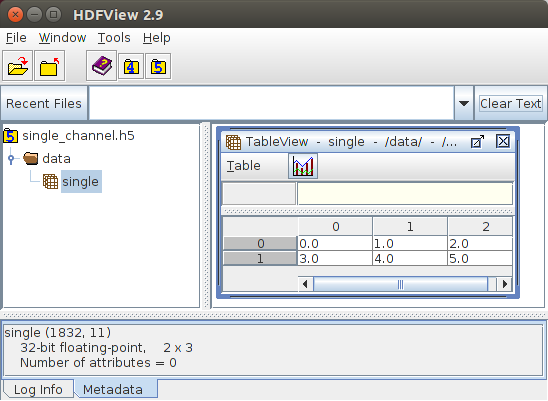
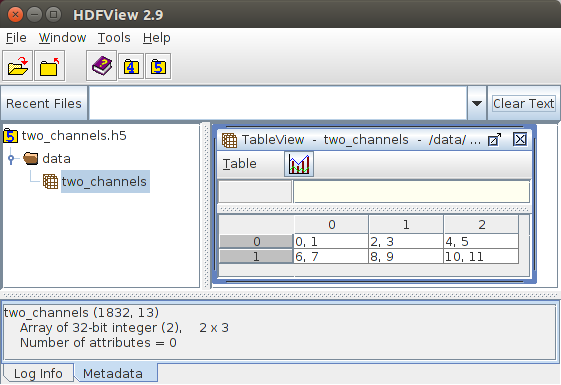
Figure 1 shows the result visualized using the tool HDFView for the file
root_group_single_channel. The results
of matrices for datasets that are not the direct children of the root group
are given in Figure 2 and Figure 3, respectively.