

Qt New Functions#
Detailed Description#
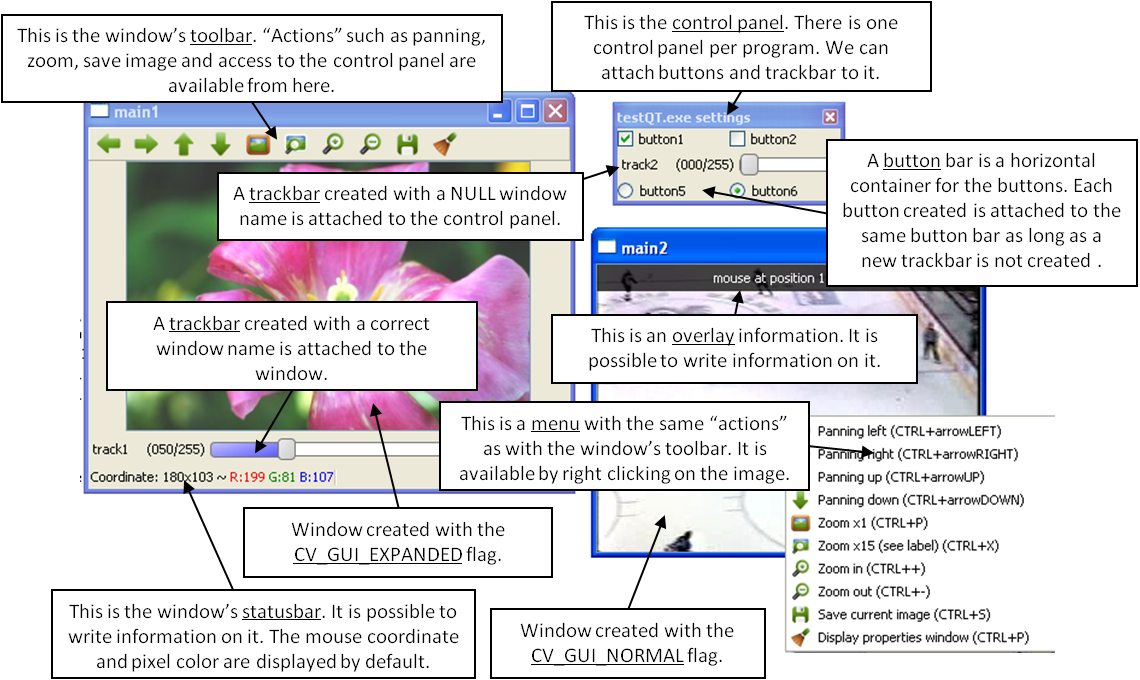
This figure explains new functionality implemented with Qt* GUI. The new GUI provides a statusbar, a toolbar, and a control panel. The control panel can have trackbars and buttonbars attached to it. If you cannot see the control panel, press Ctrl+P or right-click any Qt window and select Display properties window.
To attach a trackbar, the window name parameter must be NULL.
To attach a buttonbar, a button must be created. If the last bar attached to the control panel is a buttonbar, the new button is added to the right of the last button. If the last bar attached to the control panel is a trackbar, or the control panel is empty, a new buttonbar is created. Then, a new button is attached to it.
See below the example used to generate the figure:
#include "opencv2/highgui.hpp"

int main(int argc, char *argv[])
{
    int value = 50;
    int value2 = 0;

    namedWindow("main1",WINDOW_NORMAL);
    namedWindow("main2",WINDOW_AUTOSIZE | WINDOW_GUI_NORMAL);
    createTrackbar( "track1", "main1", &value, 255,  NULL);

    String nameb1 = "button1";
    String nameb2 = "button2";

    createButton(nameb1,callbackButton,&nameb1,QT_CHECKBOX,1);
    createButton(nameb2,callbackButton,NULL,QT_CHECKBOX,0);
    createTrackbar( "track2", NULL, &value2, 255, NULL);
    createButton("button5",callbackButton1,NULL,QT_RADIOBOX,0);
    createButton("button6",callbackButton2,NULL,QT_RADIOBOX,1);

    setMouseCallback( "main2",on_mouse,NULL );

    Mat img1 = imread("files/flower.jpg");
    VideoCapture video;
    video.open("files/hockey.avi");

    Mat img2,img3;
    while( waitKey(33) != 27 )
    {
        img1.convertTo(img2,-1,1,value);
        video >> img3;

        imshow("main1",img2);
        imshow("main2",img3);
    }

    destroyAllWindows();
    return 0;
}
Classes#
Name |
Description |
|---|---|
|
QtFont available only for Qt. See cv::fontQt. View details |
Enumerations#
enum cv::QtButtonTypes {
    cv::QT_PUSH_BUTTON = 0,
    cv::QT_CHECKBOX = 1,
    cv::QT_RADIOBOX = 2,
    cv::QT_NEW_BUTTONBAR = 1024
}
Qt “button” type. View details
enum cv::QtFontStyles {
    cv::QT_STYLE_NORMAL = 0,
    cv::QT_STYLE_ITALIC = 1,
    cv::QT_STYLE_OBLIQUE = 2
}
Qt font style. View details
enum cv::QtFontWeights {
    cv::QT_FONT_LIGHT = 25,
    cv::QT_FONT_NORMAL = 50,
    cv::QT_FONT_DEMIBOLD = 63,
    cv::QT_FONT_BOLD = 75,
    cv::QT_FONT_BLACK = 87
}
Qt font weight. View details
Enumeration Type Documentation#
QtFontStyles#
enum cv::QtFontStyles
#include <opencv2/highgui.hpp>
Qt font style.
Enumerator:
|
Normal font. |
|
Italic font. |
|
Oblique font. |
QtFontWeights#
enum cv::QtFontWeights
#include <opencv2/highgui.hpp>
Qt font weight.
Enumerator:
|
Weight of 25. |
|
Weight of 50. |
|
Weight of 63. |
|
Weight of 75. |
|
Weight of 87. |
Function Documentation#
addText()#
void cv::addText(
const Mat & img,
const String & text,
Point org,
const QtFont & font )
#include <opencv2/highgui.hpp>
Python:
cv.addText(img, text, org, nameFont[, pointSize[, color[, weight[, style[, spacing]]]]])
Draws a text on the image.
The function addText draws text on the image img using a specific font font (see example cv::fontQt )
Parameters
img— 8-bit 3-channel image where the text should be drawn.text— Text to write on an image.org— Point(x,y) where the text should start on an image.font— Font to use to draw a text.
addText()#
void cv::addText(
const Mat & img,
const String & text,
Point org,
const String & nameFont,
int pointSize = -1,
Scalar color = Scalar::all(0),
int weight = QT_FONT_NORMAL,
int style = QT_STYLE_NORMAL,
int spacing = 0 )
#include <opencv2/highgui.hpp>
Python:
cv.addText(img, text, org, nameFont[, pointSize[, color[, weight[, style[, spacing]]]]])
Draws a text on the image.
Parameters
img— 8-bit 3-channel image where the text should be drawn.text— Text to write on an image.org— Point(x,y) where the text should start on an image.nameFont— Name of the font. The name should match the name of a system font (such as Times*). If the font is not found, a default one is used.pointSize— Size of the font. If not specified, equal zero or negative, the point size of the font is set to a system-dependent default value. Generally, this is 12 points.color— Color of the font in BGRA where A = 255 is fully transparent.weight— Font weight. Available operation flags are : cv::QtFontWeights You can also specify a positive integer for better control.style— Font style. Available operation flags are : cv::QtFontStylesspacing— Spacing between characters. It can be negative or positive.
displayOverlay()#
void cv::displayOverlay(
const String & winname,
const String & text,
int delayms = 0 )
#include <opencv2/highgui.hpp>
Python:
cv.displayOverlay(winname, text[, delayms])
Displays a text on a window image as an overlay for a specified duration.
The function displayOverlay displays useful information/tips on top of the window for a certain amount of time delayms. The function does not modify the image, displayed in the window, that is, after the specified delay the original content of the window is restored.
Parameters
winname— Name of the window.text— Overlay text to write on a window image.delayms— The period (in milliseconds), during which the overlay text is displayed. If this function is called before the previous overlay text timed out, the timer is restarted and the text is updated. If this value is zero, the text never disappears.
displayStatusBar()#
void cv::displayStatusBar(
const String & winname,
const String & text,
int delayms = 0 )
#include <opencv2/highgui.hpp>
Python:
cv.displayStatusBar(winname, text[, delayms])
Displays a text on the window statusbar during the specified period of time.
The function displayStatusBar displays useful information/tips on top of the window for a certain amount of time delayms . This information is displayed on the window statusbar (the window must be created with the cv::WINDOW_GUI_EXPANDED flags).
Parameters
winname— Name of the window.text— Text to write on the window statusbar.delayms— Duration (in milliseconds) to display the text. If this function is called before the previous text timed out, the timer is restarted and the text is updated. If this value is zero, the text never disappears.
fontQt()#
QtFont cv::fontQt(
const String & nameFont,
int pointSize = -1,
Scalar color = Scalar::all(0),
int weight = QT_FONT_NORMAL,
int style = QT_STYLE_NORMAL,
int spacing = 0 )
#include <opencv2/highgui.hpp>
Creates the font to draw a text on an image.
The function fontQt creates a cv::QtFont object. This cv::QtFont is not compatible with putText .
A basic usage of this function is the following: :
Parameters
nameFont— Name of the font. The name should match the name of a system font (such as Times*). If the font is not found, a default one is used.pointSize— Size of the font. If not specified, equal zero or negative, the point size of the font is set to a system-dependent default value. Generally, this is 12 points.color— Color of the font in BGRA where A = 255 is fully transparent. Use the macro CV_RGB for simplicity.weight— Font weight. Available operation flags are : cv::QtFontWeights You can also specify a positive integer for better control.style— Font style. Available operation flags are : cv::QtFontStylesspacing— Spacing between characters. It can be negative or positive.
loadWindowParameters()#
void cv::loadWindowParameters(const String & windowName)
#include <opencv2/highgui.hpp>
Loads parameters of the specified window.
The function loadWindowParameters loads size, location, flags, trackbars value, zoom and panning location of the window windowName.
Parameters
windowName— Name of the window.
saveWindowParameters()#
void cv::saveWindowParameters(const String & windowName)
#include <opencv2/highgui.hpp>
Saves parameters of the specified window.
The function saveWindowParameters saves size, location, flags, trackbars value, zoom and panning location of the window windowName.
Parameters
windowName— Name of the window.
startLoop()#
int cv::startLoop(
int(*)(int argc, char *argv[]) pt2Func,
int argc,
char *[] argv )
#include <opencv2/highgui.hpp>
stopLoop()#
void cv::stopLoop()
#include <opencv2/highgui.hpp>