

Class cv::LineSegmentDetector#
Line segment detector class. View details
#include <opencv2/imgproc.hpp>Collaboration diagram for cv::LineSegmentDetector:
Public Member Functions#
Public Member Functions inherited from cv::Algorithm
Return |
Name |
Description |
|---|---|---|
|
Clears the algorithm state. |
|
|
Returns true if the Algorithm is empty (e.g. in the very beginning or after unsuccessful read. |
|
|
Reads algorithm parameters from a file storage. |
|
|
||
|
|
|
|
Stores algorithm parameters in a file storage. |
|
|
Static Public Member Functions#
Static Public Member Functions inherited from cv::Algorithm
Return |
Name |
Description |
|---|---|---|
|
|
Loads algorithm from the file. |
|
|
Loads algorithm from a String. |
|
Reads algorithm from the file node. |
Additional Inherited Members#
Protected Member Functions inherited from cv::Algorithm
Return |
Name |
Description |
|---|---|---|
|
Detailed Description#
Line segment detector class.
following the algorithm described at Rafael12 .
Note
Implementation has been removed from OpenCV version 3.4.6 to 3.4.15 and version 4.1.0 to 4.5.3 due original code license conflict. restored again after Computation of a NFA code published under the MIT license.
Constructor & Destructor Documentation#
~LineSegmentDetector()#
Member Function Documentation#
compareSegments()#
int cv::LineSegmentDetector::compareSegments(
const Size & size,
InputArray lines1,
InputArray lines2,
InputOutputArray image = noArray() )
Python:
cv.LineSegmentDetector.compareSegments(size, lines1, lines2[, image]) -> retval, image
Draws two groups of lines in blue and red, counting the non overlapping (mismatching) pixels.
Parameters
size— The size of the image, where lines1 and lines2 were found.lines1— The first group of lines that needs to be drawn. It is visualized in blue color.lines2— The second group of lines. They visualized in red color.image— Optional image, where the lines will be drawn. The image should be color(3-channel) in order for lines1 and lines2 to be drawn in the above mentioned colors.
Here is the call graph for this function:
detect()#
void cv::LineSegmentDetector::detect(
InputArray image,
OutputArray lines,
OutputArray width = noArray(),
OutputArray prec = noArray(),
OutputArray nfa = noArray() )
Python:
cv.LineSegmentDetector.detect(image[, lines[, width[, prec[, nfa]]]]) -> lines, width, prec, nfa
Finds lines in the input image.
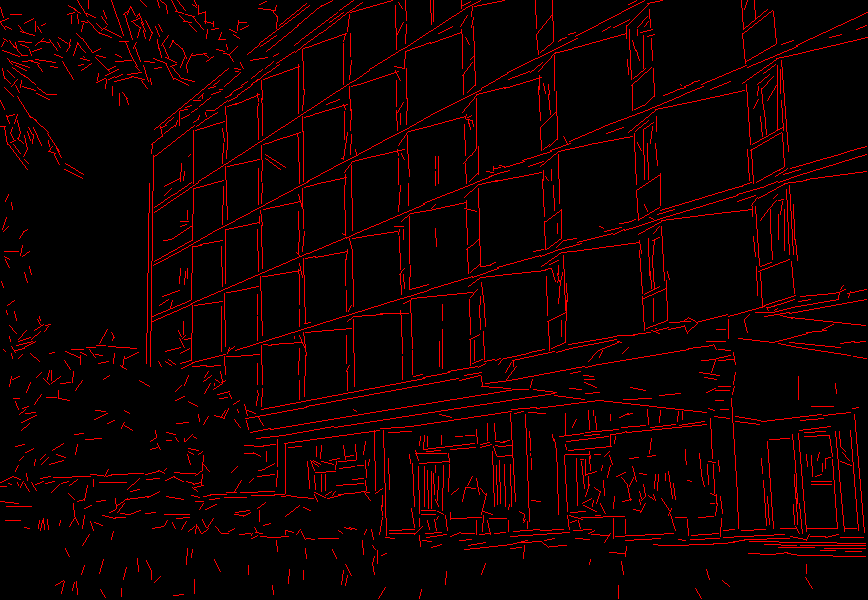
This is the output of the default parameters of the algorithm on the above shown image.
Parameters
image— A grayscale (CV_8UC1) input image. If only a roi needs to be selected, use:lsd_ptr->detect(image(roi), lines, …); lines += Scalar(roi.x, roi.y, roi.x, roi.y);lines— A vector of Vec4f elements specifying the beginning and ending point of a line. Where Vec4f is (x1, y1, x2, y2), point 1 is the start, point 2 - end. Returned lines are strictly oriented depending on the gradient.width— Vector of widths of the regions, where the lines are found. E.g. Width of line.prec— Vector of precisions with which the lines are found.nfa— Vector containing number of false alarms in the line region, with precision of 10%. The bigger the value, logarithmically better the detection.-1 corresponds to 10 mean false alarms
0 corresponds to 1 mean false alarm
1 corresponds to 0.1 mean false alarms This vector will be calculated only when the objects type is LSD_REFINE_ADV.
Here is the call graph for this function:
drawSegments()#
void cv::LineSegmentDetector::drawSegments(
InputOutputArray image,
InputArray lines )
Python:
cv.LineSegmentDetector.drawSegments(image, lines) -> image
Draws the line segments on a given image.
Parameters
image— The image, where the lines will be drawn. Should be bigger or equal to the image, where the lines were found.lines— A vector of the lines that needed to be drawn.
Source file#
The documentation for this class was generated from the following file:
opencv2/imgproc.hpp