

How to Use Background Subtraction Methods#
Background subtraction (BS) is a common and widely used technique for generating a foreground mask (namely, a binary image containing the pixels belonging to moving objects in the scene) by using static cameras.
As the name suggests, BS calculates the foreground mask performing a subtraction between the current frame and a background model, containing the static part of the scene or, more in general, everything that can be considered as background given the characteristics of the observed scene.
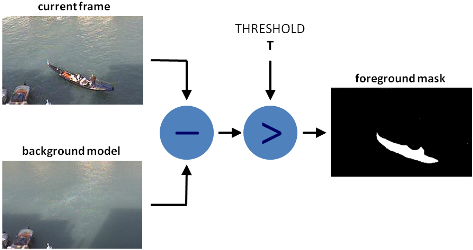
Background modeling consists of two main steps:
Background Initialization;
Background Update.
In the first step, an initial model of the background is computed, while in the second step that model is updated in order to adapt to possible changes in the scene.
In this tutorial we will learn how to perform BS by using OpenCV.
Goals#
In this tutorial you will learn how to:
Read data from videos or image sequences by using [cv::VideoCapture](#cv::VideoCapture) ;
Create and update the background model by using [cv::BackgroundSubtractor](#cv::BackgroundSubtractor) class;
Get and show the foreground mask by using cv::imshow ;
Code#
In the following you can find the source code. We will let the user choose to process either a video file or a sequence of images.
We will use [cv::BackgroundSubtractorMOG2](#cv::BackgroundSubtractorMOG2) in this sample, to generate the foreground mask.
The results as well as the input data are shown on the screen.
Downloadable code: Click here
Code at glance:
#include <iostream>
#include <sstream>
#include <opencv2/imgcodecs.hpp>
#include <opencv2/imgproc.hpp>
#include <opencv2/videoio.hpp>
#include <opencv2/highgui.hpp>
#include <opencv2/video.hpp>

using namespace cv;
using namespace std;

const char* params
    = "{ help h         |           | Print usage }"
      "{ input          | vtest.avi | Path to a video or a sequence of image }"
      "{ algo           | MOG2      | Background subtraction method (KNN, MOG2) }";

int main(int argc, char* argv[])
{
    CommandLineParser parser(argc, argv, params);
    parser.about( "This program shows how to use background subtraction methods provided by "
                  " OpenCV. You can process both videos and images.\n" );
    if (parser.has("help"))
    {
        //print help information
        parser.printMessage();
    }

    //create Background Subtractor objects
    Ptr<BackgroundSubtractor> pBackSub;
    if (parser.get<String>("algo") == "MOG2")
        pBackSub = createBackgroundSubtractorMOG2();
    else
        pBackSub = createBackgroundSubtractorKNN();

    VideoCapture capture( samples::findFile( parser.get<String>("input") ) );
    if (!capture.isOpened()){
        //error in opening the video input
        cerr << "Unable to open: " << parser.get<String>("input") << endl;
        return 0;
    }

    Mat frame, fgMask;
    while (true) {
        capture >> frame;
        if (frame.empty())
            break;

        //update the background model
        pBackSub->apply(frame, fgMask);

        //get the frame number and write it on the current frame
        rectangle(frame, cv::Point(10, 2), cv::Point(100,20),
                  cv::Scalar(255,255,255), -1);
        stringstream ss;
        ss << capture.get(CAP_PROP_POS_FRAMES);
        string frameNumberString = ss.str();
        putText(frame, frameNumberString.c_str(), cv::Point(15, 15),
                FONT_HERSHEY_SIMPLEX, 0.5 , cv::Scalar(0,0,0));

        //show the current frame and the fg masks
        imshow("Frame", frame);
        imshow("FG Mask", fgMask);

        //get the input from the keyboard
        int keyboard = waitKey(30);
        if (keyboard == 'q' || keyboard == 27)
            break;
    }

    return 0;
}
Downloadable code: Click here
Code at glance:
import org.opencv.core.Core;
import org.opencv.core.Mat;
import org.opencv.core.Point;
import org.opencv.core.Scalar;
import org.opencv.highgui.HighGui;
import org.opencv.imgproc.Imgproc;
import org.opencv.video.BackgroundSubtractor;
import org.opencv.video.Video;
import org.opencv.videoio.VideoCapture;
import org.opencv.videoio.Videoio;

class BackgroundSubtraction {
    public void run(String[] args) {
        String input = args.length > 0 ? args[0] : "../data/vtest.avi";
        boolean useMOG2 = args.length > 1 ? args[1] == "MOG2" : true;

        BackgroundSubtractor backSub;
        if (useMOG2) {
            backSub = Video.createBackgroundSubtractorMOG2();
        } else {
            backSub = Video.createBackgroundSubtractorKNN();
        }

        VideoCapture capture = new VideoCapture(input);
        if (!capture.isOpened()) {
            System.err.println("Unable to open: " + input);
            System.exit(0);
        }

        Mat frame = new Mat(), fgMask = new Mat();
        while (true) {
            capture.read(frame);
            if (frame.empty()) {
                break;
            }

            // update the background model
            backSub.apply(frame, fgMask);

            // get the frame number and write it on the current frame
            Imgproc.rectangle(frame, new Point(10, 2), new Point(100, 20), new Scalar(255, 255, 255), -1);
            String frameNumberString = String.format("%d", (int)capture.get(Videoio.CAP_PROP_POS_FRAMES));
            Imgproc.putText(frame, frameNumberString, new Point(15, 15), Core.FONT_HERSHEY_SIMPLEX, 0.5,
                    new Scalar(0, 0, 0));

            // show the current frame and the fg masks
            HighGui.imshow("Frame", frame);
            HighGui.imshow("FG Mask", fgMask);

            // get the input from the keyboard
            int keyboard = HighGui.waitKey(30);
            if (keyboard == 'q' || keyboard == 27) {
                break;
            }
        }

        HighGui.waitKey();
        System.exit(0);
    }
}

public class BackgroundSubtractionDemo {
    public static void main(String[] args) {
        // Load the native OpenCV library
        System.loadLibrary(Core.NATIVE_LIBRARY_NAME);

        new BackgroundSubtraction().run(args);
    }
}
Downloadable code: Click here
Code at glance:
from __future__ import print_function
import cv2 as cv
import argparse

parser = argparse.ArgumentParser(description='This program shows how to use background subtraction methods provided by \
                                              OpenCV. You can process both videos and images.')
parser.add_argument('--input', type=str, help='Path to a video or a sequence of image.', default='vtest.avi')
parser.add_argument('--algo', type=str, help='Background subtraction method (KNN, MOG2).', default='MOG2')
args = parser.parse_args()

#create Background Subtractor objects
if args.algo == 'MOG2':
    backSub = cv.createBackgroundSubtractorMOG2()
else:
    backSub = cv.createBackgroundSubtractorKNN()

capture = cv.VideoCapture(cv.samples.findFileOrKeep(args.input))
if not capture.isOpened():
    print('Unable to open: ' + args.input)
    exit(0)

while True:
    ret, frame = capture.read()
    if frame is None:
        break

    #update the background model
    fgMask = backSub.apply(frame)

    #get the frame number and write it on the current frame
    cv.rectangle(frame, (10, 2), (100,20), (255,255,255), -1)
    cv.putText(frame, str(capture.get(cv.CAP_PROP_POS_FRAMES)), (15, 15),
               cv.FONT_HERSHEY_SIMPLEX, 0.5 , (0,0,0))

    #show the current frame and the fg masks
    cv.imshow('Frame', frame)
    cv.imshow('FG Mask', fgMask)

    keyboard = cv.waitKey(30)
    if keyboard == 'q' or keyboard == 27:
        break
Explanation#
We discuss the main parts of the code above:
A [cv::BackgroundSubtractor](#cv::BackgroundSubtractor) object will be used to generate the foreground mask. In this example, default parameters are used, but it is also possible to declare specific parameters in the create function.
//create Background Subtractor objects
Ptr<BackgroundSubtractor> pBackSub;
if (parser.get<String>("algo") == "MOG2")
    pBackSub = createBackgroundSubtractorMOG2();
else
    pBackSub = createBackgroundSubtractorKNN();
BackgroundSubtractor backSub;
if (useMOG2) {
    backSub = Video.createBackgroundSubtractorMOG2();
} else {
    backSub = Video.createBackgroundSubtractorKNN();
}
#create Background Subtractor objects
if args.algo == 'MOG2':
    backSub = cv.createBackgroundSubtractorMOG2()
else:
    backSub = cv.createBackgroundSubtractorKNN()
A [cv::VideoCapture](#cv::VideoCapture) object is used to read the input video or input images sequence.
VideoCapture capture( samples::findFile( parser.get<String>("input") ) );
if (!capture.isOpened()){
    //error in opening the video input
    cerr << "Unable to open: " << parser.get<String>("input") << endl;
    return 0;
}
VideoCapture capture = new VideoCapture(input);
if (!capture.isOpened()) {
    System.err.println("Unable to open: " + input);
    System.exit(0);
}
capture = cv.VideoCapture(cv.samples.findFileOrKeep(args.input))
if not capture.isOpened():
    print('Unable to open: ' + args.input)
    exit(0)
Every frame is used both for calculating the foreground mask and for updating the background. If you want to change the learning rate used for updating the background model, it is possible to set a specific learning rate by passing a parameter to the
applymethod.
//update the background model
pBackSub->apply(frame, fgMask);
// update the background model
backSub.apply(frame, fgMask);
#update the background model
fgMask = backSub.apply(frame)
The current frame number can be extracted from the [cv::VideoCapture](#cv::VideoCapture) object and stamped in the top left corner of the current frame. A white rectangle is used to highlight the black colored frame number.
//get the frame number and write it on the current frame
rectangle(frame, cv::Point(10, 2), cv::Point(100,20),
          cv::Scalar(255,255,255), -1);
stringstream ss;
ss << capture.get(CAP_PROP_POS_FRAMES);
string frameNumberString = ss.str();
putText(frame, frameNumberString.c_str(), cv::Point(15, 15),
        FONT_HERSHEY_SIMPLEX, 0.5 , cv::Scalar(0,0,0));
// get the frame number and write it on the current frame
Imgproc.rectangle(frame, new Point(10, 2), new Point(100, 20), new Scalar(255, 255, 255), -1);
String frameNumberString = String.format("%d", (int)capture.get(Videoio.CAP_PROP_POS_FRAMES));
Imgproc.putText(frame, frameNumberString, new Point(15, 15), Core.FONT_HERSHEY_SIMPLEX, 0.5,
        new Scalar(0, 0, 0));
We are ready to show the current input frame and the results.
Results#
With the
vtest.avivideo, for the following frame: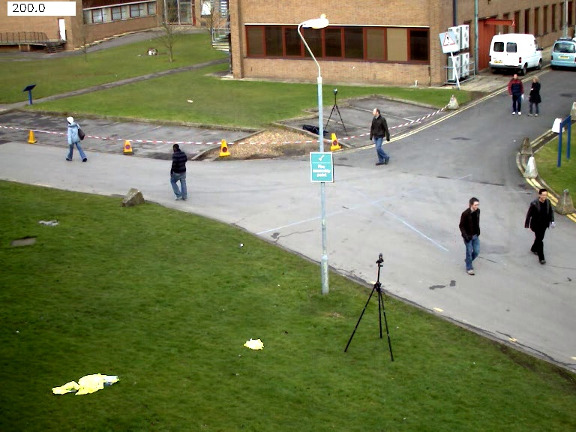
The output of the program will look as the following for MOG2 method (gray areas are detected shadows):
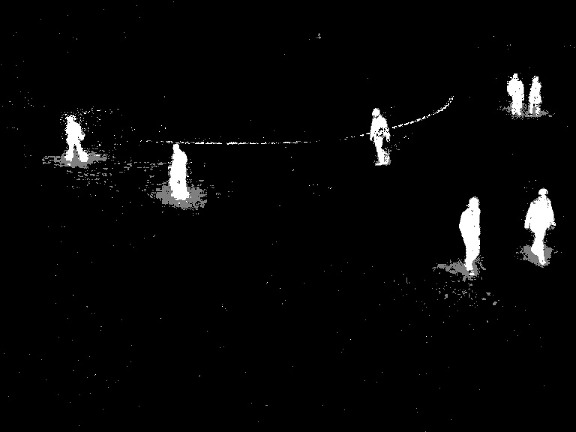
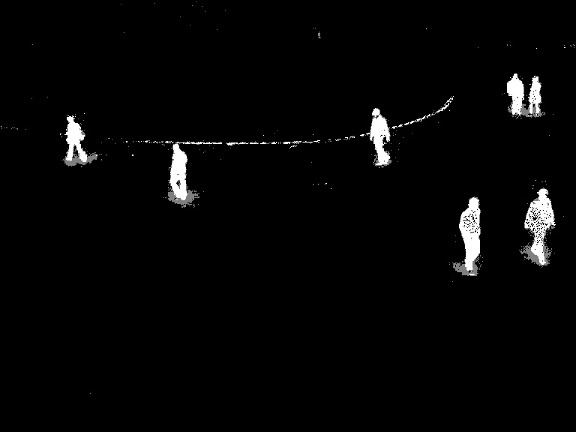
The output of the program will look as the following for the KNN method (gray areas are detected shadows):
References#
A Benchmark Dataset for Foreground/Background Extraction [316]