

Video Input with OpenCV and similarity measurement#
Goal#
Today it is common to have a digital video recording system at your disposal. Therefore, you will eventually come to the situation that you no longer process a batch of images, but video streams. These may be of two kinds: real-time image feed (in the case of a webcam) or prerecorded and hard disk drive stored files. Luckily OpenCV treats these two in the same manner, with the same C++ class. So here’s what you’ll learn in this tutorial:
How to open and read video streams
Two ways for checking image similarity: PSNR and SSIM
The source code#
As a test case where to show off these using OpenCV I’ve created a small program that reads in two
video files and performs a similarity check between them. This is something you could use to check
just how well a new video compressing algorithms works. Let there be a reference (original) video
like this small Megamind clip
and a compressed
version of it .
You may also find the source code and these video file in the
samples/data folder of the OpenCV source library.
#include <iostream> // for standard I/O
#include <string>   // for strings
#include <iomanip>  // for controlling float print precision
#include <sstream>  // string to number conversion

#include <opencv2/core.hpp>     // Basic OpenCV structures (cv::Mat, Scalar)
#include <opencv2/imgproc.hpp>  // Gaussian Blur
#include <opencv2/videoio.hpp>
#include <opencv2/highgui.hpp>  // OpenCV window I/O

using namespace std;
using namespace cv;

double getPSNR ( const Mat& I1, const Mat& I2);
Scalar getMSSIM( const Mat& I1, const Mat& I2);

static void help()
{
    cout
        << "------------------------------------------------------------------------------" << endl
        << "This program shows how to read a video file with OpenCV. In addition, it "
        << "tests the similarity of two input videos first with PSNR, and for the frames "
        << "below a PSNR trigger value, also with MSSIM."                                   << endl
        << "Usage:"                                                                         << endl
        << "./video-input-psnr-ssim <referenceVideo> <useCaseTestVideo> <PSNR_Trigger_Value> <Wait_Between_Frames> " << endl
        << "--------------------------------------------------------------------------"     << endl
        << endl;
}

int main(int argc, char *argv[])
{
    help();

    if (argc != 5)
    {
        cout << "Not enough parameters" << endl;
        return -1;
    }

    stringstream conv;

    const string sourceReference = argv[1], sourceCompareWith = argv[2];
    int psnrTriggerValue, delay;
    conv << argv[3] << endl << argv[4];       // put in the strings
    conv >> psnrTriggerValue >> delay;        // take out the numbers

    int frameNum = -1;          // Frame counter

    VideoCapture captRefrnc(sourceReference), captUndTst(sourceCompareWith);

    if (!captRefrnc.isOpened())
    {
        cout  << "Could not open reference " << sourceReference << endl;
        return -1;
    }

    if (!captUndTst.isOpened())
    {
        cout  << "Could not open case test " << sourceCompareWith << endl;
        return -1;
    }

    Size refS = Size((int) captRefrnc.get(CAP_PROP_FRAME_WIDTH),
                     (int) captRefrnc.get(CAP_PROP_FRAME_HEIGHT)),
         uTSi = Size((int) captUndTst.get(CAP_PROP_FRAME_WIDTH),
                     (int) captUndTst.get(CAP_PROP_FRAME_HEIGHT));

    if (refS != uTSi)
    {
        cout << "Inputs have different size!!! Closing." << endl;
        return -1;
    }

    const char* WIN_UT = "Under Test";
    const char* WIN_RF = "Reference";

    // Windows
    namedWindow(WIN_RF, WINDOW_AUTOSIZE);
    namedWindow(WIN_UT, WINDOW_AUTOSIZE);
    moveWindow(WIN_RF, 400       , 0);         //750,  2 (bernat =0)
    moveWindow(WIN_UT, refS.width, 0);         //1500, 2

    cout << "Reference frame resolution: Width=" << refS.width << "  Height=" << refS.height
         << " of nr#: " << captRefrnc.get(CAP_PROP_FRAME_COUNT) << endl;

    cout << "PSNR trigger value " << setiosflags(ios::fixed) << setprecision(3)
         << psnrTriggerValue << endl;

    Mat frameReference, frameUnderTest;
    double psnrV;
    Scalar mssimV;

    for(;;) //Show the image captured in the window and repeat
    {
        captRefrnc >> frameReference;
        captUndTst >> frameUnderTest;

        if (frameReference.empty() || frameUnderTest.empty())
        {
            cout << " < < <  Game over!  > > > ";
            break;
        }

        ++frameNum;
        cout << "Frame: " << frameNum << "# ";

        ///////////////////////////////// PSNR ////////////////////////////////////////////////////
        psnrV = getPSNR(frameReference,frameUnderTest);
        cout << setiosflags(ios::fixed) << setprecision(3) << psnrV << "dB";

        //////////////////////////////////// MSSIM /////////////////////////////////////////////////
        if (psnrV < psnrTriggerValue && psnrV)
        {
            mssimV = getMSSIM(frameReference, frameUnderTest);

            cout << " MSSIM: "
                << " R " << setiosflags(ios::fixed) << setprecision(2) << mssimV.val[2] * 100 << "%"
                << " G " << setiosflags(ios::fixed) << setprecision(2) << mssimV.val[1] * 100 << "%"
                << " B " << setiosflags(ios::fixed) << setprecision(2) << mssimV.val[0] * 100 << "%";
        }

        cout << endl;

        ////////////////////////////////// Show Image /////////////////////////////////////////////
        imshow(WIN_RF, frameReference);
        imshow(WIN_UT, frameUnderTest);

        char c = (char)waitKey(delay);
        if (c == 27) break;
    }

    return 0;
}

// ![get-psnr]
double getPSNR(const Mat& I1, const Mat& I2)
{
    Mat s1;
    absdiff(I1, I2, s1);       // |I1 - I2|
    s1.convertTo(s1, CV_32F);  // cannot make a square on 8 bits
    s1 = s1.mul(s1);           // |I1 - I2|^2

    Scalar s = sum(s1);        // sum elements per channel

    double sse = s.val[0] + s.val[1] + s.val[2]; // sum channels

    if( sse <= 1e-10) // For very small values, return 360 to cap PSNR (theoretical value is infinity)
        return 360.0;
    else
    {
        double mse  = sse / (double)(I1.channels() * I1.total());
        double psnr = 10.0 * log10((255 * 255) / mse);
        return psnr;
    }
}
// ![get-psnr]

// ![get-mssim]

Scalar getMSSIM( const Mat& i1, const Mat& i2)
{
    const double C1 = 6.5025, C2 = 58.5225;
    int d = CV_32F;

    Mat I1, I2;
    i1.convertTo(I1, d);            // cannot calculate on one byte large values
    i2.convertTo(I2, d);

    Mat I2_2   = I2.mul(I2);        // I2^2
    Mat I1_2   = I1.mul(I1);        // I1^2
    Mat I1_I2  = I1.mul(I2);        // I1 * I2

    Mat mu1, mu2;                   // PRELIMINARY COMPUTING
    GaussianBlur(I1, mu1, Size(11, 11), 1.5);
    GaussianBlur(I2, mu2, Size(11, 11), 1.5);

    Mat mu1_2   =   mu1.mul(mu1);
    Mat mu2_2   =   mu2.mul(mu2);
    Mat mu1_mu2 =   mu1.mul(mu2);

    Mat sigma1_2, sigma2_2, sigma12;

    GaussianBlur(I1_2, sigma1_2, Size(11, 11), 1.5);
    sigma1_2 -= mu1_2;

    GaussianBlur(I2_2, sigma2_2, Size(11, 11), 1.5);
    sigma2_2 -= mu2_2;

    GaussianBlur(I1_I2, sigma12, Size(11, 11), 1.5);
    sigma12 -= mu1_mu2;

    ///////////////////////////////// FORMULA ////////////////////////////////
    Mat t1, t2, t3;

    t1 = 2 * mu1_mu2 + C1;
    t2 = 2 * sigma12 + C2;
    t3 = t1.mul(t2);                 // t3 = ((2*mu1_mu2 + C1).*(2*sigma12 + C2))

    t1 = mu1_2 + mu2_2 + C1;
    t2 = sigma1_2 + sigma2_2 + C2;
    t1 = t1.mul(t2);                 // t1 =((mu1_2 + mu2_2 + C1).*(sigma1_2 + sigma2_2 + C2))

    Mat ssim_map;
    divide(t3, t1, ssim_map);        // ssim_map =  t3./t1;

    Scalar mssim = mean(ssim_map);   // mssim = average of ssim map
    return mssim;
}
// ![get-mssim]
#!/usr/bin/env python
# -*- coding: utf-8 -*-

# Python 2/3 compatibility
from __future__ import print_function

import numpy as np
import cv2 as cv
import argparse
import sys

def getPSNR(I1, I2):
    s1 = cv.absdiff(I1, I2) #|I1 - I2|
    s1 = np.float32(s1)     # cannot make a square on 8 bits
    s1 = s1 * s1            # |I1 - I2|^2
    sse = s1.sum()          # sum elements per channel
    if sse <= 1e-10:        # sum channels
        return 360          # For very small SSE, return 360 to cap PSNR (theoretical value is infinity)
    else:
        shape = I1.shape
        mse = 1.0 * sse / (shape[0] * shape[1] * shape[2])
        psnr = 10.0 * np.log10((255 * 255) / mse)
        return psnr

def getMSSISM(i1, i2):
    C1 = 6.5025
    C2 = 58.5225
    # INITS

    I1 = np.float32(i1) # cannot calculate on one byte large values
    I2 = np.float32(i2)

    I2_2 = I2 * I2 # I2^2
    I1_2 = I1 * I1 # I1^2
    I1_I2 = I1 * I2 # I1 * I2
    # END INITS

    # PRELIMINARY COMPUTING
    mu1 = cv.GaussianBlur(I1, (11, 11), 1.5)
    mu2 = cv.GaussianBlur(I2, (11, 11), 1.5)

    mu1_2 = mu1 * mu1
    mu2_2 = mu2 * mu2
    mu1_mu2 = mu1 * mu2

    sigma1_2 = cv.GaussianBlur(I1_2, (11, 11), 1.5)
    sigma1_2 -= mu1_2

    sigma2_2 = cv.GaussianBlur(I2_2, (11, 11), 1.5)
    sigma2_2 -= mu2_2

    sigma12 = cv.GaussianBlur(I1_I2, (11, 11), 1.5)
    sigma12 -= mu1_mu2

    t1 = 2 * mu1_mu2 + C1
    t2 = 2 * sigma12 + C2
    t3 = t1 * t2                    # t3 = ((2*mu1_mu2 + C1).*(2*sigma12 + C2))

    t1 = mu1_2 + mu2_2 + C1
    t2 = sigma1_2 + sigma2_2 + C2
    t1 = t1 * t2                    # t1 =((mu1_2 + mu2_2 + C1).*(sigma1_2 + sigma2_2 + C2))

    ssim_map = cv.divide(t3, t1)    # ssim_map =  t3./t1;

    mssim = cv.mean(ssim_map)       # mssim = average of ssim map
    return mssim

def main():
    parser = argparse.ArgumentParser()
    parser.add_argument("-d", "--delay", type=int, default=30, help=" Time delay")
    parser.add_argument("-v", "--psnrtriggervalue", type=int, default=30, help="PSNR Trigger Value")
    parser.add_argument("-r", "--ref", type=str, default="Megamind.avi", help="Path to reference video")
    parser.add_argument("-t", "--undertest", type=str, default="Megamind_bugy.avi",
                        help="Path to the video to be tested")
    args = parser.parse_args()

    sourceReference = args.ref
    sourceCompareWith = args.undertest
    delay = args.delay
    psnrTriggerValue = args.psnrtriggervalue

    framenum = -1 # Frame counter

    captRefrnc = cv.VideoCapture(cv.samples.findFileOrKeep(sourceReference))
    captUndTst = cv.VideoCapture(cv.samples.findFileOrKeep(sourceCompareWith))

    if not captRefrnc.isOpened():
        print("Could not open the reference " + sourceReference)
        sys.exit(-1)
    if not captUndTst.isOpened():
        print("Could not open case test " + sourceCompareWith)
        sys.exit(-1)

    refS = (int(captRefrnc.get(cv.CAP_PROP_FRAME_WIDTH)), int(captRefrnc.get(cv.CAP_PROP_FRAME_HEIGHT)))
    uTSi = (int(captUndTst.get(cv.CAP_PROP_FRAME_WIDTH)), int(captUndTst.get(cv.CAP_PROP_FRAME_HEIGHT)))

    if refS != uTSi:
        print("Inputs have different size!!! Closing.")
        sys.exit(-1)

    WIN_UT = "Under Test"
    WIN_RF = "Reference"

    cv.namedWindow(WIN_RF, cv.WINDOW_AUTOSIZE)
    cv.namedWindow(WIN_UT, cv.WINDOW_AUTOSIZE)
    cv.moveWindow(WIN_RF, 400, 0) #750,  2 (bernat =0)
    cv.moveWindow(WIN_UT, refS[0], 0) #1500, 2

    print("Reference frame resolution: Width={} Height={} of nr#: {}".format(refS[0], refS[1],
                                                                             captRefrnc.get(cv.CAP_PROP_FRAME_COUNT)))
    print("PSNR trigger value {}".format(psnrTriggerValue))

    while True: # Show the image captured in the window and repeat
        _, frameReference = captRefrnc.read()
        _, frameUnderTest = captUndTst.read()

        if frameReference is None or frameUnderTest is None:
            print(" < < <  Game over!  > > > ")
            break

        framenum += 1
        psnrv = getPSNR(frameReference, frameUnderTest)
        print("Frame: {}# {}dB".format(framenum, round(psnrv, 3)), end=" ")

        if (psnrv < psnrTriggerValue and psnrv):
            mssimv = getMSSISM(frameReference, frameUnderTest)
            print("MSSISM: R {}% G {}% B {}%".format(round(mssimv[2] * 100, 2), round(mssimv[1] * 100, 2),
                                                     round(mssimv[0] * 100, 2)), end=" ")

        print()

        cv.imshow(WIN_RF, frameReference)
        cv.imshow(WIN_UT, frameUnderTest)

        k = cv.waitKey(delay)
        if k == 27:
            break

    sys.exit(0)

if __name__ == "__main__":
    main()
How to read a video stream (online-camera or offline-file)?#
Essentially, all the functionalities required for video manipulation is integrated in the [cv::VideoCapture](#cv::VideoCapture) C++ class. This on itself builds on the FFmpeg open source library. This is a basic dependency of OpenCV so you shouldn’t need to worry about this. A video is composed of a succession of images, we refer to these in the literature as frames. In case of a video file there is a frame rate specifying just how long is between two frames. While for the video cameras usually there is a limit of just how many frames they can digitize per second, this property is less important as at any time the camera sees the current snapshot of the world.
The first task you need to do is to assign to a [cv::VideoCapture](#cv::VideoCapture) class its source. You can do this either via the [cv::VideoCapture::VideoCapture](#cv::VideoCapture::VideoCapture) or its [cv::VideoCapture::open](#cv::VideoCapture::open) function. If this argument is an integer then you will bind the class to a camera, a device. The number passed here is the ID of the device, assigned by the operating system. If you have a single camera attached to your system its ID will probably be zero and further ones increasing from there. If the parameter passed to these is a string it will refer to a video file, and the string points to the location and name of the file. For example, to the upper source code a valid command line is:
video/Megamind.avi video/Megamind_bug.avi 35 10
We do a similarity check. This requires a reference and a test case video file. The first two arguments refer to this. Here we use a relative address. This means that the application will look into its current working directory and open the video folder and try to find inside this the Megamind.avi and the Megamind_bug.avi.
const string sourceReference = argv[1],sourceCompareWith = argv[2];

VideoCapture captRefrnc(sourceReference);
// or
VideoCapture captUndTst;
captUndTst.open(sourceCompareWith);
To check if the binding of the class to a video source was successful or not use the [cv::VideoCapture::isOpened](#cv::VideoCapture::isOpened) function:
if ( !captRefrnc.isOpened())
  {
  cout  << "Could not open reference " << sourceReference << endl;
  return -1;
  }
Closing the video is automatic when the objects destructor is called. However, if you want to close it before this you need to call its [cv::VideoCapture::release](#cv::VideoCapture::release) function. The frames of the video are just simple images. Therefore, we just need to extract them from the [cv::VideoCapture](#cv::VideoCapture) object and put them inside a Mat one. The video streams are sequential. You may get the frames one after another by the [cv::VideoCapture::read](#cv::VideoCapture::read) or the overloaded >> operator:
The upper read operations will leave empty the Mat objects if no frame could be acquired (either cause the video stream was closed or you got to the end of the video file). We can check this with a simple if:
if( frameReference.empty()  || frameUnderTest.empty())
{
 // exit the program
}
A read method is made of a frame grab and a decoding applied on that. You may call explicitly these two by using the [cv::VideoCapture::grab](#cv::VideoCapture::grab) and then the [cv::VideoCapture::retrieve](#cv::VideoCapture::retrieve) functions.
Videos have many-many information attached to them besides the content of the frames. These are usually numbers, however in some case it may be short character sequences (4 bytes or less). Due to this to acquire these information there is a general function named [cv::VideoCapture::get](#cv::VideoCapture::get) that returns double values containing these properties. Use bitwise operations to decode the characters from a double type and conversions where valid values are only integers. Its single argument is the ID of the queried property. For example, here we get the size of the frames in the reference and test case video file; plus the number of frames inside the reference.
When you are working with videos you may often want to control these values yourself. To do this there is a [cv::VideoCapture::set](#cv::VideoCapture::set) function. Its first argument remains the name of the property you want to change and there is a second of double type containing the value to be set. It will return true if it succeeds and false otherwise. Good examples for this is seeking in a video file to a given time or frame:
captRefrnc.set(CAP_PROP_POS_MSEC, 1.2);  // go to the 1.2 second in the video
captRefrnc.set(CAP_PROP_POS_FRAMES, 10); // go to the 10th frame of the video
// now a read operation would read the frame at the set position
For properties you can read and change look into the documentation of the [cv::VideoCapture::get](#cv::VideoCapture::get) and [cv::VideoCapture::set](#cv::VideoCapture::set) functions.
Image similarity - PSNR and SSIM#
We want to check just how imperceptible our video converting operation went, therefore we need a system to check frame by frame the similarity or differences. The most common algorithm used for this is the PSNR (aka Peak signal-to-noise ratio). The simplest definition of this starts out from the mean squared error. Let there be two images: I1 and I2; with a two dimensional size i and j, composed of c number of channels.
Then the PSNR is expressed as:
Here the \(MAX_I\) is the maximum valid value for a pixel. In case of the simple single byte image per pixel per channel this is 255. When two images are the same the MSE will give zero, resulting in an invalid divide by zero operation in the PSNR formula. In this case the PSNR is undefined and as we’ll need to handle this case separately. The transition to a logarithmic scale is made because the pixel values have a very wide dynamic range. All this translated to OpenCV and a function looks like:
double getPSNR(const Mat& I1, const Mat& I2)
{
    Mat s1;
    absdiff(I1, I2, s1);       // |I1 - I2|
    s1.convertTo(s1, CV_32F);  // cannot make a square on 8 bits
    s1 = s1.mul(s1);           // |I1 - I2|^2

    Scalar s = sum(s1);        // sum elements per channel

    double sse = s.val[0] + s.val[1] + s.val[2]; // sum channels

    if( sse <= 1e-10) // For very small values, return 360 to cap PSNR (theoretical value is infinity)
        return 360.0;
    else
    {
        double mse  = sse / (double)(I1.channels() * I1.total());
        double psnr = 10.0 * log10((255 * 255) / mse);
        return psnr;
    }
}
def getPSNR(I1, I2):
    s1 = cv.absdiff(I1, I2) #|I1 - I2|
    s1 = np.float32(s1)     # cannot make a square on 8 bits
    s1 = s1 * s1            # |I1 - I2|^2
    sse = s1.sum()          # sum elements per channel
    if sse <= 1e-10:        # sum channels
        return 360          # For very small SSE, return 360 to cap PSNR (theoretical value is infinity)
    else:
        shape = I1.shape
        mse = 1.0 * sse / (shape[0] * shape[1] * shape[2])
        psnr = 10.0 * np.log10((255 * 255) / mse)
        return psnr
Typically result values are anywhere between 30 and 50 for video compression, where higher is better. If the images significantly differ you’ll get much lower ones like 15 and so. This similarity check is easy and fast to calculate, however in practice it may turn out somewhat inconsistent with human eye perception. The structural similarity algorithm aims to correct this.
Describing the methods goes well beyond the purpose of this tutorial. For that I invite you to read the article introducing it. Nevertheless, you can get a good image of it by looking at the OpenCV implementation below.
Note
SSIM is described more in-depth in the: “Z. Wang, A. C. Bovik, H. R. [130] and E. P. Simoncelli, “Image quality assessment: From error visibility to structural similarity,” IEEE Transactions on Image Processing, vol. 13, no. 4, pp. 600-612, Apr. 2004.” article.
Scalar getMSSIM( const Mat& i1, const Mat& i2)
{
    const double C1 = 6.5025, C2 = 58.5225;
    int d = CV_32F;

    Mat I1, I2;
    i1.convertTo(I1, d);            // cannot calculate on one byte large values
    i2.convertTo(I2, d);

    Mat I2_2   = I2.mul(I2);        // I2^2
    Mat I1_2   = I1.mul(I1);        // I1^2
    Mat I1_I2  = I1.mul(I2);        // I1 * I2

    Mat mu1, mu2;                   // PRELIMINARY COMPUTING
    GaussianBlur(I1, mu1, Size(11, 11), 1.5);
    GaussianBlur(I2, mu2, Size(11, 11), 1.5);

    Mat mu1_2   =   mu1.mul(mu1);
    Mat mu2_2   =   mu2.mul(mu2);
    Mat mu1_mu2 =   mu1.mul(mu2);

    Mat sigma1_2, sigma2_2, sigma12;

    GaussianBlur(I1_2, sigma1_2, Size(11, 11), 1.5);
    sigma1_2 -= mu1_2;

    GaussianBlur(I2_2, sigma2_2, Size(11, 11), 1.5);
    sigma2_2 -= mu2_2;

    GaussianBlur(I1_I2, sigma12, Size(11, 11), 1.5);
    sigma12 -= mu1_mu2;

    ///////////////////////////////// FORMULA ////////////////////////////////
    Mat t1, t2, t3;

    t1 = 2 * mu1_mu2 + C1;
    t2 = 2 * sigma12 + C2;
    t3 = t1.mul(t2);                 // t3 = ((2*mu1_mu2 + C1).*(2*sigma12 + C2))

    t1 = mu1_2 + mu2_2 + C1;
    t2 = sigma1_2 + sigma2_2 + C2;
    t1 = t1.mul(t2);                 // t1 =((mu1_2 + mu2_2 + C1).*(sigma1_2 + sigma2_2 + C2))

    Mat ssim_map;
    divide(t3, t1, ssim_map);        // ssim_map =  t3./t1;

    Scalar mssim = mean(ssim_map);   // mssim = average of ssim map
    return mssim;
}
def getMSSISM(i1, i2):
    C1 = 6.5025
    C2 = 58.5225
    # INITS

    I1 = np.float32(i1) # cannot calculate on one byte large values
    I2 = np.float32(i2)

    I2_2 = I2 * I2 # I2^2
    I1_2 = I1 * I1 # I1^2
    I1_I2 = I1 * I2 # I1 * I2
    # END INITS

    # PRELIMINARY COMPUTING
    mu1 = cv.GaussianBlur(I1, (11, 11), 1.5)
    mu2 = cv.GaussianBlur(I2, (11, 11), 1.5)

    mu1_2 = mu1 * mu1
    mu2_2 = mu2 * mu2
    mu1_mu2 = mu1 * mu2

    sigma1_2 = cv.GaussianBlur(I1_2, (11, 11), 1.5)
    sigma1_2 -= mu1_2

    sigma2_2 = cv.GaussianBlur(I2_2, (11, 11), 1.5)
    sigma2_2 -= mu2_2

    sigma12 = cv.GaussianBlur(I1_I2, (11, 11), 1.5)
    sigma12 -= mu1_mu2

    t1 = 2 * mu1_mu2 + C1
    t2 = 2 * sigma12 + C2
    t3 = t1 * t2                    # t3 = ((2*mu1_mu2 + C1).*(2*sigma12 + C2))

    t1 = mu1_2 + mu2_2 + C1
    t2 = sigma1_2 + sigma2_2 + C2
    t1 = t1 * t2                    # t1 =((mu1_2 + mu2_2 + C1).*(sigma1_2 + sigma2_2 + C2))

    ssim_map = cv.divide(t3, t1)    # ssim_map =  t3./t1;

    mssim = cv.mean(ssim_map)       # mssim = average of ssim map
    return mssim
This will return a similarity index for each channel of the image. This value is between zero and one, where one corresponds to perfect fit. Unfortunately, the many Gaussian blurring is quite costly, so while the PSNR may work in a real time like environment (24 frames per second) this will take significantly more than to accomplish similar performance results.
Therefore, the source code presented at the start of the tutorial will perform the PSNR measurement for each frame, and the SSIM only for the frames where the PSNR falls below an input value. For visualization purpose we show both images in an OpenCV window and print the PSNR and MSSIM values to the console. Expect to see something like:
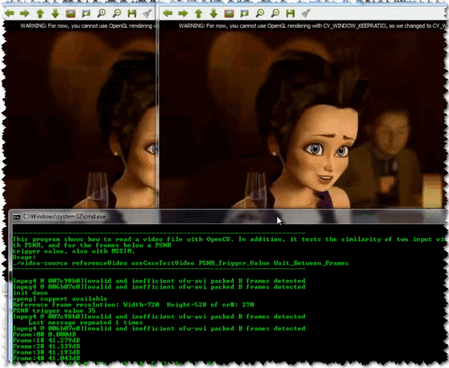
You may observe a runtime instance of this on the YouTube here.