 |
OpenCV 5.1.0-dev
Open Source Computer Vision
|
Loading...
Searching...
No Matches
|
OpenCV 5.1.0-dev
Open Source Computer Vision
|
Prev Tutorial: How to run deep networks in browser
Next Tutorial: How to run custom OCR model
| Original author | Dmitry Kurtaev |
| Compatibility | OpenCV >= 3.4.1 |
Deep learning is a fast-growing area. New approaches to building neural networks usually introduce new types of layers. These could be modifications of existing ones or implementation of outstanding research ideas.
OpenCV allows importing and running networks from different deep learning frameworks. There is a number of the most popular layers. However, you can face a problem that your network cannot be imported using OpenCV because some layers of your network can be not implemented in the deep learning engine of OpenCV.
The first solution is to create a feature request at https://github.com/opencv/opencv/issues mentioning details such as a source of a model and a type of new layer. The new layer could be implemented if the OpenCV community shares this need.
The second way is to define a custom layer so that OpenCV's deep learning engine will know how to use it. This tutorial is dedicated to show you a process of deep learning model's import customization.
Deep learning layer is a building block of network's pipeline. It has connections to input blobs and produces results to output blobs. There are trained weights and hyper-parameters. Layers' names, types, weights and hyper-parameters are stored in files are generated by native frameworks during training. If OpenCV encounters unknown layer type it throws an exception while trying to read a model:
To import the model correctly you have to derive a class from cv::dnn::Layer with the following methods:
And register it before the import:
MyType is a type of unimplemented layer from the thrown exception.Let's see what all the methods do:
Retrieves hyper-parameters from cv::dnn::LayerParams. If your layer has trainable weights they will be already stored in the Layer's member cv::dnn::Layer::blobs.
createThis method should create an instance of you layer and return cv::Ptr with it.
Returns layer's output shapes depending on input shapes. You may request an extra memory using internals.
Implement a layer's logic here. Compute outputs for given inputs.
forward implementation should not rely on that the second invocation of forward will have the same data at outputs and internals.finalize methodThe chain of methods is the following: OpenCV deep learning engine calls create method once, then it calls getMemoryShapes for every created layer, then you can make some preparations depend on known input dimensions at cv::dnn::Layer::finalize. After network was initialized only forward method is called for every network's input.
This is an example of how to import a network with tf.image.resize_bilinear operation. This is also a resize but with an implementation different from OpenCV's built-in resize.
Let's create a single layer network:
OpenCV sees that TensorFlow's graph in the following way:
Custom layers import from TensorFlow is designed to put all layer's attr into cv::dnn::LayerParams but input Const blobs into cv::dnn::Layer::blobs. In our case resize's output shape will be stored in layer's blobs[0].
Next we register a layer and try to import the model.
ONNX groups operators into domains. The standard operators live in the default domain ai.onnx; vendors and exporters often place their own ops in a named domain such as my.namespace. When OpenCV imports an ONNX node, it looks the op up in cv::dnn::LayerFactory by:
ai.onnx domain (or no domain), and"<domain>.<op_type>", for nodes in any non-default domain.Node attributes are passed through to the layer constructor as cv::dnn::LayerParams entries with the same names. Consider an op MyCustomOp with attributes scale and bias that computes y = scale * x + bias. The implementation can look like:
To import a model that uses this op, register the layer before calling cv::dnn::readNetFromONNX. Use cv::dnn::LayerFactory::registerLayer for runtime registration (and cv::dnn::LayerFactory::unregisterLayer when done) — pick the right key for the domain of the op as described above:
A complete runnable example is available at samples/dnn/custom_layer_onnx.cpp. Tiny ONNX models exercising both the default-domain and custom-domain registration paths can be generated with generate_custom_layer_models.py in the opencv_extra repository.
The following example shows how to customize OpenCV's layers in Python.
Let's consider the Holistically-Nested Edge Detection model. Its Crop layers receive two input blobs and crop the first one to match the spatial dimensions of the second. OpenCV's built-in Crop layer trims from the top-left corner, whereas this model expects cropping from the center, so using the built-in behaviour directly would produce shifted results with filled borders.
Next we're going to replace OpenCV's Crop layer that makes top-left cropping by a centric one.
getMemoryShapes and forward methodsThat's it! We have replaced an implemented OpenCV's layer to a custom one. You may find a full script in the source code.
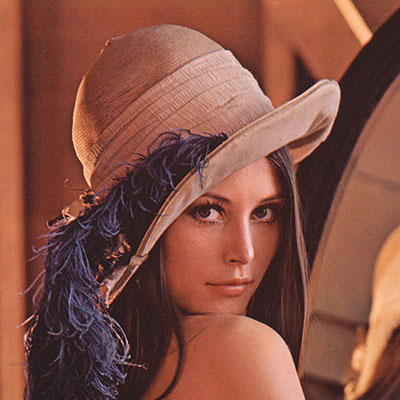 | 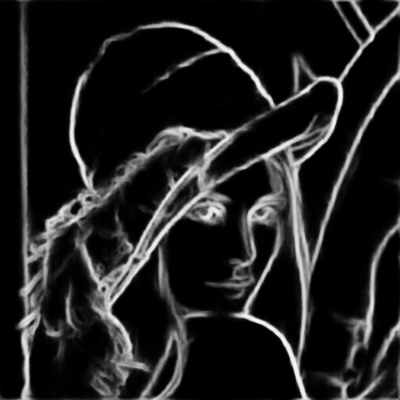 |
 1.12.0