

Load ONNX framework models#
Introduction#
In this tutorial you will learn how to use opencv_dnn module for image classification by using GoogLeNet trained network from ONNX model zoo.
We will demonstrate results of this example on the following picture.
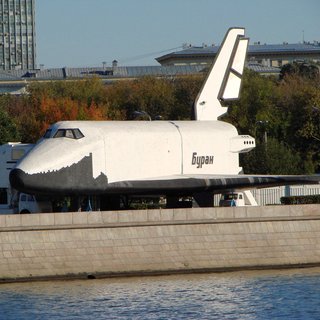
Source Code#
We will be using snippets from the example application, that can be downloaded here.
#include <fstream>
#include <sstream>
#include <iostream>

#include <opencv2/dnn.hpp>
#include <opencv2/imgproc.hpp>
#include <opencv2/highgui.hpp>
#include <opencv2/core/utils/logger.hpp>

#include "common.hpp"

using namespace cv;
using namespace std;
using namespace dnn;

const string about =
        "Use this script to run a classification model on a camera stream, video, image or image list (i.e. .xml or .yaml containing image lists)\n\n"
        "Firstly, download required models using `download_models.py` (if not already done). Set environment variable OPENCV_DOWNLOAD_CACHE_DIR to specify where models should be downloaded. Also, point OPENCV_SAMPLES_DATA_PATH to opencv/samples/data.\n"
        "To run:\n"
        "\t ./example_dnn_classification model_name --input=path/to/your/input/image/or/video (don't give --input flag if want to use device camera)\n"
        "Sample command:\n"
        "\t ./example_dnn_classification resnet --input=$OPENCV_SAMPLES_DATA_PATH/baboon.jpg\n"
        "\t ./example_dnn_classification squeezenet\n"
        "Model path can also be specified using --model argument. "
        "Use imagelist_creator to create the xml or yaml list\n";

const string param_keys =
    "{ help  h         |                   | Print help message. }"
    "{ @alias          |                   | An alias name of model to extract preprocessing parameters from models.yml file. }"
    "{ zoo             | ../dnn/models.yml | An optional path to file with preprocessing parameters }"
    "{ input i         |                   | Path to input image or video file. Skip this argument to capture frames from a camera.}"
    "{ imglist         |                   | Pass this flag if image list (i.e. .xml or .yaml) file is passed}"
    "{ crop            |       false       | Preprocess input image by center cropping.}"
    //"{ labels          |                   | Path to the text file with labels for detected objects.}"
    "{ model           |                   | Path to the model file.}";

const string backend_keys = format(
    "{ backend          | default | Choose one of computation backends: "
                              "default: automatically (by default), "
                              "openvino: Intel's Deep Learning Inference Engine (https://software.intel.com/openvino-toolkit), "
                              "opencv: OpenCV implementation, "
                              "vkcom: VKCOM, "
                              "cuda: CUDA, "
                              "webnn: WebNN }");

const string target_keys = format(
    "{ target           | cpu | Choose one of target computation devices: "
                              "cpu: CPU target (by default), "
                              "opencl: OpenCL, "
                              "opencl_fp16: OpenCL fp16 (half-float precision), "
                              "vpu: VPU, "
                              "vulkan: Vulkan, "
                              "cuda: CUDA, "
                              "cuda_fp16: CUDA fp16 (half-float preprocess) }");

string keys = param_keys + backend_keys + target_keys;

vector<string> classes;
static bool readStringList( const string& filename, vector<string>& l )
{
    l.resize(0);
    FileStorage fs(filename, FileStorage::READ);
    if( !fs.isOpened() )
        return false;
    size_t dir_pos = filename.rfind('/');
    if (dir_pos == string::npos)
        dir_pos = filename.rfind('\\');
    FileNode n = fs.getFirstTopLevelNode();
    if( n.type() != FileNode::SEQ )
        return false;
    FileNodeIterator it = n.begin(), it_end = n.end();
    for( ; it != it_end; ++it )
    {
        string fname = (string)*it;
        if (dir_pos != string::npos)
        {
            string fpath = samples::findFile(filename.substr(0, dir_pos + 1) + fname, false);
            if (fpath.empty())
            {
                fpath = samples::findFile(fname);
            }
            fname = fpath;
        }
        else
        {
            fname = samples::findFile(fname);
        }
        l.push_back(fname);
    }
    return true;
}

int main(int argc, char** argv)
{
    utils::logging::setLogLevel(utils::logging::LOG_LEVEL_INFO);

    CommandLineParser parser(argc, argv, keys);

    if (!parser.has("@alias") || parser.has("help"))
    {
        cout << about << endl;
        parser.printMessage();
        return -1;
    }
    const string modelName = parser.get<String>("@alias");
    const string zooFile = findFile(parser.get<String>("zoo"));

    keys += genPreprocArguments(modelName, zooFile);
    parser = CommandLineParser(argc, argv, keys);
    parser.about(about);
    if (argc == 1 || parser.has("help"))
    {
        parser.printMessage();
        return 0;
    }
    String sha1 = parser.get<String>("sha1");
    float scale = parser.get<float>("scale");
    Scalar mean = parser.get<Scalar>("mean");
    Scalar std = parser.get<Scalar>("std");
    bool swapRB = parser.get<bool>("rgb");
    bool crop = parser.get<bool>("crop");
    int inpWidth = parser.get<int>("width");
    int inpHeight = parser.get<int>("height");
    String model = findModel(parser.get<String>("model"), sha1);
    String backend = parser.get<String>("backend");
    String target = parser.get<String>("target");
    bool isImgList = parser.has("imglist");

    // Open file with labels.
    string labels_filename = parser.get<String>("labels");
    string file = findFile(labels_filename);
    ifstream ifs(file.c_str());
    if (!ifs.is_open()){
        cout<<"File " << file << " not found";
        exit(1);
    }
    string line;
    while (getline(ifs, line))
    {
        classes.push_back(line);
    }
    if (!parser.check())
    {
        parser.printErrors();
        return 1;
    }
    CV_Assert(!model.empty());
    EngineType engine = ENGINE_AUTO;
    if (backend != "default" || target != "cpu"){
        engine = ENGINE_CLASSIC;
    }
    Net net = readNetFromONNX(model, engine);
    net.setPreferableBackend(getBackendID(backend));
    net.setPreferableTarget(getTargetID(target));
    net.setProfilingMode(DNN_PROFILE_SUMMARY);

    // Create a window
    static const std::string kWinName = "Deep learning image classification in OpenCV";
    namedWindow(kWinName, WINDOW_NORMAL);

    //Create FontFace for putText
    FontFace sans("sans");

    VideoCapture cap;
    vector<string> imageList;
    size_t currentImageIndex = 0;

    if (parser.has("input")) {
        string input = findFile(parser.get<String>("input"));

        if (isImgList) {
            bool check = readStringList(samples::findFile(input), imageList);
            if (imageList.empty() || !check) {
                cout << "Error: No images found or the provided file is not a valid .yaml or .xml file." << endl;
                return -1;
            }
        } else {
            // Input is not a directory, try to open as video or image
            cap.open(input);
            if (!cap.isOpened()) {
                cout << "Failed to open the input." << endl;
                return -1;
            }
        }
    } else {
        cap.open(0); // Open default camera
    }

    Mat frame, blob;
    for(;;)
    {
        if (!imageList.empty()) {
            // Handling directory of images
            if (currentImageIndex >= imageList.size()) {
                waitKey();
                break; // Exit if all images are processed
            }
            frame = imread(imageList[currentImageIndex++]);
            if(frame.empty()){
                cout<<"Cannot open file"<<endl;
                continue;
            }
        } else {
            // Handling video or single image
            cap >> frame;
        }
        if (frame.empty())
        {
            break;
        }
        blobFromImage(frame, blob, scale, Size(inpWidth, inpHeight), mean, swapRB, crop);
        // Check std values.
        if (std.val[0] != 0.0 && std.val[1] != 0.0 && std.val[2] != 0.0)
        {
            // Divide blob by std.
            divide(blob, std, blob);
        }
        net.setInput(blob);

        TickMeter timeRecorder;
        timeRecorder.reset();
        Mat prob = net.forward();
        double t1;
        timeRecorder.start();
        prob = net.forward();
        timeRecorder.stop();
        net.printPerfProfile();

        int N = (int)prob.total(), K = std::min(5, N);
        std::vector<std::pair<float, int> > prob_vec;
        for (int i = 0; i < N; i++) {
            prob_vec.push_back(std::make_pair(-prob.at<float>(i), i));
        }
        std::sort(prob_vec.begin(), prob_vec.end());

        t1 = timeRecorder.getTimeMilli();
        timeRecorder.reset();
        string label = format("Inference time: %.1f ms", t1);
        Mat subframe = frame(Rect(0, 0, std::min(1000, frame.cols), std::min(300, frame.rows)));
        subframe *= 0.3f;
        putText(frame, label, Point(20, 50), Scalar(0, 255, 0), sans, 25, 800);

        // Print predicted class.
        for (int i = 0; i < K; i++) {
            int classId = prob_vec[i].second;
            float confidence = -prob_vec[i].first;
            label = format("%d. %s: %.2f", i+1, (classes.empty() ? format("Class #%d", classId).c_str() :
                                        classes[classId].c_str()), confidence);
            putText(frame, label, Point(20, 110 + i*35), Scalar(0, 255, 0), sans, 25, 500);
        }
        imshow(kWinName, frame);
        int key = waitKey(isImgList ? 1000 : 100);
        if (key == ' ')
            key = waitKey();
        if (key == 'q' || key == 27) // Check if 'q' or 'ESC' is pressed
            return 0;
    }
    waitKey();
    return 0;
}
Explanation#
Firstly, download GoogLeNet model files:
python download_models.py googlenet
Also you need file with names of ILSVRC2012 classes: classification_classes_ILSVRC2012.txt.
Put these files into working dir of this program example.
Read and initialize network using path to .onnx file
EngineType engine = ENGINE_AUTO;
if (backend != "default" || target != "cpu"){
    engine = ENGINE_CLASSIC;
}
Net net = readNetFromONNX(model, engine);
net.setPreferableBackend(getBackendID(backend));
net.setPreferableTarget(getTargetID(target));
net.setProfilingMode(DNN_PROFILE_SUMMARY);
Read input image and convert to the blob, acceptable by GoogleNet
VideoCapture cap;
vector<string> imageList;
size_t currentImageIndex = 0;

if (parser.has("input")) {
    string input = findFile(parser.get<String>("input"));

    if (isImgList) {
        bool check = readStringList(samples::findFile(input), imageList);
        if (imageList.empty() || !check) {
            cout << "Error: No images found or the provided file is not a valid .yaml or .xml file." << endl;
            return -1;
        }
    } else {
        // Input is not a directory, try to open as video or image
        cap.open(input);
        if (!cap.isOpened()) {
            cout << "Failed to open the input." << endl;
            return -1;
        }
    }
} else {
    cap.open(0); // Open default camera
}
cv::VideoCapture can load both images and videos.
We convert the image to a 4-dimensional blob (so-called batch) with
1x3x224x224shape after applying necessary pre-processing like resizing and mean subtraction for each blue, green and red channels correspondingly using cv::dnn::blobFromImage function.Pass the blob to the network
net.setInput(blob);
Make forward pass
timeRecorder.start();
prob = net.forward();
timeRecorder.stop();
net.printPerfProfile();
During the forward pass output of each network layer is computed, but in this example we need output from the last layer only.
Determine the best class
We put the output of network, which contain probabilities for each of 1000 ILSVRC2012 image classes, to the
probblob. And find the index of element with maximal value in this one. This index corresponds to the class of the image.Run an example from command line
./example_dnn_classification googlenet
For our image we get prediction of class
space shuttlewith more than 99% sureness.